Verified on release 3.0.74.2 "Accounting for Kazakhstan" (edition 3.0).
A counterparty sent you an invoice, you sit down to receive the goods — and 1C complains: "Accounting account is not filled in" or substitutes a VAT rate of 16% instead of 16%. The reason is almost always the same: the item card was filled in hastily. An empty item type, no CN FEA code specified, no VAT rate selected — and then everything falls apart: incorrect postings, an ESF that won't go through, "skewed" cost of goods. This guide is about how to set up a card once and correctly, so that documents post themselves.
1. Purpose
2. Where to find it
Menu path: section "Warehouse" → "Items" (or section "Reference books" → block "Goods and services" → "Items").
You can open the list directly in 1C via a navigation link. Menu "Service" → "Go to navigation link" (or Ctrl+F11), paste:
e1cib/list/Справочник.Номенклатура
Create a new position with the "Create" button, edit it — by double-clicking the row. To keep things tidy, use folders (the "Create group" button): "Goods", "Materials", "Services", etc.
2. How to find out your release
Menu "Help" → "About the program" (the "?" icon in the top right corner). In the window that opens, you will see:
the platform version (for example, 8.3.24.xxxx);
the configuration release — "Accounting for Kazakhstan, edition 3.0 (3.0.74.2)".
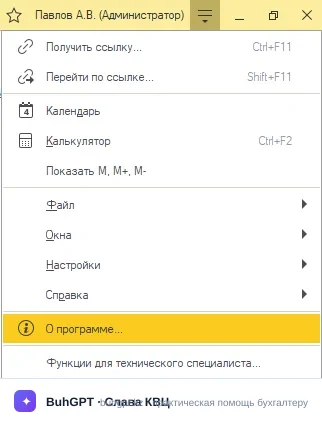
If your release differs, individual fields may be in other places, but the logic of filling them in is the same.
3. How to fill it in
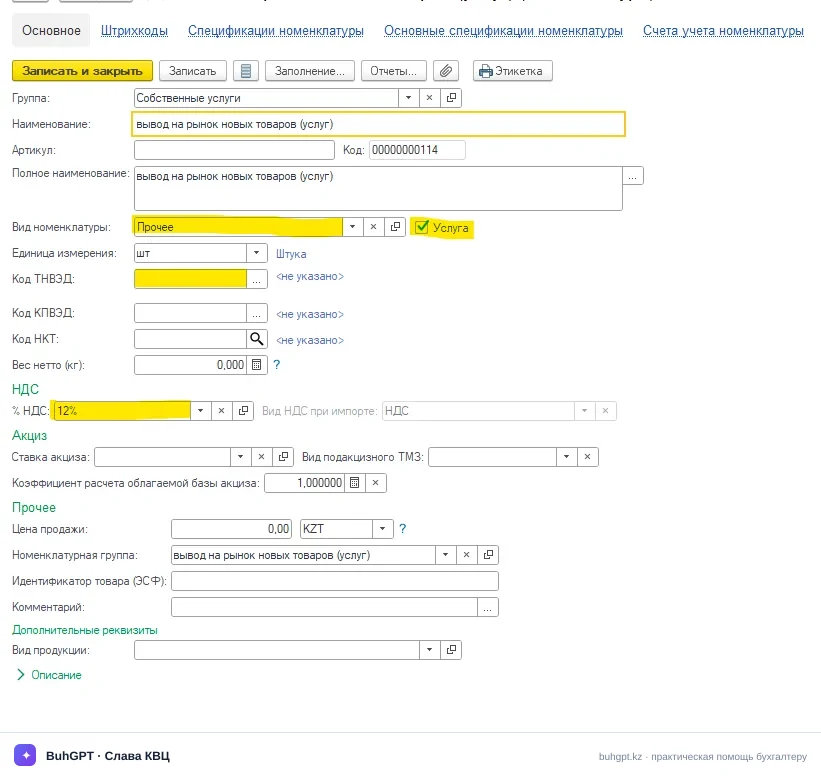
Below are the key fields of the card. Mandatory ones are marked in bold.
Field | What it is for and what happens if there is an error |
|---|---|
Name (mand.) | A short working name for search and selection in documents. If you write it unclearly ("Item1"), you won't find the position later in the selection list. |
Full name | Goes into printed forms (invoices, bills, ESF). Leave it empty — and the short name will be printed in documents. |
Item type (mand.) | The main field. Determines the accounting accounts, the type (goods/service/material) and the "Service" attribute. Make a mistake — and goods will go to 7010 instead of 1330, or a service will ask for a warehouse. |
Unit of measure (mand.) | Piece, kg, service, etc. Affects the quantity and price. Wrong unit → wrong amounts in the invoice. |
Article number | Your internal code for search and printing. Optional, but convenient in the warehouse. |
VAT rate (mand. for VAT payers) | For taxable GWS, set 16% (the 2026 rate), for exempt ones — "Without VAT" or "0%". Leave the old value of 16% — and you will understate the tax, the ESF will not pass the format-logical control. |
CN FEA / CP FEA code | Mandatory for goods in the ESF and SNT. Without the code, you cannot issue an electronic invoice. |
Attribute of the origin of goods | 1–5 (produced in the RK, import, from the list of exemptions, etc.). Needed for the ESF and the "Virtual warehouse" module. An error → blocking of the ESF. |
Name in ESF | How the position will be printed in the electronic invoice. If empty — the name is taken. |
Item group | Analytics for income accounts 6010 and cost accounts 7010. Empty — and you won't be able to analyze revenue by area. |
Accounting accounts (register) | Set in "Item accounting accounts" — by type/group or by an individual position. See below. |
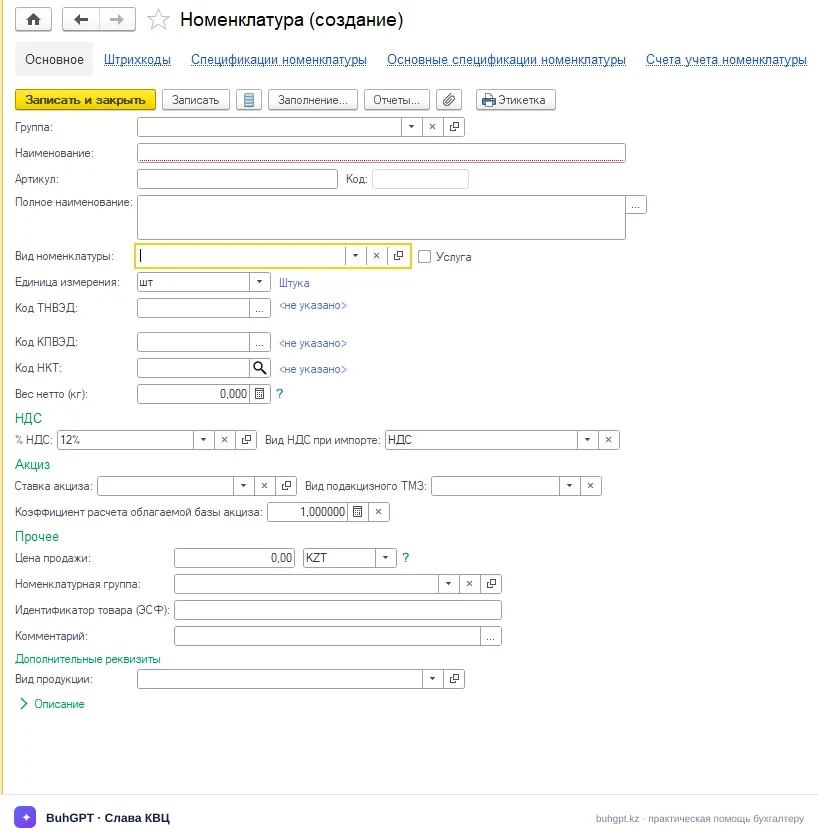
Accounting accounts. You do not enter them directly in the card itself — they are stored in a separate register "Item accounting accounts" (the "Accounting accounts" link from the item type form or from the list). Here are set:
Accounting account — 1330 "Goods" for goods, 1310 for raw materials and materials;
VAT accounting account — 1420 "VAT recoverable" (input VAT);
Income account — 6010 "Income from the sale of GWS";
Expense/cost account — 7010 "Cost of GWS sold";
VAT accounting account on sales — 3130 "VAT".
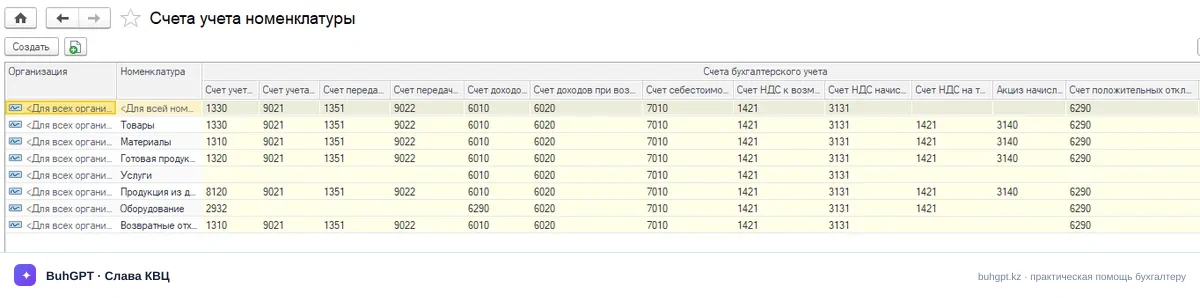
Usually the accounts are set up at the item type level once — then each new card of this type receives them automatically.
4. A worked example with postings
You are an LLP on the general established regime, a VAT payer. You set up the item "DeLonghi Coffee Machine" and sell it.
Card:
Name:
DeLonghi ECAM Coffee MachineItem type:
Goods(account 1330)Unit:
pcsVAT rate:
16%CN FEA code:
8516 71 000 0, origin attribute:2 (import)
Receipt from the supplier: 10 pcs at 100,000 ₸ excluding VAT.
Cost of goods: 10 × 100,000 = 1,000,000 ₸
VAT 16%: 1,000,000 × 16% = 160,000 ₸
Total payable: 1,160,000 ₸
Postings of the "Receipt of inventory" document:
Dr | Cr | Amount, ₸ | Description |
|---|---|---|---|
1330 | 3310 | 1,000,000 | Goods received |
1420 | 3310 | 160,000 | Input VAT |
Sale to a buyer: 4 pcs at a sale price of 180,000 ₸ excluding VAT.
Revenue excluding VAT: 4 × 180,000 = 720,000 ₸
VAT 16%: 720,000 × 16% = 115,200 ₸
Payable by the buyer: 835,200 ₸
Cost (at the average): 4 × 100,000 = 400,000 ₸
Postings of the "Sale of inventory" document:
Dr | Cr | Amount, ₸ | Description |
|---|---|---|---|
1210 | 6010 | 720,000 | Income from sale accrued |
1210 | 3130 | 115,200 | VAT payable accrued |
7010 | 1330 | 400,000 | Cost of goods written off |
All these postings came together correctly only because the card had the type "Goods" (accounts 1330/7010/6010) and the rate 16%. Had you set the type "Services" — 1C would not have written off from the warehouse and would not have touched 1330.
5. Item types (what the reference book provides)
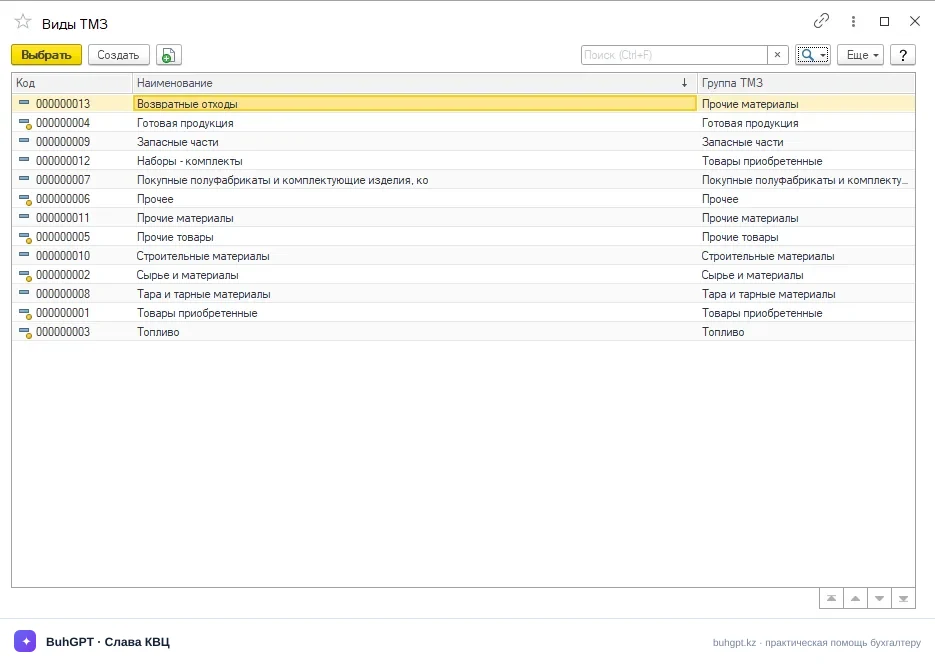
Through the "Item type" field, the card describes different accounting objects:
Goods — for resale, account 1330;
Materials (raw materials) — account 1310, written off to production;
Finished products — account 1320, received from production;
Semi-finished products — account 1340;
Services / Works — the "Service" attribute, without a warehouse and quantitative accounting of balances;
Packaging — returnable and non-returnable;
Equipment, inventory, workwear — with special write-off rules;
Fuel, spare parts — for accounting of fuel and lubricants and repairs.
6. What is generated when used
The item card itself does not make movements — it is a reference book. Movements are generated by documents that take data from it:
Postings on accounts 1330/1310/1320, 1420, 6010, 7010, 3130 — upon receipt, sale, transfer, write-off;
Movements in the registers of batches and warehouse accounting (quantity and cost by warehouses);
ESF (electronic invoice) in the IS ESF — uses the CN FEA code, origin attribute, name in ESF, VAT rate from the card;
SNT (accompanying waybill for goods) — for positions from the list of exemptions and excisable goods;
The "Item accounting accounts" register — the rules for substituting accounts.
7. Printed forms
From the card itself:
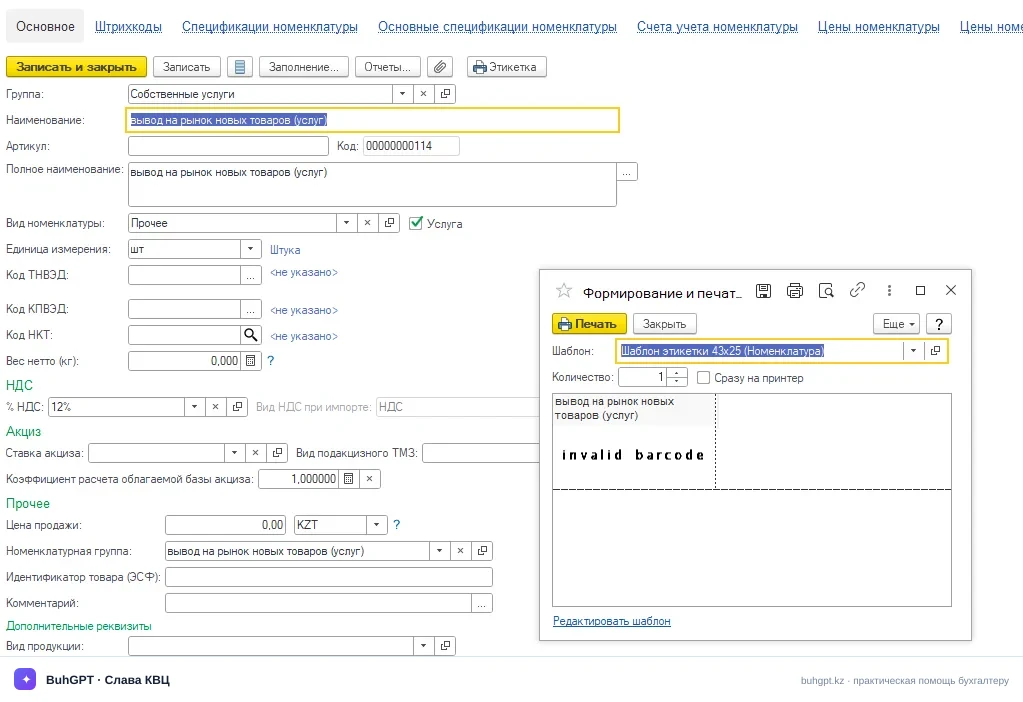
Price tag and Label (via the "Print" button);
From documents in which the item participates:
Waybill for the release of stocks to a third party;
Bill for payment;
Certificate of completed works (rendered services) — for services;
Consignment note;
ESF (upload to the IS ESF), SNT.
8. Common mistakes
"Item type is not filled in" — when trying to select a position in a document. Open the card, specify the type (Goods/Materials/Services) and save. Without it, 1C does not know the accounting account.
"Item accounting accounts are not specified" — the type is there, but the "Accounting accounts" register is empty. Go to the item type → "Accounting accounts" and set 1330/1420/6010/7010/3130.
VAT rate of 16% in the ESF → format-logical control in the IS ESF rejects the invoice. Correct the rate in the card to 16% and refill the sales document.
"CN FEA code is not filled in" when issuing an ESF for goods. Fill in the CN FEA code and origin attribute in the card, then in the document click "Fill in → By item".
Duplicate items ("Coffee machine" and "coffee machine"). Leads to a splitting of balances. Use the "Search and removal of duplicates" processing (section "Administration" → "Maintenance") and merge the positions.
A service requires a warehouse/quantity. This means the type does not have the
"Service" attribute set. Set it — and the document will stop requiring a warehouse.