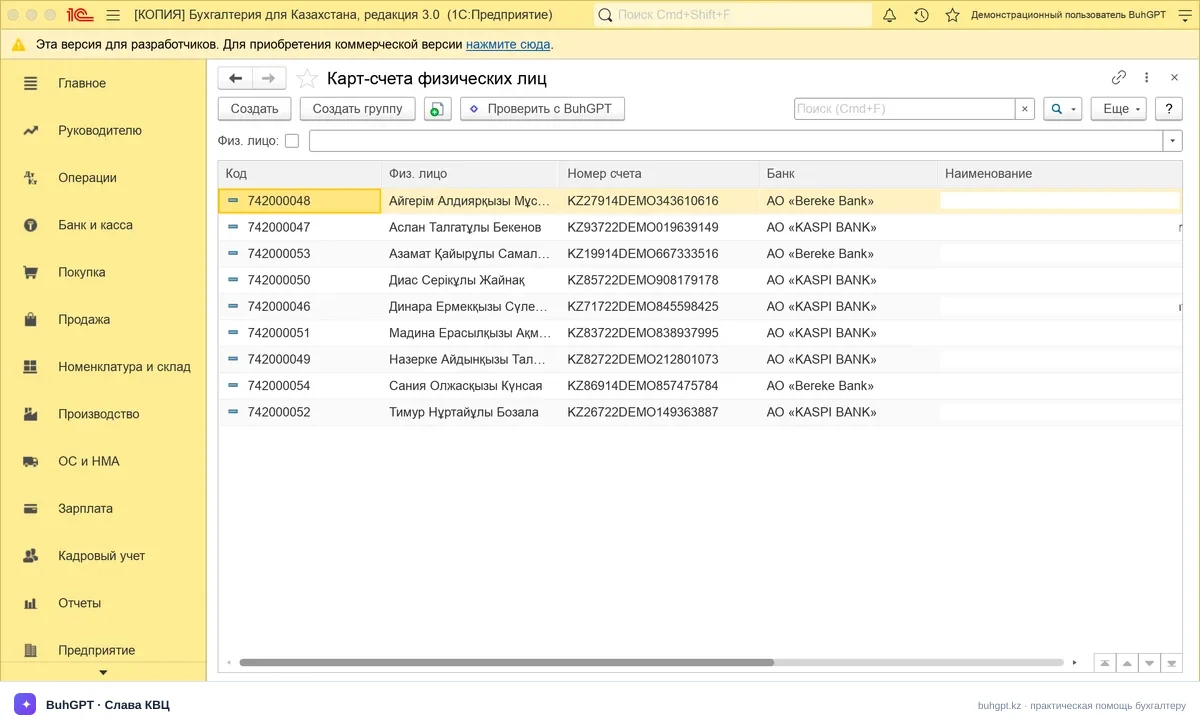
In Accounting for Kazakhstan, edition 3.0, release 3.0.74.2, the Individual Card Accounts catalog stores individuals’ bank details used to prepare transfers of wages, benefits, alimony, and other payments.
1. Identification
Parameter | Value |
|---|---|
Object type | Catalog (Catalog) |
Name | КартСчета |
Full name | Справочник.КартСчета (Catalogs.КартСчета) |
Synonym | Individual Card Accounts |
Configuration | Accounting for Kazakhstan, edition 3.0, release 3.0.74.2 |
Ownership | The standard Владелец attribute of type Справочник.ФизическиеЛица specifies the item owner. |
Hierarchy | A hierarchy of groups and items with a separate form for groups |
Purpose | Stores individuals’ bank card accounts to populate recipient details when transferring payments |
Purpose. The Владелец attribute links the card account item to an individual. When the recipient for the account is a different individual, the system uses the НеЯвляетсяВладельцемСчета flag and the ФизЛицоВладелецСчета attribute.
Where to find it in 1C Open Payroll → Catalogs and Settings → Individual Card Accounts. The technical navigation link for the list is e1cib/list/Справочник.КартСчета.
2. Attributes and tabular sections
2.1 Header attributes
Name | Type | Data entry | Purpose |
|---|---|---|---|
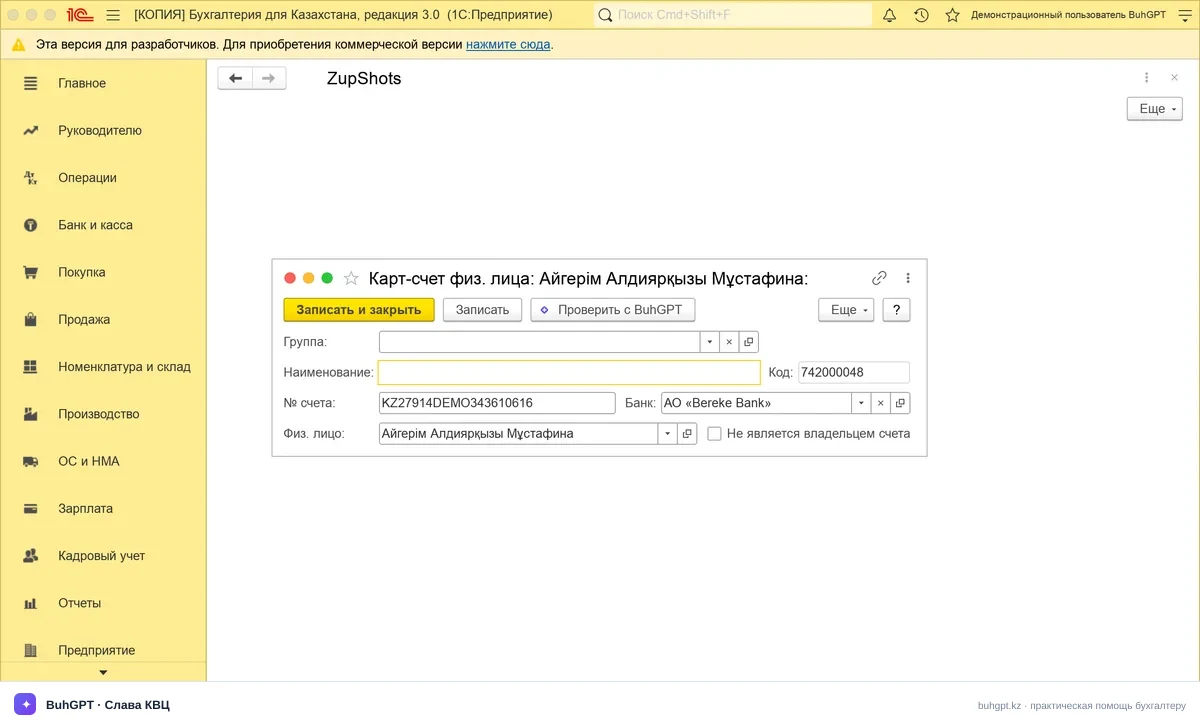
Банк | Справочник.Банки | Filled in for an item in use | Reference to the bank where the card account is held. The system uses this attribute to prepare the recipient’s bank details. |
НомерСчета | String | Enter the bank account number | IBAN or another bank account number supported by the item form. |
НеЯвляетсяВладельцемСчета | Boolean | Set as needed | Indicates that the actual account holder and the individual who owns the catalog item are different people. |
ФизЛицоВладелецСчета | Справочник.ФизическиеЛица | Filled in when the НеЯвляетсяВладельцемСчета flag is set | Individual identified as the actual bank account holder. |
УдалитьФамилия | String | Internal attribute | Attribute from the previous data structure, identified in the configuration by the Удалить prefix. |
УдалитьИмя | String | Internal attribute | Attribute from the previous data structure, identified in the configuration by the Удалить prefix. |
УдалитьОтчество | String | Internal attribute | Attribute from the previous data structure, identified in the configuration by the Удалить prefix. |
УдалитьИдентификационныйКодЛичности | String | Internal attribute | Attribute from the previous data structure for identification details. |
УдалитьРНН | String | Internal attribute | Attribute from the previous data structure for the taxpayer registration number (TRN). |
The object also has the standard catalog attributes Код, Наименование, Владелец, Родитель, ЭтоГруппа, ПометкаУдаления, and Предопределённый. The Владелец attribute is of type Справочник.ФизическиеЛица and determines which individual’s record the card account is listed under.
Fields with the Удалить prefix belong to the previous object structure. When adding a new card account in the usual way, the accountant enters the individual, bank, and account number in the form, along with details of another account holder if needed. The primary owner’s personal details are maintained in the individual’s record.
2.2 Tabular sections
This catalog structure has no tabular sections. The item’s attributes store the details for a single card account, so the record has no separate rows for banks, accounts, or owners.
3. Forms
The catalog has four forms.
Form | Purpose |
|---|---|
ФормаЭлемента | Enter and edit a single card account, including the bank, account number, and actual account holder’s details. |
ФормаСписка | View catalog items and groups, open records, and work with selected rows. |
ФормаВыбора | Select an existing card account from the form of a related application object. |
ФормаГруппы | Create and edit a group and its name in the catalog hierarchy. |
The item form lets users enter bank details in sequence. The list form shows saved items within the data scope available to the user. The selection form returns a reference to the selected card account to the object that opened it.
4. Key module procedures
The object’s logic handles entry of the bank, account number, and actual account holder’s details. The object module, manager module, and form modules in the Configurator for release 3.0.74.2 define the exact set of exported and internal procedures.
Item form logic
When the form opens, it retrieves the item data and prepares the account holder fields for display.
Changing the НеЯвляетсяВладельцемСчета flag changes the availability or visibility of the ФизЛицоВладелецСчета attribute.
For the Банк field, select a reference to an item in the Banks catalog.
Enter the account number in the НомерСчета attribute. It is saved in the selected individual’s record.
Item write logic
The system saves the values of the active card account attributes and the reference to the item owner.
The system saves the other account holder’s details when the НеЯвляетсяВладельцемСчета flag is set.
During routine record creation, leave the internal attributes with the Удалить prefix blank.
Once saved, the item can be selected in related forms that have a card account attribute.
5. Posting and register movements
КартСчета is a Catalog object. Its items can be created, saved, edited, marked for deletion, and selected. Posting applies to documents, so the technical description of this catalog focuses on write and form handlers. The ОбработкаПроведения procedure belongs to document posting.
When a payment is prepared, the related document receives a reference to the selected card account. The application can use this reference to retrieve the bank, account number, item owner, and actual account holder’s details. The logic of the document or data processor that generates the payment or bank payment register determines which attributes are carried over.
Update the card account record before finalizing the payment data. If the bank document has already been populated, use the built-in command on its form to repopulate the relevant fields after correcting the catalog entry. This ensures that the payment uses the current details.
Before making the transfer, the accountant checks the account number, bank, and individual against the recipient’s documents. For a third-party account, the accountant also checks the НеЯвляетсяВладельцемСчета flag and the ФизЛицоВладелецСчета field. These checks help prevent the selection of another individual’s record or an outdated bank account.
The catalog provides analytical data about the payment recipient. Payment documents and bank documents access the saved record through their own routines for populating fields, saving, and processing.
6. Related objects and creation based on an existing object
Справочник.ФизическиеЛица is the type of the Владелец attribute and the source of personal details for the primary owner of the record.
Справочник.Банки provides the items that can be selected for the Банк attribute.
ФизЛицоВладелецСчета references another individual when the bank account holder differs from the item owner.
Documents in the Payroll and Bank and Cash sections are related objects that can use the card account reference to populate payment recipient details.
Selection form allows users to select an existing item from a related application object.
Creation based on an existing object is optional for a card account record. Users can create the item from the catalog list or from the selection form of a related object.
7. Extension points
Additional attributes and information can store card account details that the standard fields do not cover.
Write event subscriptions can add account number format checks, find matching details, or prepare data for exchange.
Configuration extension lets users add custom attributes, commands, and form elements without directly modifying the standard object.
Common integration modules can retrieve the account number, bank, and owner details to generate a data exchange file or payment register.
Functional options can control the visibility of user-added workflows and interface elements.
When customizing the catalog through an extension, preserve the types of the built-in attributes and account for the ownership relationship between the item and the individual. Check for duplicates using the owner, bank, and account number together, while preserving the purpose of the standard fields with the Удалить prefix.
8. Frequently asked questions
What data does the КартСчета catalog store? The record contains a reference to an individual, the bank, the account number, and, if needed, details of a different actual account holder.
What are the attributes with the Удалить prefix for? These are internal fields from the previous object structure. The accountant leaves them blank when creating a new card account in the usual way.
How do I specify that someone other than the employee holds the card account? In the item form, set the НеЯвляетсяВладельцемСчета flag and select the actual account holder in the ФизЛицоВладелецСчета field.
Can I specify multiple accounts for one individual? Create a separate item owned by the corresponding individual for each bank account. This lets you select the relevant record in a related document.
Where can I check the details before making a payment? Open the record through Payroll → Catalogs and Settings → Individual Card Accounts and check the bank, account number, and account holder against the recipient details in the bank document.
What should I check after changing a bank account? Verify that the payment document references the correct catalog item and use the built-in command on its form to repopulate the bank details.