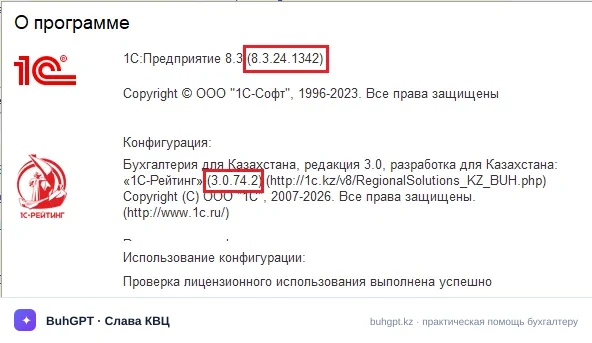
Verified in release 3.0.74.2 of “Accounting for Kazakhstan” (version 3.0).
You have created a new accrual—a holiday bonus. You posted “Payroll Accrual,” but the program withheld PIT and MPC differently from what you expected: it either taxed too much or did not tax it at all. Or, conversely, financial assistance became subject to all contributions even though it should not have. The reason is almost always the same: the accrual references an item in the “Organization Accruals” directory, and its taxation settings are incorrect. It is this directory that determines which taxes and contributions apply to every tenge of an employee’s income. Open it and correct one setting instead of editing 20 accruals one by one.
1. Purpose
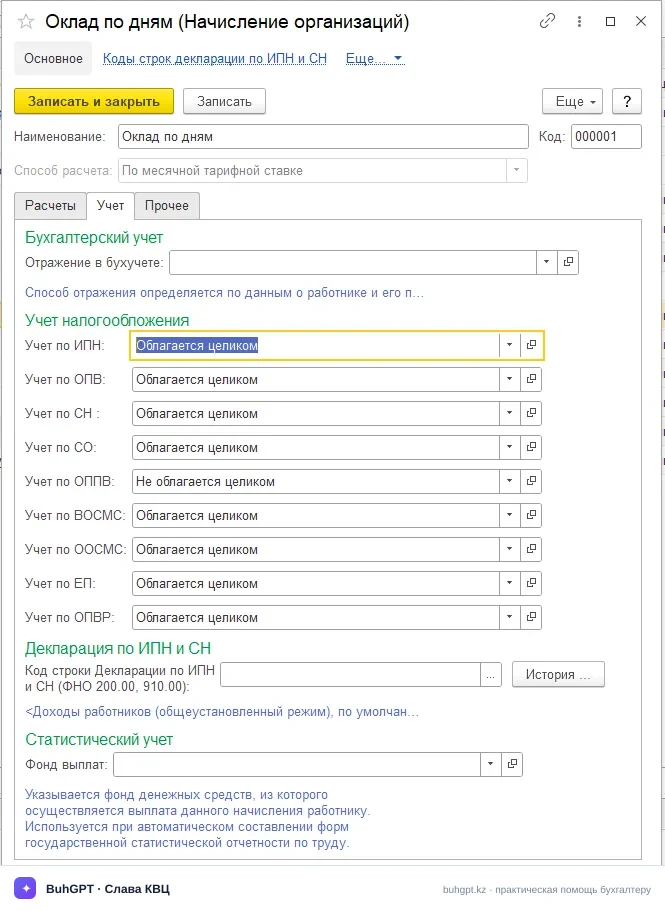
The “Organization Accruals” directory classifies types of accruals to individuals and contains their taxation settings. For each accrual type, on the Accounting tab, you specify whether it is subject to PIT, MPC, EMPC, MOPC, SC, CSHI contributions, CSHI premiums, ST and UP. These settings are used by accruals and the “Payroll and Contribution Accrual” document, as well as by the appendices to form 200.00.
2. Where to Find It
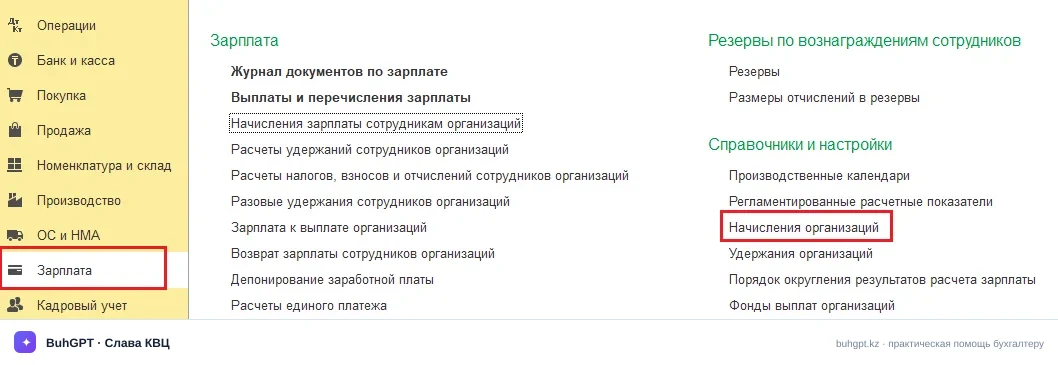
The “Payroll” section → the “Directories and Settings” group (in some interfaces, “See also”) → “Organization Accruals”.
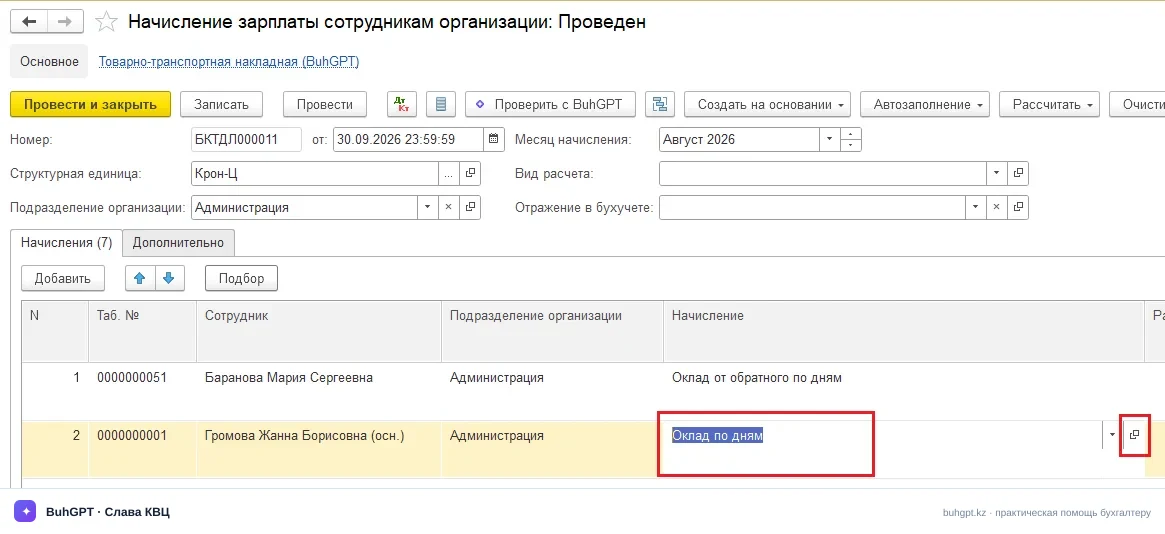
Another reliable route is through the accrual card: the “Payroll” section → the “Payroll Accruals for Employees of Organizations” document → open any accrual → the “Accrual” field → click “Open” to open the accrual type.
2a. How to Find Your Release
The “Tools and Settings” → “About” menu. It shows the platform version (for example, 8.3.24.1342) and the configuration release. These instructions were verified in 3.0.74.2. If you have a different release, the set of taxation checkboxes and income codes may differ—consult the release notes.
3. How to Complete It
Most standard accrual types are already available in the directory out of the box (Salary by Days, Vacation Pay, Sick Leave Pay, Vacation Compensation, etc.). A custom type is rarely created—it is usually sufficient to check and correct the settings of an existing one.
Main form fields:
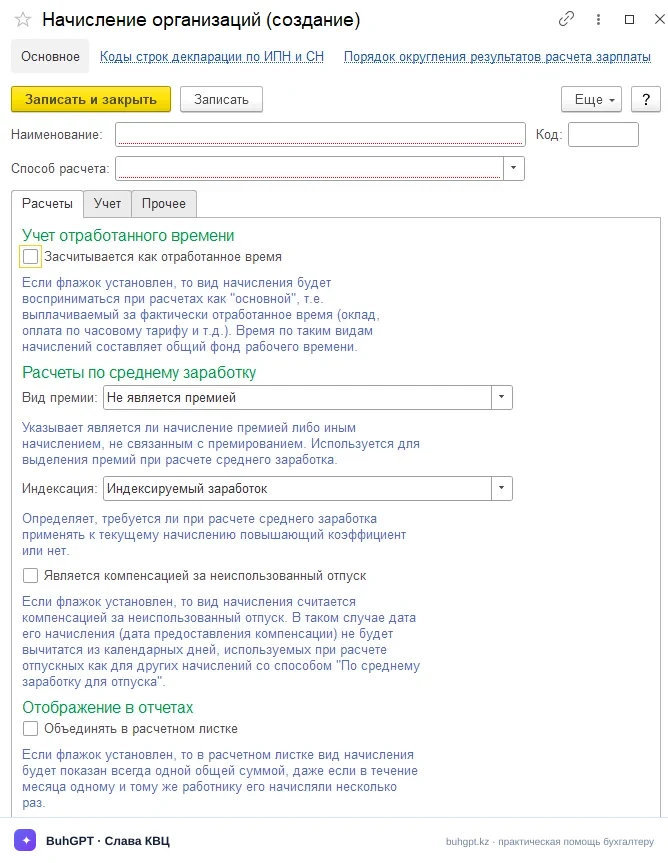
Name — required. Use a specific name: “Quarterly Bonus,” “Non-taxable Financial Assistance.” You will use this name to find the income type in accruals. A vague name means someone else’s mistake six months later.
Code — completed automatically. Do not edit it manually: duplicate codes disrupt filtering and reporting.
Calculation method — determines the formula evaluated during automatic accrual calculation and is required.
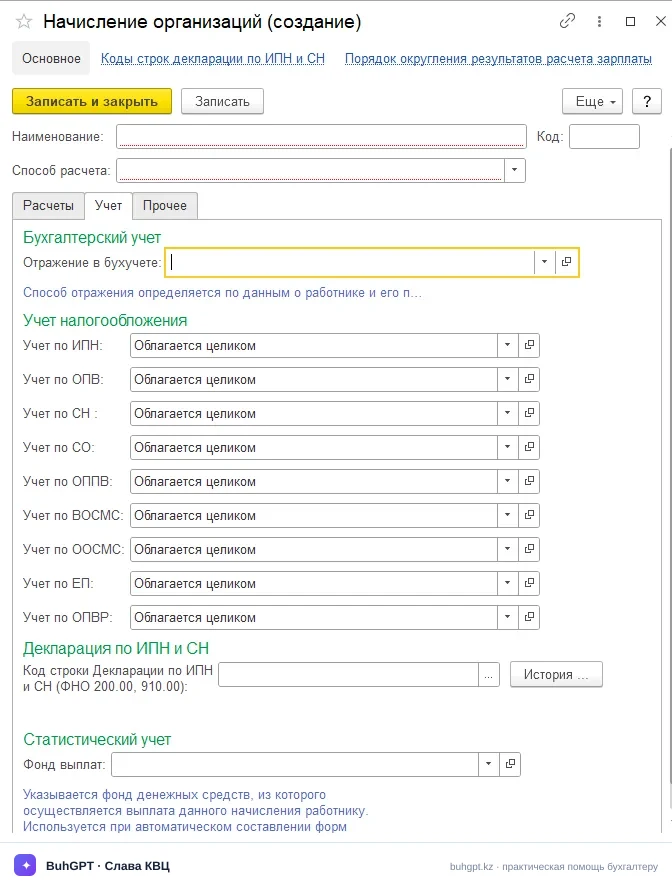
Accounting tab:
Taxation accounting — the core of the card. Each payment has a “Fully taxable / Fully non-taxable” attribute. Set it according to the actual treatment:
Flag | What it means | What happens if it is incorrect |
|---|---|---|
PIT | Income is included in the PIT taxable base at 10% | You will under-withhold or over-withhold the employee’s tax |
MPC | Included in the pension contribution base at 10% | Discrepancy with the UAPF and a penalty for incomplete remittance |
EMPC | Included in the employer’s EMPC base at 3,5% | Understatement of the employer’s liabilities |
SC | Included in the social contribution base at 5% | Error in remittance to the State Social Insurance Fund |
CSHI contributions | Included in the CSHI contribution base at 3% | Underpayment of the employer’s contributions |
CSHI premiums | Included in the CSHI premium base at 2% | Incorrect withholding from the employee |
ST | Included in the social tax base at 6% | Misstatement of the social tax line in 200.00 |
PIT and ST Return - this field specifies the line code of the PIT and ST return (form 200.02) to which the amount of this accrual must be allocated.
Tip: do not create a new accrual type if a standard one is suitable. Extra types with identical settings cause confusion in reporting.
4. Worked Example with Accounting Entries
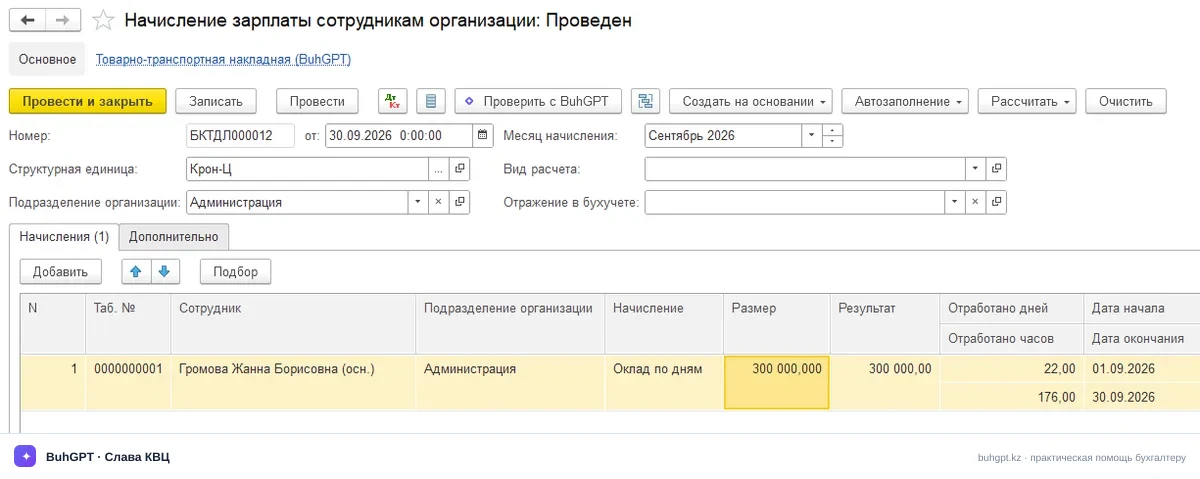
A manager’s salary (administrative personnel) is 300 000 ₸ per month. The “Salary by Days” accrual references an accrual type with seven taxation flags enabled. Let us see how this is reflected in the “Payroll Accruals for Employees of Organizations,” “Calculation of Withholdings for Employees of Organizations” and “Calculation of Taxes, Premiums and Contributions for Employees of Organizations” documents using 2026 figures.
Employee withholdings:
MPC = 10% × 300 000 = 30 000 ₸
CSHI premiums = 2% × 300 000 = 6 000 ₸
Basic PIT deduction = 30 MCI = 30 × 4 325 = 129 750 ₸
PIT base = 300 000 − 30 000 (MPC) − 6 000 (CSHI premiums) − 129 750 (deduction) = 134 250 ₸
PIT = 10% × 134 250 = 13 425 ₸
Net pay = 300 000 − 30 000 − 6 000 − 13 425 = 250 575 ₸
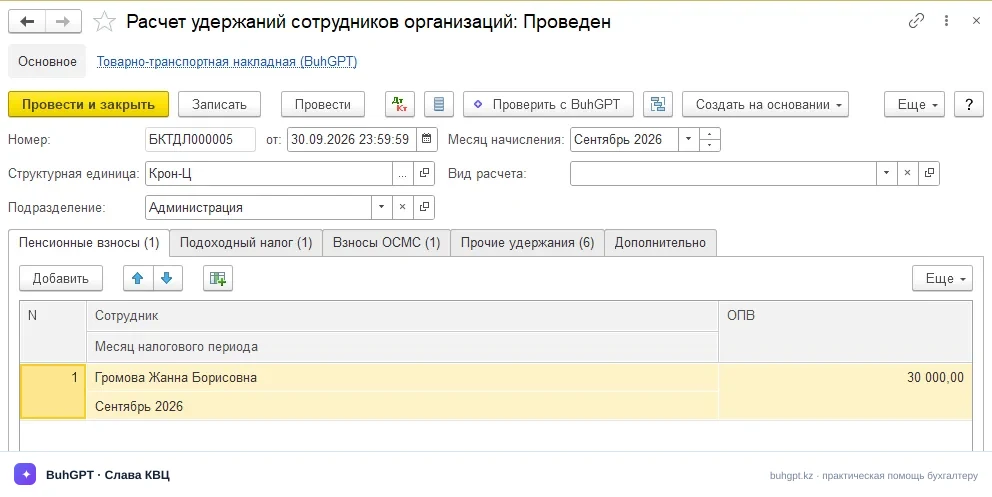
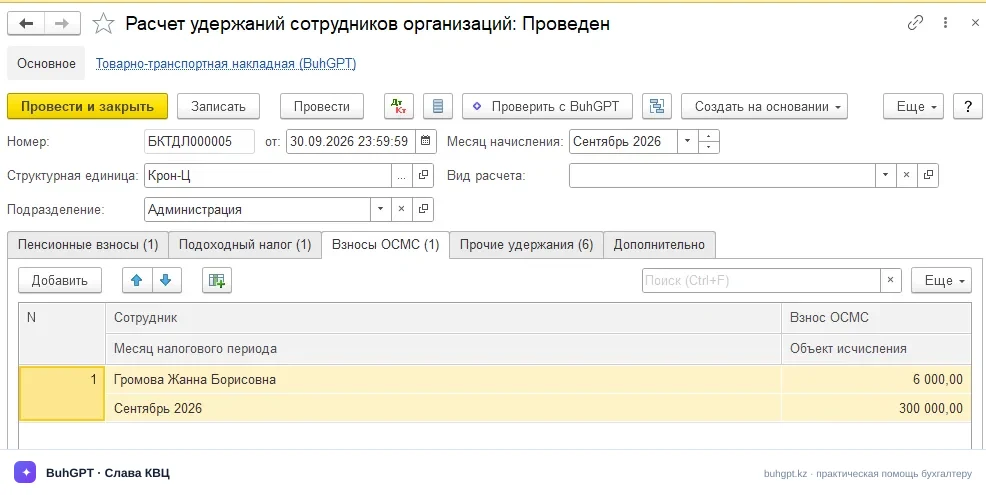
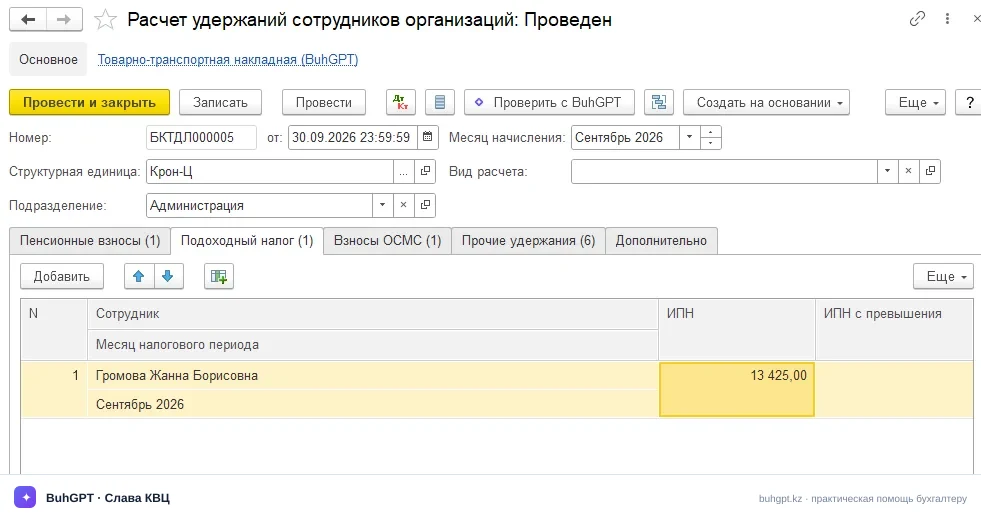
Employer-funded payments:
EMPC = 3,5% × 300 000 = 10 500 ₸
SC = 5% × (300 000 − 30 000) = 5% × 270 000 = 13 500 ₸
CSHI contributions = 3% × 300 000 = 9 000 ₸
ST = 6% × (300 000 − 30 000 − 6 000) = 6% × 264 000 = 15 840 ₸
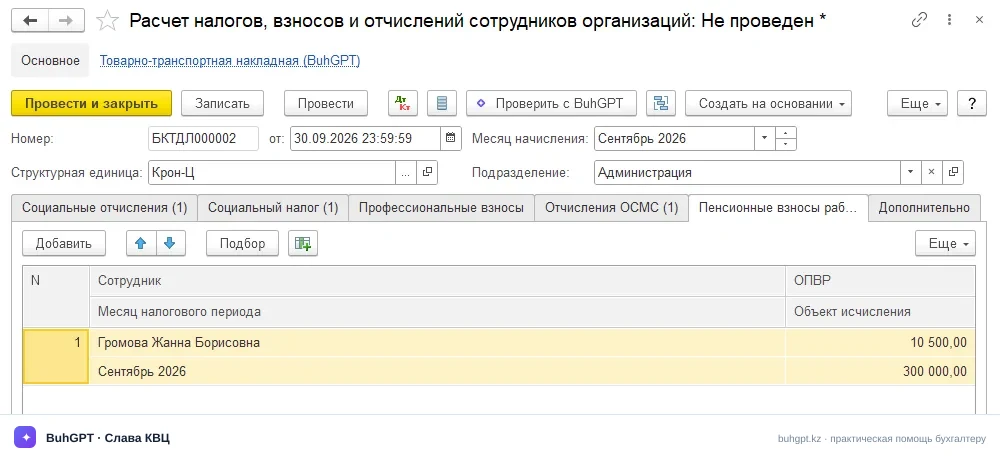
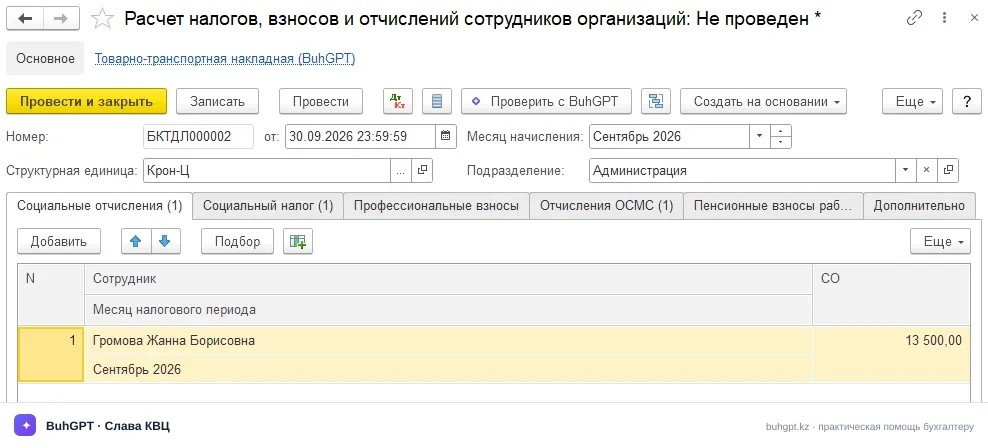
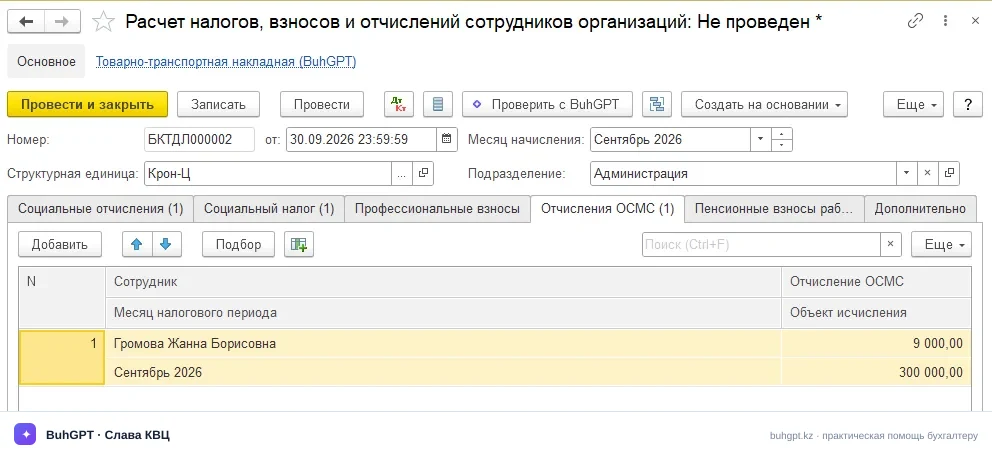
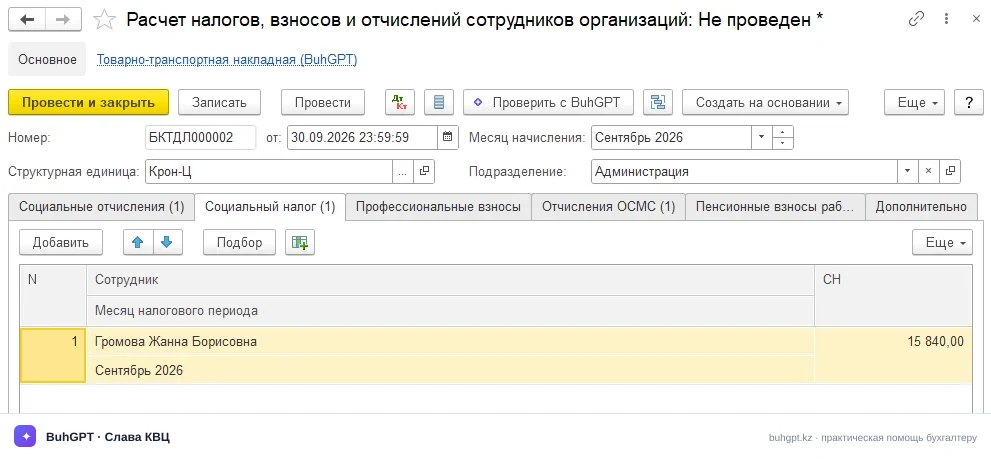
The “Organization Accruals” directory itself does not create accounting entries—it only defines the rules. The entries are generated by the final “Payroll Recognition in Statutory Accounting” document.
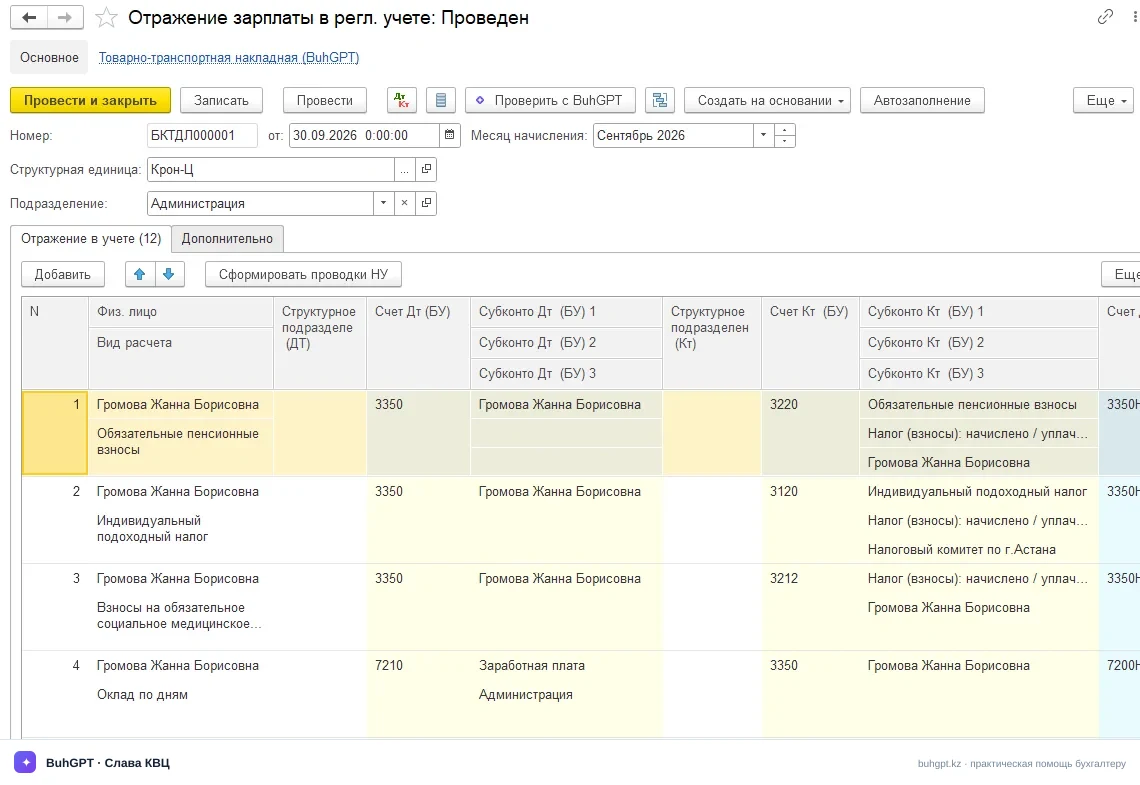
Under Kazakhstan’s standard chart of accounts, they look as follows:
Dr | Cr | Amount, ₸ | Description |
|---|---|---|---|
7210 | 3350 | 300 000 | Salary accrued |
3350 | 3120 | 13 425 | PIT withheld |
3350 | 3220 | 30 000 | MPC withheld |
3350 | 3212 | 6 000 | CSHI premiums withheld |
7210 | 3211 | 13 500 | SC accrued |
7210 | 3250 | 10 500 | EMPC accrued |
7210 | 3213 | 9 000 | CSHI contributions accrued |
7210 | 3150 | 15 840 | ST accrued |
If the “MPC” checkbox were cleared for the accrual type (for example, if you configured the bonus incorrectly), there would be no 30 000 ₸ MPC line, while the PIT base would increase to 164 250 ₸, and PIT would become 16 425 ₸ instead of 13 425 ₸. One checkbox—three calculation errors.
5. Accrual Calculation Methods
The list covers all accruals to individuals processed through the payroll module:
By monthly tariff rate / by hours — for monthly salary and other additional payments and allowances based on time worked, where the amount is set for the month as a whole.
Reverse calculation by monthly tariff rate — for reverse calculation when time worked does NOT need to be taken into account.
Reverse calculation by monthly tariff rate by days / by hours — For reverse calculation when time worked must be taken into account.
By hourly tariff rate — for accruals calculated from an hourly tariff rate.
Fixed amount — for additional payments established as exact amounts regardless of time worked.
Percentage — for various percentage-based additional payments and allowances. The types from which the percentage is calculated are specified on the Other tab.
By average earnings for sick leave / for vacation — for calculating vacation pay, sick leave pay and compensation for unused vacation. The types included in average earnings are specified on the Other tab.
By monthly calculation index / by days / by hours - for accruals calculated based on the monthly calculation index.
By minimum wage / by days / by hours - For accruals calculated based on the minimum wage.
6. What Is Generated Upon Posting
The directory is not a document; when saved, it does not create movements and is not posted. It has an indirect effect: its field values are used by accruals and the “Accruals for Employees of Organizations,” “Calculation of Withholdings for Employees of Organizations,” “Calculation of Taxes, Premiums and Contributions for Employees of Organizations” and “Payroll Recognition in Statutory Accounting” documents, which create:
Accounting entries (see the table above);
Register movements for income, PIT, MPC, EMPC, SC, CSHI contributions, CSHI premiums and ST, which are subsequently used to compile form 200.00;
Data for the payslip and summaries.
Electronic documents (E-invoices and Waybills for Goods) are unrelated to this directory—they concern sales, not payroll.
7. Print Forms
The directory has no print forms of its own—it is a classifier. Accrual type settings are reflected in the print forms of payroll documents:
Payslip — shows how each accrual was taxed;
Summary of accruals and withholdings;
Appendices to return 200.00 (200.01, 200.05) — a breakdown of accruals by codes and types.
To check how the settings were applied, print the payslip for a specific employee after calculating payroll.
8. Common Errors
Income was taxed under the old rules (a deduction of 14 MCI instead of 30 MCI). The income type settings or accounting parameters have an effective date earlier than 2026. Check the settings’ effective date and update the basic deduction to 30 MCI from 01.01.2026.
The bonus was not included in the MPC / ST base. The corresponding value is disabled for the income type. Enable the attribute and recalculate the “Accruals for Employees of Organizations,” “Calculation of Withholdings for Employees of Organizations” and “Calculation of Taxes, Premiums and Contributions for Employees of Organizations” documents for the month—the calculation will not be recalculated retroactively on its own.
9. FAQ
Why are some taxation attributes disabled for financial assistance? Some financial assistance is not taxable within the limits of adjustments under the Tax Code of the Republic of Kazakhstan. PIT and some contributions are disabled for this type of income, and the program calculates according to the enabled attributes.
I changed the taxation attribute, but payroll was not recalculated. Why? Income type settings are applied during calculation. The already posted “Payroll Accrual for Employees of Organizations” document must be reposted; it will then apply the new rules.
What is the current basic PIT deduction? From 2026, it is 30 MCI per month, that is, 30 × 4 325 = 129 750 ₸, but no more than 360 MCI per year. The previous 14 MCI no longer applies.
What is the PIT rate, and where does the 15% threshold apply? 10% on income up to 8 500 MCI per year and 15% on the amount above this threshold. The 10% rate applies to standard salaries.
How is this directory related to form 200.00? The return line code determines the line and appendix of the return in which the amount will appear. An incorrect code causes a discrepancy in 200.00.
Is the EMPC rate really 3,5%? Yes, in 2026, employer mandatory pension contributions are 3,5% (the rate increases in stages).
Can an accidentally deleted standard income type be restored? Predefined types cannot be deleted; they can only be marked for deletion. If a standard item is missing, update the configuration: predefined data is restored during the update.
10. Related Documents
Where it is applied: the “Accruals for Employees of Organizations,” “Calculation of Withholdings for Employees of Organizations” and “Calculation of Taxes, Premiums and Contributions for Employees of Organizations” documents use the taxation attributes when calculating PIT, MPC, EMPC, SC, CSHI contributions, CSHI premiums and ST.
Where the totals go: the regulated “Form 200.00” report (PIT and ST return) with appendices.
Related objects: civil-law contracts, the “Employees” and “Individuals” directories, and payroll accounting parameters (where the current rates and deduction are specified).
How to find your release: “Tools and Settings” → “About”—the platform version and configuration release are shown there.
This guide was prepared for “Accounting for Kazakhstan,” version 3.0, release 3.0.74.2. When upgrading to a new release, check the rates, income codes and MCI/MW amounts.