1. Identification
Parameter | Value |
|---|---|
Object type | Catalog |
Name |
|
Full name |
|
Synonym | — (the object has no synonym; the “Predefined report variants” representation appears in the interface) |
Configuration | Accounting for Kazakhstan, edition 3.0 (version 3.0.74.2) |
Owner subsystem | “Standard Subsystems” → “Report Variants” mechanism (SSL) |
Object class | Service (technical) catalog |
user access to standard report settings;
placement of variants in command interface sections;
multilingual reporting support (the primary language plus two additional languages, including Kazakh);
full-text search for variants by keywords.
The catalog is populated and updated automatically during configuration initialization and updates. Administrators and developers rarely access it, mainly when configuring the visibility of variants in sections. Regular users do not work with it directly: they see the result of its operation as a list of available variants in the reports menu.
Important: this is a non-exportable service catalog for metadata support, not an accounting object. It does not store the enterprise’s business data (amounts, inventory items, counterparties) and does not participate in financial or tax accounting.
Where to find it in 1C:
Navigation link:
e1cib/list/Справочник.ПредопределенныеВариантыОтчетовIn the interface: “Catalogs” → “ПредопределенныеВариантыОтчетов”.
2. Attributes and tabular sections
2.1 Header attributes
Name | Type | Required | Purpose |
|---|---|---|---|
ВидимостьПоУмолчанию |
| Not validated | Whether to display the variant in the list by default when the user first accesses the report |
Включен |
| Not validated | Variant activity flag; disabled variants are not shown to users |
ГруппироватьПоОтчету |
| Not validated | Indicates whether variants are grouped by parent report in the interface |
КлючВарианта |
| Not validated | Unique programmatic identifier of a variant within a single report (part of the natural key) |
КлючевыеСлова |
| Not validated | Full-text search keywords in the primary language |
КлючевыеСловаЯзык1 |
| Not validated | Search keywords in an additional language (Kazakh) |
КлючевыеСловаЯзык2 |
| Not validated | Search keywords in the second additional language |
КлючЗамеров |
| Not validated | Technical key for linking to the performance measurement system (APC) |
НаименованияПараметровИОтборов |
| Not validated | Custom names of variant parameters and filters in the primary language |
НаименованияПараметровИОтборовЯзык1 |
| Not validated | Names of parameters and filters in an additional language |
НаименованияПараметровИОтборовЯзык2 |
| Not validated | Names of parameters and filters in the second additional language |
НаименованияПолей |
| Not validated | Custom names of report fields in the primary language |
НаименованияПолейЯзык1 |
| Not validated | Names of report fields in an additional language |
НаименованияПолейЯзык2 |
| Not validated | Names of report fields in the second additional language |
Описание |
| Not validated | Detailed description of the variant for the user in the primary language |
ОписаниеЯзык1 |
| Not validated | Description of the variant in an additional language |
ОписаниеЯзык2 |
| Not validated | Description of the variant in the second additional language |
Отчет |
| Not validated at the metadata level, validated programmatically | Reference to the report metadata object to which the variant belongs (part of the natural key; effectively required) |
Standard catalog attributes (Наименование, Родитель, ПометкаУдаления, Предопределённый) are used by the SSL mechanism in the standard manner: Наименование stores the variant representation, while the Родитель hierarchy stores grouping by report/section.
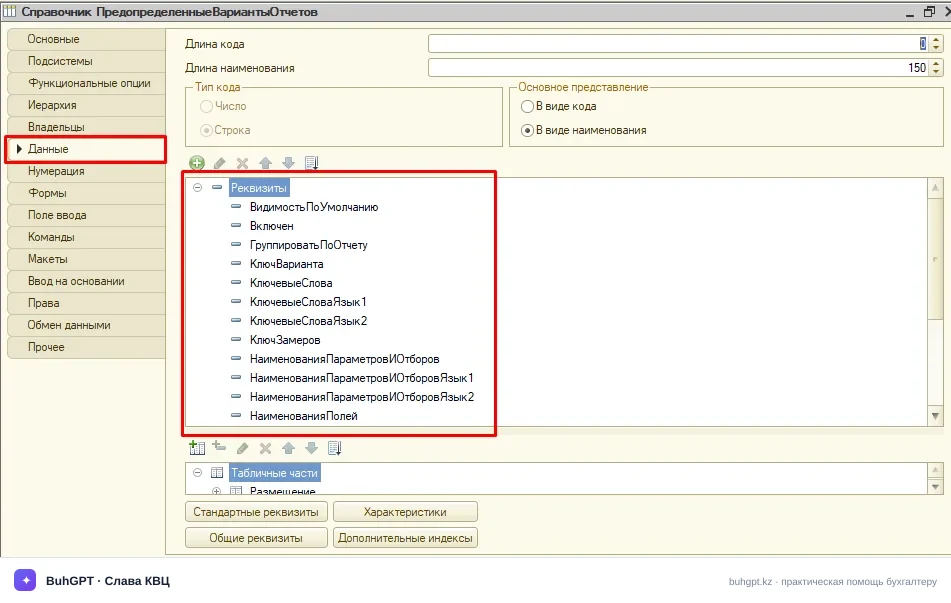
Note on the natural key. The Отчет + КлючВарианта pair forms the variant’s natural key. Variants are searched for and matched during configuration updates using this pair, not the catalog’s internal code/reference.
2.2 Tabular sections
As a rule, the catalog has no separate application-specific tabular sections: multilingual names of parameters, filters, and fields are stored in string header attributes (attributes of the …Язык1/…Язык2 form). Multilingual support is implemented through a set of “parallel” attributes rather than a separate tabular section.
Requires verification for the specific build 3.0.74.2: the presence/composition of the auxiliary Placement tabular section — in some SSL versions, placement of a variant by section is moved to a subordinate table, while in others it is stored as a serialized string.
3. Forms
As an SSL service catalog, the object uses a minimal set of forms. A specialized variant editor is not needed here because variants are configured from the form of the report itself.
Form | Purpose |
|---|---|
ФормаСписка (automatic/standard) | Viewing the list of predefined variants, administrator diagnostics, and setting visibility and the “Enabled” flag |
ФормаЭлемента (automatic/standard) | Viewing the attributes of a specific variant (key, report, descriptions, keywords), primarily in read-only mode |
ФормаГруппы (automatic) | Working with groups when variants are arranged hierarchically |
ФормаВыбора (automatic) | Selecting a variant from other report subsystem mechanisms |
User-specific variant visibility and placement are actually managed through the common report variants subsystem form (“Report Variant Settings” / “All Reports”), which reads and updates the data in this catalog, rather than through the catalog’s own forms.
4. Key module procedures
No separate application-specific BSL evidence for the modules of build 3.0.74.2 is attached. Below are the standard handlers and logic points typical of this service catalog in the SSL “Report Variants” subsystem:
Manager module — programmatic population/update. When the infobase is updated, the subsystem rereads predefined variants from the report metadata and synchronizes the catalog (creating missing items, updating names/keywords/descriptions, and setting
Включен). Matching is performed using the natural key Отчет + КлючВарианта.Object module —
ОбработкаПроверкиЗаполнения. TheОтчетattribute is not marked as required in the metadata, but it is validated programmatically: without a valid reference to the metadata object identifier, the variant is not considered valid.Object module —
ПередЗаписью/ПриУстановкеНовогоКода. Maintaining the integrity of the variant key and service fields, and prohibiting the creation of “user” items where only predefined items are expected.Subsystem common modules (
ВариантыОтчетов,ВариантыОтчетовСлужебный,ВариантыОтчетовПовтИсп). Core business logic: retrieving variants available to a user/section, applying default visibility, full-text search usingКлючевыеСлова, and localizing representations according to the current session language.Localization mechanism. The choice between the
Наименование/Описание/…attribute and its language-specific counterpart (…Язык1,…Язык2) is determined by the user’s interface language (in the Republic of Kazakhstan, Russian is typically the primary language and Kazakh an additional language).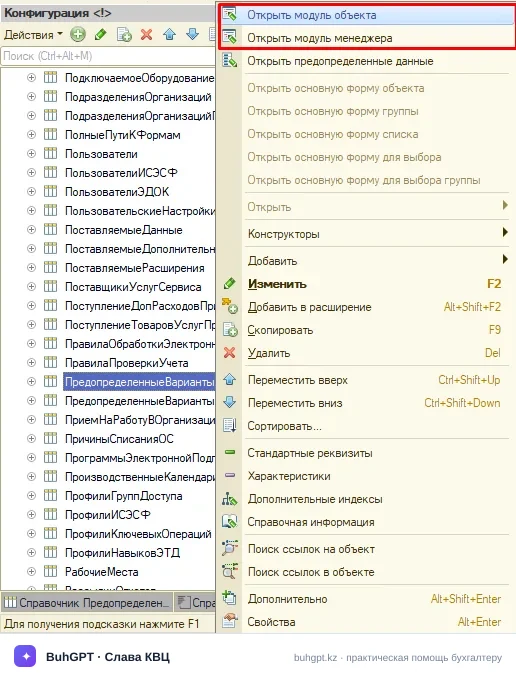
Requires verification: the exact procedure names and the Справочник.ПредопределенныеВариантыОтчетов.МодульМенеджера:<строка> path in the specific build, as the set of handlers changed between SSL releases.
5. Posting and register movements
The catalog is not posted and does not generate register movements: catalogs in 1C do not have posting, register, or accounting entry mechanisms. The object does not participate in financial or tax accounting and does not create entries in accounting, accumulation, or information registers.
The catalog’s only “output” is variant metadata in the reporting interface; it merely describes how report variants should be displayed and found.
Where accounting entries actually arise (for context: they are generated by documents, not this catalog). Reports whose variants are managed by the catalog (trial balance, account analysis, account card, etc.) read entries based on the standard chart of accounts of the Republic of Kazakhstan, for example, when goods are sold to a customer in tenge (₸):
Dr | Cr | Description |
|---|---|---|
1210 | 6010 | Revenue (sales income) from the customer recognized |
1210 | 3130 | VAT payable accrued at a rate of 16 % |
7010 | 1330 | Cost of goods sold written off |
1030 | 1210 | Payment received in the current account |
3310 | 1030 | Payment to supplier (settlement of short-term accounts payable) |
These entries are displayed by reports and have no relation to writing data to the catalog itself; they are provided as an illustration of the data on which report variants are built. Electronic support for sales in the Republic of Kazakhstan (E-invoices in the E-invoicing IS, VWT) also relates to sales documents, not this catalog.
6. Related objects and create based on
Справочник.ИдентификаторыОбъектовМетаданных— theОтчетattribute references the identifier of the report metadata object. This is the key relationship: without a valid identifier, the variant becomes “orphaned.”Справочник.ВариантыОтчетов(user variants) — a companion SSL catalog that stores variants created/modified by users. Predefined variants serve as the base on top of which users save their own settings.Configuration reports (
Отчет.metadata objects) — the source of Data Composition System settings to which variants are linked.Information registers of the report variants subsystem — store variant placement by section, user-specific visibility, and service flags.
Create based on is not provided for this catalog, either as a source or a destination. Items are created programmatically by the subsystem rather than entered manually “based on” another object.
7. Extension points
SSL overridable modules:
ВариантыОтчетовПереопределяемый— registration and configuration of variants, setting visibility by section, and fine-tuning placement during initialization.Handler
ПриОпределенииНастроекВариантовОтчетов/ПриНастройкеВариантовОтчетов(in the subsystem’s overridable module) — the standard extension point where the application solution sets the visibility, grouping, and placement of specific variants.Configuration extensions: adding custom attributes/forms is permitted, but caution is required: the catalog is updated automatically, so logic is best placed in overridable modules rather than the object module.
Multilingual support: additional languages are configured by populating the
…Язык1,…Язык2attributes (for the Republic of Kazakhstan, Kazakh is the primary additional language); when interface languages are added, these fields are used by the localization mechanism.Full-text search: keywords (
КлючевыеСлова*) are the configuration point for making variants discoverable to users; they are populated when variants are registered.
Requires verification: the specific list of exported procedures in the overridable module in version 3.0.74.2 (signatures changed between SSL releases).