1. Identification
Parameter | Value |
|---|---|
Object type | Document (Documents) |
Name |
|
Full name |
|
Synonym | “Batch (manual accounting)” (the synonym is not set separately in the metadata itself; it is displayed as “Batch (manual accounting)”) |
Configuration | Accounting for Kazakhstan, edition 3.0, version 3.0.74.2 |
Navigation link |
|
Where to find it | “Core Activities” section → “Batch (manual accounting)” |
Purpose. The “Batch” document is intended for the manual creation and accounting of batches of goods, work, or services. It is used by accountants and accounting specialists to detail movements of inventories in terms of specific suppliers and contracts. The key feature of the object is that it is a reference document that, by itself, is not posted and does not generate register movements. Its purpose is to serve as the “Batch” dimension value referenced by other documents (receipt, sale, write-off) and registers in batch-based cost accounting and counterparty analytics.
It is used periodically—when a batch must be created manually without being linked to a receipt document: when adjusting accounting records, entering opening balances, or maintaining batch accounting manually.
2. Header Attributes and Tabular Sections
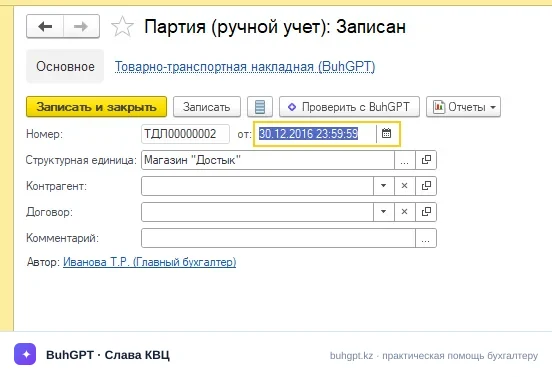
The set of attributes in the provided evidence is disclosed only partially (only the mandatory set is explicitly documented). Below is the guaranteed minimum from the evidence and the analytics typically used for a batch document.
Header attributes
Attribute | Type (typical) | Mandatory | Purpose |
|---|---|---|---|
| CatalogRef.Organizations | Yes | The organization in whose accounting records the batch exists. This is a mandatory field—the document cannot be saved/selected without it. |
| Date / String | Yes (standard) | Standard document attributes. The batch accounting date affects the chronology of batch accounting (see scenario 3.5). |
| CatalogRef.Counterparties | No | The supplier to which the batch relates. Used for cost analytics by counterparty. |
| CatalogRef.CounterpartyContracts | No | The supply contract under which the batch arose. |
| CatalogRef.Departments | No | Accounting department/warehouse. Used when transferring batches in bulk (scenario 3.4). |
| String | No | Free-form text explanation. |
According to the evidence, only “Organization” is mandatory. If a field from the mandatory list is not completed, 1C will not allow the document to be saved and will display an error such as “Field … is not filled in.”
Requires verification (version-specific): the exact complete list of header attributes (the presence of
Counterparty/Contract/Department) in the metadata of release 3.0.74.2—the composition of analytics may differ between versions.
Tabular sections
The document’s tabular sections are not documented in the evidence. Tabular sections are uncommon for a reference batch document serving as a dimension value—the batch is described by header attributes. If a tabular section containing an item list exists in a specific release, its purpose is to list the items included in the batch.
Requires verification: the presence and composition of tabular sections in release 3.0.74.2.
3. Forms
Form | Purpose |
|---|---|
Document form ( | The main form for manually creating and editing a batch (scenarios 3.1 “Creating a New Batch Manually” and 3.2 “Copying an Existing Batch”). |
List form ( | Viewing, searching, and navigating the batch list; opened via the |
Selection form ( | Selecting a specific batch when completing other documents—sales and inventory write-offs (scenario 3.3)—when the batch must be specified for the cost write-off. |
4. Key Module Procedures
The source code of the modules (path:line) was not included in the provided evidence, and the document does not generate movements; therefore, the following are typical handlers for a document of this type. Their presence/content in the specific release requires verification.
FillProcessing(object module)—completes default attributes upon creation (including when creating based on another document and when copying—scenario 3.2).FillCheckProcessing(object module)—checks mandatory attributes; this is where completion of “Organization” is checked and the “Field … is not filled in” error is generated.BeforeWrite(object module)—pre-write checks and normalization of the date/dependent attributes (scenario 3.5 “Changing the Batch Date”).OnCreateAtServer(form module)—initial form setup and field visibility/availability.OrganizationOnChange,CounterpartyOnChange(form module)—recalculates dependent values (for example, populating the contract based on the counterparty).
The
PostingProcessing/UndoPostingProcessingprocedures are absent due to the object’s logic—the document is not posted (see section 5).
Requires verification: the actual composition and contents of the procedures in the object/form module of release 3.0.74.2 (no code evidence was provided).
5. Posting and Movements
The “Batch” document does not generate register movements (register_records: []) and is not posted. This is confirmed by the metadata: the object and its modules contain no entry-generation logic.
The document’s accounting role is to serve as the “Batch” dimension value. Entries and movements are generated by other documents that reference the batch. The standard accounting logic of these related documents under the standard chart of accounts of the Republic of Kazakhstan is shown below (figures comply with Kazakhstan’s 2026 rules: VAT rate 16 %, currency—tenge ₸):
Receipt of goods (creates the batch as analytics for account 1330):
Dr | Cr | Description |
|---|---|---|
1330 “Goods” | 3310 “Short-term payables to suppliers” | Receipt of goods into the batch (analytics—this batch) |
1420 “Recoverable VAT” | 3310 “Short-term payables to suppliers” | Input VAT 16 % |
Sale of goods (writes off the cost of the selected batch—scenario 3.3):
Dr | Cr | Description |
|---|---|---|
1210 “Short-term trade receivables” | 6010 “Revenue from sales” | Sales revenue |
1210 | 3130 “VAT payable” | Output VAT, 16 % |
7010 “Cost of sales” | 1330 “Goods” | Writing off the cost of the specified batch |
Payment:
Dr | Cr | Description |
|---|---|---|
1030 “Cash in current bank accounts” | 1210 | Receipt of payment from the customer |
3310 | 1030 | Payment to the supplier |
VAT example: for a shipment of 1 000 000 ₸ (excluding VAT), the VAT amount = 1 000 000 × 16 % = 160 000 ₸, and the amount payable by the customer is 1 160 000 ₸.
The batch appears as a dimension value in the batch accounting/cost registers of related documents, but the “Batch” document does not create any records of its own.
6. Related Objects and Creation Based on Another Document
Inventory receipt documents—when goods are received, the batch is used as analytics for account 1330; the batch can be created automatically by the receipt document or manually using this document.
Inventory sale/write-off documents—select a batch via the SelectionForm to write off the cost (Dr 7010 Cr 1330).
Batch accounting and cost registers—use “Batch” as a dimension.
Catalogs
Organizations,Counterparties,CounterpartyContracts,Departments—sources of attribute values.Electronic documents of the Republic of Kazakhstan—Electronic Invoices (EISF) and Accompanying Consignment Notes for Goods are generated based on sale/receipt documents (not the “Batch” document itself), but rely on the same batch analytics.
Creation based on another document. The metadata does not specify standard creation based on another document for “Batch” itself; the practical equivalent is copying an existing batch (scenario 3.2) for a repeat delivery from the same counterparty. The batch, in turn, serves as a basis value (dimension) for inventory movement documents.
Requires verification: the specific “Create based on” commands for/from the “Batch” document in release 3.0.74.2.
7. Extension Points
Configuration extension (Extensions): adding header attributes (for example, additional batch analytics), new forms, and commands without removing the configuration from support.
Object module event handlers:
BeforeWrite,FillCheckProcessing,FillProcessing—for custom checks and automatic completion (including date normalization—scenario 3.5).Form module handlers:
OnCreateAtServer,…OnChange—for controlling visibility/availability and dependent attributes.Event subscriptions (EventSubscription): responding to the writing/deletion of a batch in related logic.
Bulk processing / “Bulk Object Change” processing: mass changes to batch attributes, including transfer to another department (scenario 3.4).
Additional reports and processors (Standard Subsystems Library): external processors linked to the document through the additional reports and processors subsystem.
Because the object is not posted, the “movement generation” extension point (
PostingProcessing) is not applicable to it—checks, forms, and bulk processing should be extended instead.