Verified in release 3.0.74.2 of “Accounting for Kazakhstan” (version 3.0).
1. Purpose
The “Currencies” directory stores the list of currencies you use (tenge, dollar, euro, ruble, etc.) and the rules for converting their exchange rates into tenge. Documents (bank, expense report, receipt, sale) obtain the exchange rate for their date from this directory and calculate the amount in the statutory accounting currency—tenge (₸).
2. Where to Find It
Section “Bank and Cash” → “Directories and Settings” block → “Currencies”.
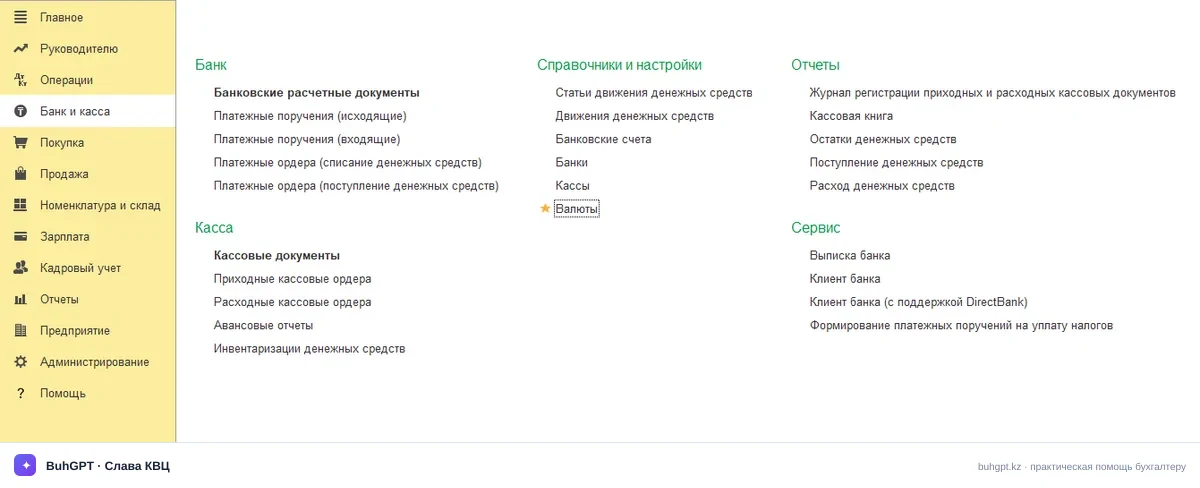
Fig. 1. Currencies Directory
3. How to Complete It
Open the list → “Create” (or “Select from Classifier”—this is faster; see below). Let us review each field.
Numeric code (required) — The numeric code under ISO 4217: tenge—398, dollar—840, euro—978, ruble—643, yuan—156. It is used for data exchange and loading exchange rates. If you enter the wrong code, the exchange rate will not be retrieved from the website.
Alphabetic code (required) — The three-letter ISO code: KZT, USD, EUR, RUB. The 1C service uses it to match the currency with the exchange rate of the National Bank of Kazakhstan. If you leave it blank or enter “dol,” automatic exchange-rate loading will not work.
Name (required) — How the currency is displayed in documents and reports: “US Dollar,” “Euro.” It does not affect accounting entries, but an empty field makes it difficult to select the currency in documents.
Load exchange rates from the website — A checkbox. Select it, and the exchange rate will be updated automatically according to a schedule or when the relevant button is clicked. Clear it, and the exchange rate will have to be entered manually—which is precisely how discrepancies with counterparties arise.
Amount-in-words parameters (amount declension) — How the amount is written in words in printed forms: “dollar / dollars,” “tiyn / cent.” These parameters are completed automatically from the classifier. If you create the currency manually, specify them yourself; otherwise, the amount in words will be incorrect in printed documents.
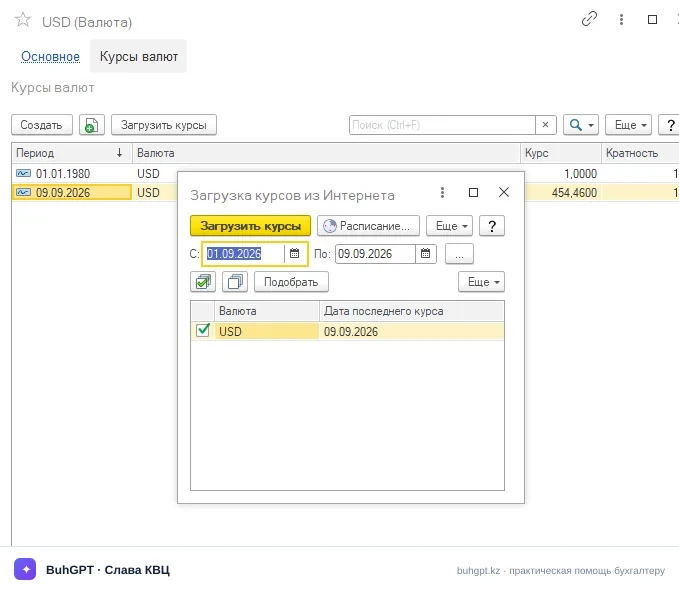
After creating the required currency, you can load exchange rates for previous periods. To do this, open the record for the currency you created and follow the “Exchange Rates” hyperlink at the top of the form.
In the window that opens, select the “Load Exchange Rates” command. A form will then appear in which you can specify the required parameters and load exchange rates for the selected period.
4. Worked Example with Accounting Entries
Scenario. On 01.09.2026, you received goods worth 1 000 USD from a supplier in the Russian Federation. Payment is due later. The exchange rate of the National Bank of Kazakhstan on 01.09.2026 is 480,00 ₸/USD. Payment was made on 06.09.2026, when the exchange rate was 485,00 ₸/USD.
Step 1. Add/check the USD currency. Alphabetic code USD (840), unit 1, rate-setting method—“according to website data.” Load the exchange rates for September.
Step 2. Receipt of goods on 01.09.2026 (“Receipt of Inventory and Services” document, settlement currency USD, exchange rate 480,00):
Dr | Cr | Amount, ₸ | Description |
|---|---|---|---|
1330 | 3310 | 480 000,00 | Goods recognized (1 000 × 480) |
The amount in the document currency is recorded as 1 000 USD, and the amount in tenge is 480 000 ₸. The exchange rate was obtained from the “Currencies” directory for 01.09.2026—which is why it is important that the correct rate be recorded there.
Step 3. Payment on 06.09.2026 (“Write-off from Current Account” document, exchange rate 485,00):
Dr | Cr | Amount, ₸ | Description |
|---|---|---|---|
3310 | 1030 | 485 000,00 | Payment to supplier (1 000 × 485) |
Step 4. Exchange difference. The liability was 480 000 ₸ and was settled for 485 000 ₸. The exchange rate increased and the tenge weakened, resulting in a negative exchange difference of 5 000 ₸ (expense):
Dr | Cr | Amount, ₸ | Description |
|---|---|---|---|
7430 | 3310 | 5 000,00 | Exchange difference expense (485 000 − 480 000) |
In the standard chart of accounts of the Republic of Kazakhstan: 7430 is “Exchange Difference Expenses,” and 6250 is “Exchange Difference Income” (if the exchange rate had fallen). 1C generates the exchange-difference entry automatically when the payment document is posted or through the “Revaluation of Foreign-Currency Funds” document at the end of the period.
Total: the goods are recognized at 480 000 ₸, the actual payment was 485 000 ₸, and the difference of 5 000 ₸ was recognized as an expense. If you had forgotten to update the exchange rate and left it at 480 for both dates, the discrepancy would have been “hidden” and emerged during the next reconciliation with the bank.
5. What Is Generated When Working with the Directory
The directory itself does not generate accounting entries—it is not a document. However, it controls three things:
“Exchange Rates” information register—when rates are loaded or entered manually, records containing “date—currency—exchange rate—unit” are written here. All documents obtain their exchange rates from this register.
Recalculation of amounts in documents—bank, cash, expense report, receipt, and sale documents insert the exchange rate for their date and calculate the amount in tenge.
Exchange differences—based on the register entries, the “Revaluation of Foreign-Currency Funds” document and payment documents calculate accounting entries for accounts 7430/6250.
6. Common Errors
“The currency exchange rate … has not been entered for the date …”—appears when posting a foreign-currency document. There is no exchange rate in the register for the required date. Open the currency → “Exchange Rates” → load the period or enter the exchange rate manually. The National Bank of Kazakhstan does not publish the exchange rate for the current day immediately, so the rate “for today” may appear later—check the document date.
The exchange rate is exactly 100 times too high/low—the unit is incorrect. Check the “Unit” field: it must be 1 for USD/EUR.
“A currency with this code already exists”—you are manually creating a currency that already exists (often a duplicate tenge or USD record). Do not create a duplicate—find the existing item. Duplicate currencies disrupt reporting and revaluation.
Exchange rates are not loaded automatically—the “Load exchange rates from the website” checkbox is not selected, the alphabetic code (USD/EUR) is not completed, or there is no internet connection/ITS subscription. Check these in sequence: checkbox → code → manually select “Load Exchange Rates.”
The amount in the electronic invoice does not match—the cause is almost always an incorrect exchange rate on the turnover date. Correct the exchange rate in the directory, repost the document, and regenerate the electronic invoice.