Verified on release 3.0.74.2 "Accounting for Kazakhstan" (edition 3.0).
End of the quarter. You opened form 200.00, clicked "Fill in" — and in line 200.00.001 the income for IIT doesn't match what the payroll sheet shows. For one employee the payment went through in the following month, for another the deduction was changed retroactively, and for a third the HR accountant recorded sick leave under the wrong type of accrual. Until the figures reconcile, the declaration cannot be submitted — IIT, MPC, social contributions and social tax for the quarter all depend on it. Let's figure out how the report gathers data, where it takes it from, and how to quickly find the discrepancy.
1. Purpose
2. Where to find it
Section "Reports" → "Regulated reports" (or "1C-Reporting" → "Regulated reports"). On the left side of the window, in the tree of names, select the group "Tax reporting" → "Form 200.00 Declaration on individual income tax and social tax" and click on it. After that, click the "Create report" button on the top panel, set the period (quarter), tax committee and taxpayer (organization).
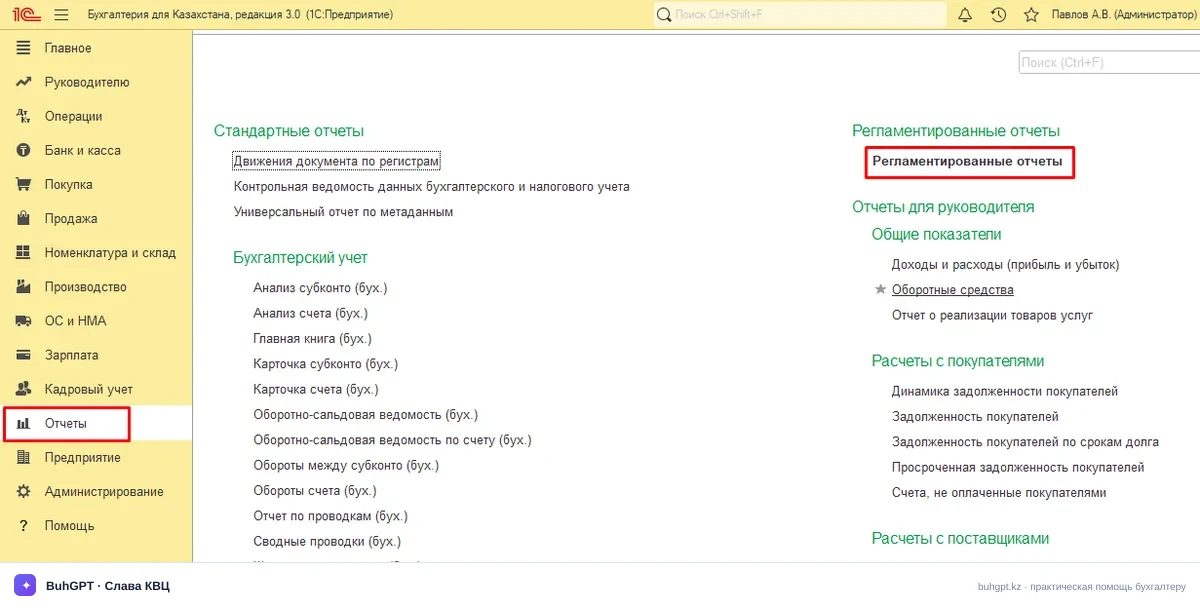
Quick way: menu "Go to link" → or through the navigation bar enter the link and in the dropdown list that appears click on the suggested result with the link icon — "Regulated report 200 form":
e1cib/list/Отчет.РегламентированныйОтчет200Форма
2a. How to find out your release
"Help" → "About the program" (or the "i" icon in the upper right corner). There you will find the platform version (for example, 8.3.24) and the configuration release — a line like "Accounting for Kazakhstan, edition 3.0 (3.0.74.2)". The appendices and control ratios of form 200.00 change from release to release, so before submitting, update to the current version.
3. How to fill in — step by step
Filling in goes "bottom-up": first the appendices (breakdown by individuals), then the main form (totals).
Header (MANDATORY):
Taxpayer — for which legal entity/sole proprietor you are submitting. The social tax rates and residency status depend on it. Make a mistake — and the entire breakdown will be gathered for the wrong employees.
Period (Tax period) — the reporting quarter and year (reflected in line 2 of the form itself). If you set the wrong quarter, the income will be gathered for a different period and the amounts won't match the payroll sheet.
Type — initial / regular / additional / by notice / liquidation. For a regular submission — "Regular (initial)". Set "Additional" only when correcting an already accepted declaration.
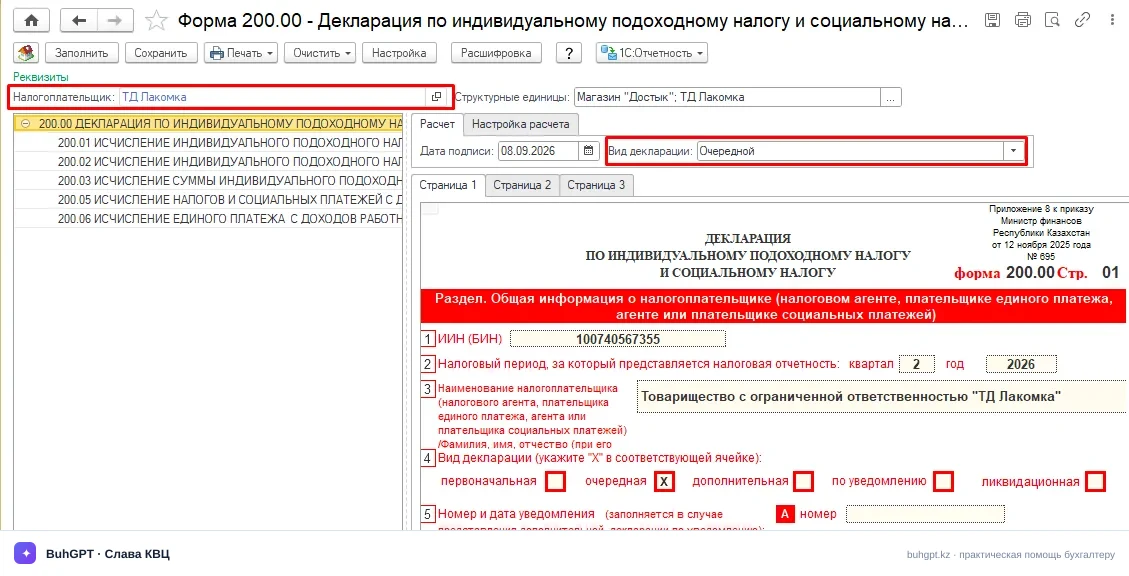
Title page (200.00):
Residency status, taxpayer category — pulled from the organization's card. Check the type of activity: applying a special regime changes the social tax calculation.
Tax authority code, OKED — from the organization's settings.
Appendix 200.01 (for citizens of the RK) — here, month by month for each month of the quarter: employee income, IIT, MPC, EMPC, CMHI, MHI, SC, social tax. Filled in automatically based on accrual and withholding data.
Appendix 200.02 — for foreigners and stateless persons (if any).
Appendix 200.05 — breakdown by individuals: by name, the amounts of income, deductions and taxes. This is exactly what the tax authority looks at when reconciling.
Procedure:
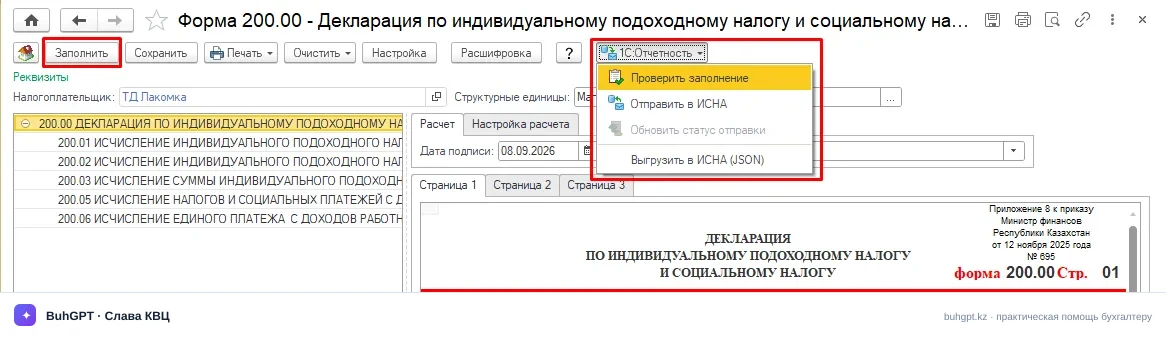
Click "Fill in" — the report will gather data from payroll accrual documents, payments and tax calculations for the quarter.
Expand 200.05 and visually reconcile the amounts by employee with the payroll sheet.
Check the lines of the main form 200.00 (001–024) — there are the totals of IIT and social tax payable.
Click "Check" — a check of the control ratios will start.
"Save", then send via 1C-Reporting or export to a file.
Yellow (white) fields can be edited manually, but remember: when you click "Fill in" again, manual edits will be overwritten. If you edit by hand — do not click "Fill in" again.
4. A worked example with figures
An LLP on the general regime, 1 resident employee, salary 300,000 ₸ per month, standard deduction of 30 MCI. 2026 indicators: MCI = 4,325 ₸, MW = 85,000 ₸, basic IIT deduction = 30 MCI = 129,750 ₸/month.
Calculation for one month:
Indicator | Rate / base | Amount, ₸ |
|---|---|---|
Accrued (income) | — | 300,000 |
MPC (at employee's expense) | 10% of 300,000 | 30,000 |
CMHI (at employee's expense) | 2% of 300,000 | 6,000 |
Income taxable under IIT | 300,000 − 30,000 MPC − 6,000 CMHI − 129,750 deduction | 134,250 |
IIT | 10% of 134,250 | 13,425 |
Take-home | 300,000 − 30,000 − 6,000 − 13,425 | 250,575 |
At the employer's expense (over and above the salary):
Contribution | Rate / base | Amount, ₸ |
|---|---|---|
EMPC | 3.5% of 300,000 | 10,500 |
SC (social contributions) | 5% of (300,000 − 30,000 MPC) | 13,500 |
MHI | 3% of 300,000 | 9,000 |
Social tax | 6% of (300,000 − 30,000 MPC) − SC 13,500 | 2,700 |
Social tax: 6% × 270,000 = 16,200, minus SC 13,500 = 2,700 ₸ payable.
Postings when accruing salary (document "Salary accrual", not the report itself):
Operation | Dr | Cr | Amount, ₸ |
|---|---|---|---|
Salary accrued | 7210 | 3350 | 300,000 |
IIT withheld | 3350 | 3120 | 13,425 |
MPC withheld | 3350 | 3220 | 30,000 |
CMHI withheld | 3350 | 3210 | 6,000 |
EMPC accrued | 7210 | 3220 | 10,500 |
SC accrued | 7210 | 3210 | 13,500 |
MHI accrued | 7210 | 3210 | 9,000 |
Social tax accrued | 7210 | 3150 | 2,700 |
For the quarter (3 months) form 200.00 will include: income 900,000, IIT 40,275, MPC 90,000, EMPC 31,500, CMHI 18,000, MHI 27,000, SC 40,500, social tax 8,100. You will see these same amounts in appendix 200.05 next to the employee's full name.
Important about the 2026 ceilings: the base for MPC and EMPC is capped at 50 MW = 4,250,000 ₸ per month. IIT of 10% applies up to an annual income of 8,500 MCI, above that — 15%. In our example the limits are not reached.
5. Types of operation (what the report produces)
Form 200.00 is a regulated report; it does not have "types of operation" like a document does, but it has generation modes:
Regular (initial) — a regular submission for the quarter.
Additional — correction of a previously submitted declaration (only the changes are indicated).
Additional by notice — at the request of the tax authority.
Liquidation — upon deregistration / liquidation.
6. What is generated when filling in and posting
The report itself does not make accounting postings — it gathers already accrued amounts. The postings are formed by the documents "Accrual of salary and contributions", "Salary payment", as well as tax and contribution calculations.
When filling in, the report reads:
registers for IIT and income of individuals;
registers for the calculation of MPC, EMPC, CMHI, MHI, SC;
social tax accruals.
When sending via 1C-Reporting, an electronic declaration file (XML) is generated and, if the service is connected, an acceptance protocol from the SGDS/KNP. Form 200.00 does not generate an ESI or CTA — it is reporting on labor, not on VAT/goods movement.
7. Printable forms
Declaration on IIT and social tax (form 200.00) — title page and main form.
Appendix 200.01 — calculation of IIT and social tax for citizens of the RK.
Appendix 200.02 — for foreigners and stateless persons.
Appendix 200.05 — breakdown of amounts by individuals.
Printing is available via the "Print" button from the report form; export to a file — via the "Export" button.
8. Common mistakes
"Control ratio not met: line 200.00.001 ≠ sum of appendices" — the income in the main form doesn't match the breakdown. The cause is usually a manual edit of one of the cells. Click "Fill in" again and don't touch the totals by hand.
"Employee's income is missing in appendix 200.05" — the payment or accrual was posted outside the quarter, or the accrual was made under a type that does not relate to the employee's income. Check the date of the accrual document and the settings of the accrual type (the "Income in the form of wages" checkbox).
"MPC/SC exceed the allowable base" — the 50 MW ceiling (4,250,000 ₸) for a high-paid employee was not taken into account. Check the withholding settings and the limits in the payroll accounting policy.
"Tax authority code is not filled in" — the SRD is not indicated in the organization's card. Fill in the organization's details on the "Tax inspectorate" tab.
"Negative social tax" — the SC turned out to be greater than the social tax (a common situation with low salaries). This is normal: the social tax payable cannot be less than zero, the report sets 0. There is no need to check it manually.