Verified on release 3.0.74.2 "Accounting for Kazakhstan" (edition 3.0).
You have set up a new organization, posted your first sale — and the wrong VAT rate is sent to the ESF, the cost of goods is not written off, and IIT is calculated using the old MCI instead of 30. The cause is almost always the same: the organization was set up "on the go," the VAT payer checkboxes, accounting policy, and payroll parameters were not filled in. Basic organization settings is that single screen you return to in order to put all key parameters in order in 10 minutes and stop catching errors in documents.
1. Purpose
2. Where to find it
Path in the interface:
Main → Settings → Organizations → open the card → Basic settings command (or Settings → Basic organization settings);
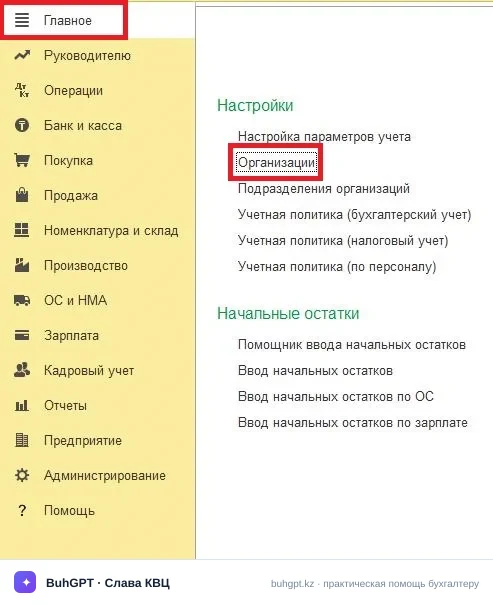
or from the startup assistant on the first launch of the program.
Quick way: the "Go to link" menu → or via the navigation bar enter the link and in the drop-down list that appears click the suggested result with the link icon — "Basic organization settings":
If there are several organizations, first select the one you need in the header field. Settings are stored separately for each organization, so they cannot be mixed up.
2a. How to find out your release
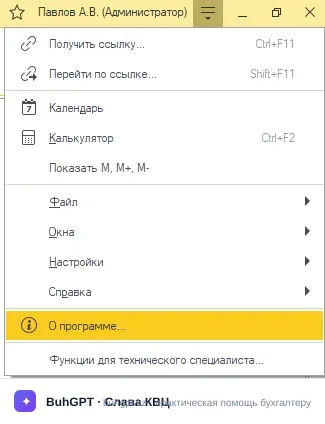
Help → About the program (or ☰ → Help → About the program). In the window that opens, at the top is the platform version (for example, 8.3.24), and below is the configuration release ("Accounting for Kazakhstan", edition 3.0, version 3.0.74.2). Match the instructions precisely to this number: the deduction and rate values changed in 2026, and on older releases the fields may look different.
3. How to fill it in — step by step
The settings are divided into blocks. Let's go through each one.
"Organization" block (MANDATORY)
Field | Why | If you make a mistake |
|---|---|---|
Type — legal entity / IE | Determines the set of taxes and reporting forms | An IE with the "legal entity" type will not see the required IIT rates and the simplified regime |
Name, BIN/IIN | Substituted into all documents and the ESF | The ESF will be sent with someone else's BIN — the counterparty will not accept it, a fine |
Main bank account (IIC, BIC) | Printed on invoices and payment orders | The money will go to the wrong account |
Legal/actual address | Details in the ESF and contracts | The IS ESF will reject the ESF if it does not match the SDB LE database |
Head, chief accountant | Signatures on printed forms | Empty signatures on acts and invoices |
"Accounting policy (tax accounting)" block (MANDATORY)
Select the regime: generally established or special (simplified declaration, retail tax, for peasant farms). Tax calculation and the composition of declarations depend on this. Specify the date from which the regime applies — it affects month-end closing and accruals.
"VAT" block (MANDATORY if you are a payer)
The "VAT payer" checkbox and the date of VAT registration.
Default VAT rate — 16% (the current rate in Kazakhstan for 2026). It is exactly this rate that is substituted into sales and the ESF.
Method of attributing VAT to offset — proportional or separate.
If the checkbox is not set, the program will not allocate VAT in documents, and you simply will not be able to issue an ESF correctly.
"Accounting policy" block
Inventory valuation method: FIFO or average. Affects the cost of goods when writing off (account 7010).
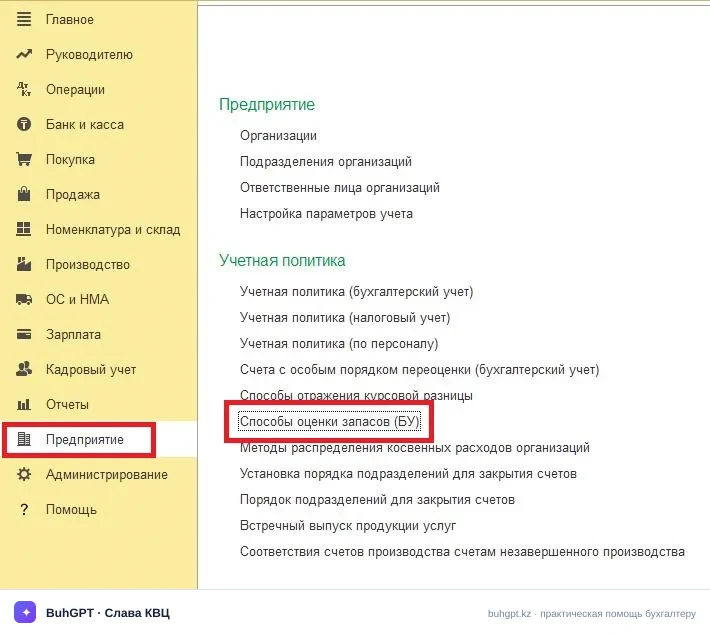
Rounding settings and the cost calculation method.
"Payroll and tax parameters" block
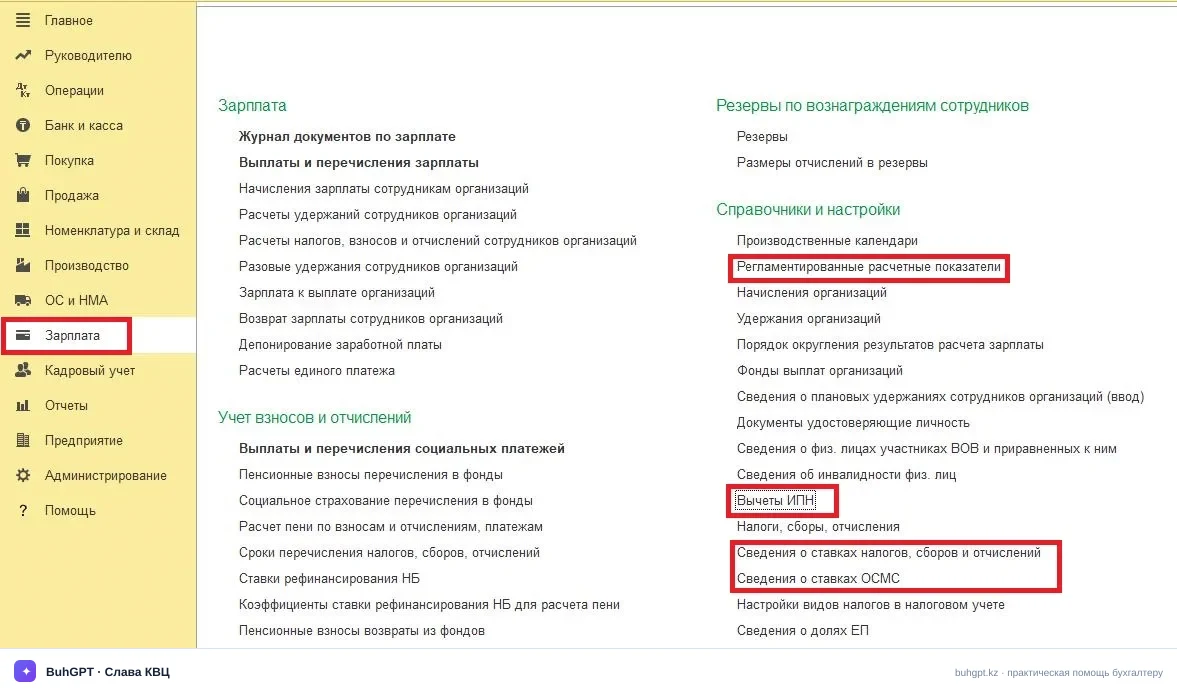
Indicator | Where it is located in 1C (Register / Reference book) | Path in the interface |
MCI and MMW | Information register "Regulated calculation indicators" | Section "Payroll" → "Reference books and settings" → "Regulated calculation indicators" |
Rates of taxes and contributions (MPC, MPEC, MHIC, SHIC, SD, IIT, Social tax) | Information register "Information on rates of taxes, fees and deductions" | Section "Payroll" → "Reference books and settings" → "Information on rates of taxes, fees and deductions" |
Limits and amounts of deductions (for example, the basic deduction of 30 MCI) | Reference book "IIT deductions" and the subordinate register "Amount of IIT deductions" | Section "Payroll" → "Reference books and settings" → "IIT deductions" |
How to update the indicators for 2026
If old rates are applied when calculating payroll (for example, an outdated deduction is pulled instead of 30 MCI), the employee will receive less take-home pay, and taxes will be calculated incorrectly. There is no need to enter these values manually into each register. The current parameters for the current year are loaded into the database in two ways:
Automatically: during a standard configuration release update.
Manually via internet support: go to the "Administration" section → "Internet support and services" → "Classifiers and exchange rates" → click the "Update classifiers" button.
After loading the classifiers, the new values will begin to apply to all accrual documents dated on or after the effective date of the new rates.
4. A worked example with postings
Condition. LLP "Aktau Trade", a VAT payer, generally established regime, default VAT rate — 16%, inventory valuation — FIFO. Settings entered from 01.01.2026.
On 07.09.2026 we sell goods to a buyer for 1,160,000 ₸ including VAT. The cost of the batch under FIFO is 700,000 ₸.
VAT calculation: 1,160,000 / 1.16 = 1,000,000 ₸ (income) + 160,000 ₸ (VAT 16%).
Thanks to the completed basic settings, the sales document generates postings automatically:
Dr | Cr | Amount, ₸ | Description |
|---|---|---|---|
1210 | 6010 | 1 000 000 | Income from sales |
1210 | 3130 | 160 000 | VAT payable 16% |
7010 | 1330 | 700 000 | Cost written off (FIFO) |
Gross profit on the transaction: 1,000,000 − 700,000 = 300,000 ₸.
If the settings had the old VAT rate, the ESF would show 124,285.71 ₸ instead of 160,000 ₸ — a discrepancy with the counterparty's act and refusal to accept the ESF. That is precisely why the rate is "hardwired" into the basic settings once.
Payroll example. Salary 300,000 ₸. Deduction 30 MCI = 30 × 4,325 = 129,750 ₸. MPC: 300,000 × 10% = 30,000 ₸. MHIC: 300,000 × 2% = 6,000 ₸. IIT base: 300,000 − 30,000 − 6,000 − 129,750 = 134,250 ₸. IIT: 134,250 × 10% = 13,425 ₸. With the old deduction the tax would be noticeably higher — that is the price of an incorrect setting.
5. Types of operation / what the data processor provides
The data processor itself does not make postings — it sets the parameters that "enable" the behavior of documents:
registers the organization's taxation system;
sets/removes the VAT payer status and the default rate;
sets the accounting policy (inventory valuation, cost);
sets the payroll parameters (deductions, contribution rates, base limits);
records the details that appear in printouts and electronic documents.
6. What is generated when saving
Entries in information registers: "Accounting policy", "VAT rates", "VAT payers", "Payroll and personnel accounting settings", organization details.
These entries are dated, so different rates and deductions can be stored for different periods.
There are no direct postings — they appear later, in sales, receipts, and payroll accrual, where these parameters are already used.
Through the VAT parameters, the correct issuance of the ESF (IS ESF) and SNT from sales documents is ensured.
7. Printed forms
As a rule, the data processor has no printed form of its own — it is a settings wizard. But the details filled in here are printed in:
the Invoice for payment, Waybill, Certificate of completed work;
the Invoice and ESF;
the Payment order (bank details, BIC);
payroll forms (payslips, certificates).
8. Common errors
"The organization's accounting policy is not filled in for the document date" — you are posting a sale for a period for which the settings are not set. Open the basic settings and specify the accounting policy start date earlier than the document date.
"The organization is not a VAT payer" — when trying to allocate VAT or issue an ESF. Set the "VAT payer" checkbox and specify the registration date.
"The VAT rate does not match the document date" — in the setting, the validity period of the 16% rate begins later than the document date. Check the rate application date.
VAT is calculated at the old rate instead of 16% — an outdated setting is saved in the settings. Update the value to 16% from the required date.
IIT is overstated, the employee received less — in the payroll settings the deduction is set to the old value or the MCI is incorrect. Set 30 MCI/month and MCI 4,325 ₸.
9. FAQ
How do I open the basic settings if the startup assistant is already closed? Main → Organizations → organization card → the "Basic settings" command.
Where do I switch the organization from last year's rate to 16% VAT? In the "VAT" block of the basic settings, set the default rate to 16% with a start date of 2026. Documents for past periods will retain the pre