Accurate calculation of individual income tax (IIT) in “1C:Accounting 8 for Kazakhstan, edition 3.0” depends directly on entering employee tax deduction details correctly. If you enter an application late or make an error when entering it, the software will calculate tax at the maximum rate without applying the deductions the employee is entitled to. The employee will overpay IIT, and the accountant will have to make additional adjustments.
1. Why do you need an “Application for IIT Deductions”?
Under the Tax Code of the Republic of Kazakhstan, an individual can reduce their taxable income by the amount of standard and other deductions, such as mandatory pension contributions (MPC), compulsory social health insurance (CSHI) contributions, and the standard deduction for a calendar month.
When an employee is hired, 1C requires a dedicated document to be entered before it can apply these deductions.
2. How to create the application in 1C 3.0 step by step
Creating the document in the software takes only a few minutes.
Step 1. Open the document journal
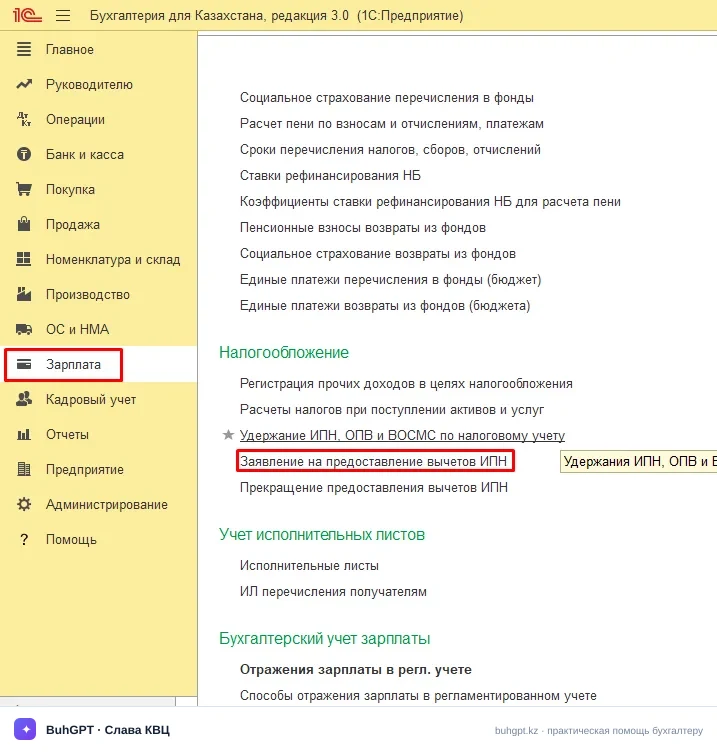
Open “Payroll” from the top menu.
In the “Taxation” subsection, select “Application for IIT Deductions” (in some versions, the path may be “Payroll” → “Application for IIT Deductions”).
Click “Create”.
Step 2. Complete the document header and table
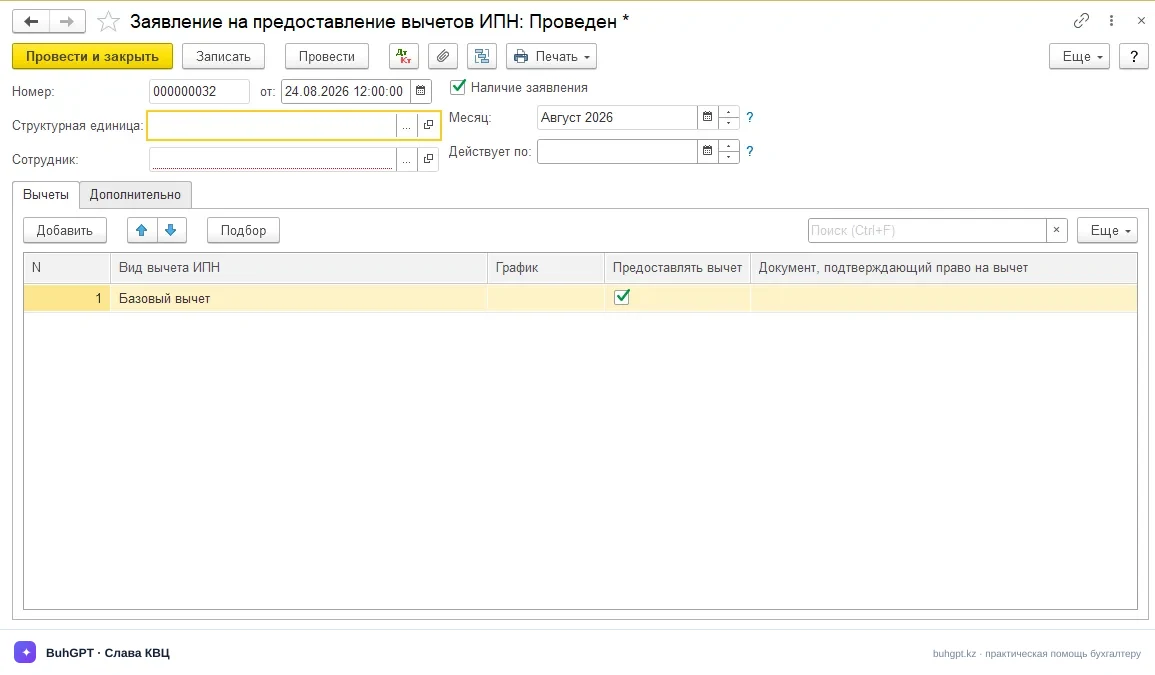
Fill in the main fields in the new document form.
Under Organization, select your company if the database contains records for multiple organizations.
Under Employee, select the individual who submitted the application.
Validity period (“Effective From” / “Effective Through”)
In the “Effective From” field, enter the month and year when the deduction starts to apply. This is usually the month the employee was hired or the start of the tax period.
You can leave the “Effective Through” field blank. The deduction will remain in effect indefinitely until the employee submits a request to cancel it or change its terms. Recommendation — Leave the field blank to avoid recreating documents each year. Some companies choose to set the end date to the end of the calendar year.
Step 3. Add the deduction types
In the table at the bottom, list the deductions the employee is entitled to.
Standard deductions (for example, 14 MCI or the basic deduction, depending on current legislation and the employee’s status).
Deductions for MPC.
Deductions for CSHI contributions.
Important. For tax accounting purposes, the employee must submit a signed application in paper or electronic form. Employees can apply for the standard deduction only through their primary employer.
Step 4. Post the document
Click “Save”, then “Post”.
To verify the data you entered, open the employee’s record and click “IIT Deduction Details” to see the history and current status of all deductions granted. 3. Interface screenshots
Path to the document journal
“Application for IIT Deductions” document interface
4. Frequently asked questions (FAQ)
1. Do I need to create a new deduction application every year?
If you left the “Effective Through” field blank when you created the document, it remains valid automatically. If you set an end date (for example, December 31), create a new application at the start of the new year.
2. Can an employee claim an IIT deduction through a secondary employer?
No. Under Kazakhstan tax law, an individual may claim standard deductions (for example, 14 MCI) through only one tax agent, their primary employer. The deduction is unavailable through a secondary employer.
3. What should I do if the deduction amount changes (for example, from 14 MCI to the basic deduction)?
End the previous application by setting its “Effective Through” date in the preceding period. Then create a new application with the updated deduction settings, either manually or using dedicated processing tools.
Completing the “Application for IIT Deductions” correctly in Accounting for Kazakhstan 3.0 helps ensure accurate payroll calculations and avoid objections from the tax authorities during audits. Record promptly whether the job is primary or secondary and monitor the documents’ validity periods to avoid applying the same deduction twice for an employee.