Checked on release 3.0.74.2 "Accounting for Kazakhstan" (version 3.0).
The situation where it all begins
You received a batch of goods, recorded the invoice — and then it turned out: some boxes are defective, the wrong item was delivered, or the supplier sent a reconciliation act where the delivery amount has already been reduced, "because you returned it." You have excess goods on account 1330, and the supplier has an "excess" debt on account 3310, and the amounts do not match. You cannot return "manually" with journal entries: it will break the inventory accounting and VAT. There is a separate document for this — "Return of goods to the supplier". It removes the goods from the balances exactly at the batch and price at which you received them and adjusts the credited VAT.
1. Purpose
The document formalizes the return of previously purchased goods (materials, containers) to the supplier. It writes off the inventory at the purchase price, reduces your debt to the supplier (or creates their debt to you), and reverses the VAT that was credited upon purchase.
2. Where to find
Menu: section "Purchases" → block "Returns" → journal "Returns of goods to suppliers" → button "Create".
It is most convenient to enter the return based on the receipt document — then the counterparty, contract, nomenclature, batches, and prices will be filled in automatically (more on this in section 10).
3. How to fill out
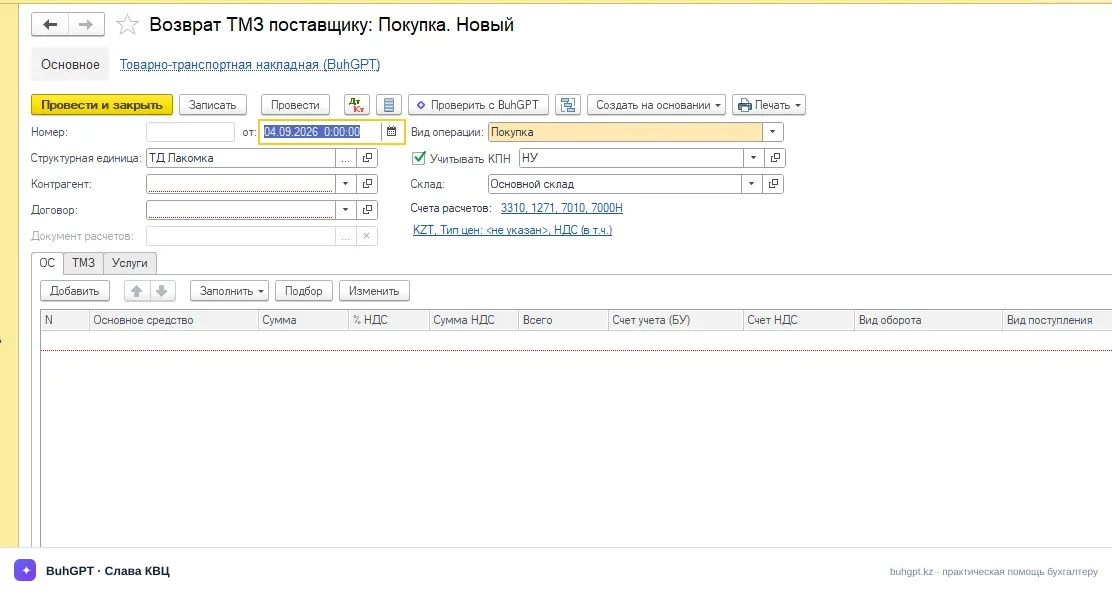
Header
Field | Purpose and what will happen in case of error |
|---|---|
Organization (mandatory) | Your legal entity. It affects the chart of accounts, VAT payer status, and numbering. If you make a mistake — VAT and ESF will go to the wrong organization. |
Date (mandatory) | Return date. It cannot be earlier than the receipt date — otherwise, there will be nothing to write off (the batch does not exist yet). It affects the VAT period. |
Counterparty (mandatory) | The supplier to whom you are returning. It will be pulled from the source document. If incorrect — the debt will "hang" on the wrong one, and the reconciliation will not match. |
Contract (mandatory) | Type "With the supplier." It determines the currency and accounts for settlements. If the contract currency is tenge, all amounts are in ₸. |
Receipt document | Key field. Indicates from which batch and at what price to write off. Without it, the program will not find the cost and VAT. Always fill it in when the return is based on a specific delivery. |
Warehouse | Where the goods are physically being returned from. It affects the register "Goods in warehouses." An incorrect warehouse will result in "No batches found." |
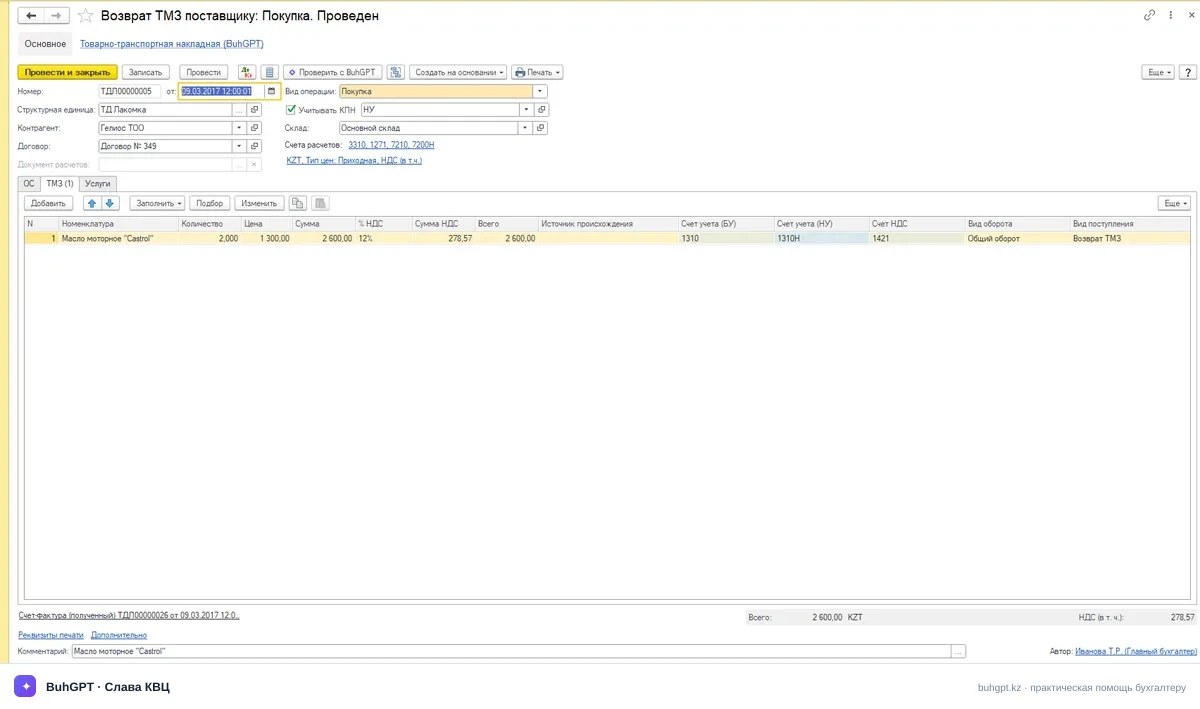
Table part "Goods"
Column | What to specify |
|---|---|
Nomenclature | The same item as in the receipt. |
Quantity | How much you are returning. Not more than the remaining amount of the batch. |
Price / Amount | Return price = purchase price. When entered based on the document, it is filled in automatically. |
% VAT | The rate of receipt — 16% (current rate of the RK). If the goods were without VAT/exempt — "Without VAT." |
VAT Amount | Calculated from the amount: 16% of the cost. |
Accounting Account | 1330 "Goods" (or 1310 "Raw materials and materials" — by type of inventory). |
VAT Account | 1420 "VAT to be refunded" — the one that is reduced. |
Tabs "Accounting Accounts" / "Additional"
Account for settlements with the counterparty — 3310 "Short-term payables to suppliers." This is the account that is reduced by the return amount.
Advance Account — if the delivery was prepaid.
Data for ESF / CNT — a mark indicating the need to issue electronic documents for the return (if you are a VAT payer and are required to accompany the movement of goods).
4. What is generated upon posting
Accounting entries — see section 4 (Dr 3310 Cr 1330; Dr 3310 Cr 1420).
Movements in registers:
Goods in warehouses / Goods batches in warehouses — expense of the returned quantity.
Settlements with counterparties — reduction of debt under the contract.
VAT Registers ("VAT to be refunded," acquisition turnover) — adjustment of credited tax.
CNT / ESF — records for issuing electronic documents.
Electronic documents:
CNT (accompanying invoice for goods) — issued for the physical movement of the returned goods if the goods fall under the virtual warehouse / list of controlled items.
ESF for return — when returning, the VAT payer generates an electronic invoice (usually, an additional ESF to the original) in the ESF information system. The document provides a command to upload to the ESF cabinet.
5. Printed forms
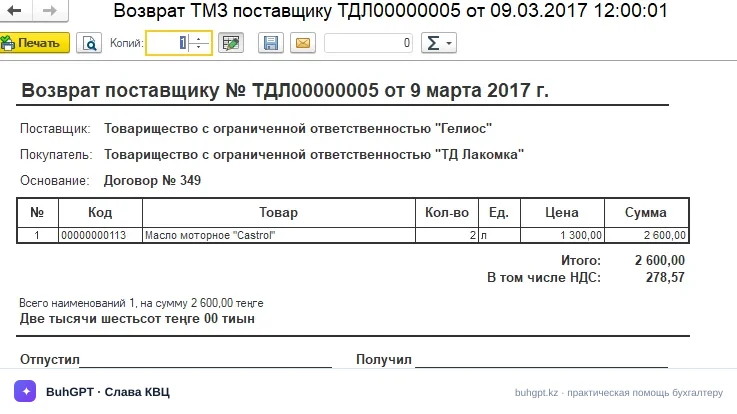
Available by clicking the "Print" button:
"Return of goods to the supplier" — the commodity form of the document itself.
"Invoice for the release of inventory to the side" (form Z-2) — for transferring goods upon return.
"Invoice" — if a paper form is needed (the main document is the ESF in electronic form).
6. Common mistakes
"No batches found for writing off nomenclature ..." The receipt document/warehouse is not specified or incorrect, or the goods of this batch have already been consumed. Fill in the "Receipt document" and the correct warehouse, check the remaining amount of the batch.
"Exceeded the quantity of goods available for return" You are returning more than was received (or more than remains). Reduce the quantity to the remaining amount of the batch.
"The document date is earlier than the date of the source document" Return is earlier than receipt — the batch does not exist yet. Set the date no earlier than the receipt date.
"VAT rate not filled in" / "VAT rate does not match the receipt document" The line has an empty or incorrect rate. Set 16% (or the one that was in the receipt, up to "Without VAT").
"The organization is not a VAT payer" — and you are trying to issue an ESF. Check the accounting policy/VAT registration settings: without payer status, account 1420 and ESF will not be filled in.
7. FAQ
1. Is it mandatory to specify the receipt document? Practically yes. It sets the batch, cost, and the amount of VAT to be reversed. Without it, the program will not find the price and balance. Enter the return based on the receipt.
2. At what price is the goods written off — at the purchase price or current? At the receipt price (cost of that batch), not at the current accounting or market price.
3. What is the VAT rate for the return? The same as in the original delivery. For current operations in the RK, it is 16%. If purchased "Without VAT" — the return is also without VAT.
4. Is it necessary to issue an ESF for the return? If you are a VAT payer — yes, as a rule, an additional ESF to the original is issued. Non-VAT payers do not issue ESF.
5. And