As of 31 December 2026, account 3430 “Short-term provisions for employee benefits” should show the amount the entity will pay for unused leave days, calculated as days × average daily earnings plus employer contributions. IAS 19 requires this for accumulating paid leave. In 1C:Accounting for Kazakhstan 3.0.75.1, you can accrue the provision every month using the standard functionality, then reconcile it against the calculation in December and adjust it with a single entry.
At a glance
- Liability as of 31.12.2026 = unused days × average daily earnings + social tax, social contributions, employer mandatory pension contributions and employer compulsory social health insurance contributions
- Account 3430 is the same in the chart of accounts under Order No. 185 and in the revised chart under Order No. 533
- If you run payroll in 1C:Accounting, use the “Provisions” directory, the “Provision Contribution Rates” register and the “Payroll Posting to Statutory Accounts” document
- If you run payroll in 1C:Payroll and HR 3, the provision is imported through the “Payroll Posting to Financial Accounts (Integration with 1C:Payroll and HR 3)” document
- In December, reconcile the balance of account 3430 against the calculation based on unused leave days and post the difference using a “Transaction” document
For the full year-end closing procedure, see “Closing 2026 and Opening 2027”. This article covers the annual leave provision.
How the liability arises
Employees are entitled to at least 24 calendar days of paid leave each year (Article 88 of the Labour Code of Kazakhstan). Unused days carry forward, and upon termination the employee receives compensation based on average earnings (Article 96 of the Labour Code of Kazakhstan). The entity therefore has a year-end liability to employees for services they have already rendered.
IAS 19 classifies this leave as accumulating. The entity recognises the expense when the employee renders service that earns the leave entitlement (paragraph 13). It measures the liability at the amount it expects to pay for the days accumulated as of the reporting date (paragraph 16). Employer contributions are also part of short-term employee benefits (paragraph 9).
How to calculate the liability as of 31.12.2026
You need three figures for each employee: unused leave days as of 31.12, average daily earnings for calculating leave pay, and the applicable employer contribution rates. Obtain the unused leave balance from your HR records.
Example: An LLP has three employees. The 2026 employer rates are 6% for social tax, 5% for social contributions, 3,5% for employer mandatory pension contributions and 3% for employer compulsory social health insurance contributions, for a total of 17,5%. For simplicity, all rates are applied to the full amount of leave pay. By law, social tax is calculated on income after deducting mandatory pension contributions and employee compulsory social health insurance contributions (paragraph 2 of Article 556 of the Tax Code of Kazakhstan). This example excludes limits on the assessment base and categories eligible for relief.
| Employee | Days × average daily earnings | Amount, tenge |
|---|---|---|
| Aigerim | 18 × 20 000 | 360 000 |
| Yerzhan | 10 × 15 000 | 150 000 |
| Marina | 30 × 12 000 | 360 000 |
| Total leave pay | 870 000 | |
| Contributions at 17,5% | 870 000 × 0,175 | 152 250 |
| Liability | 870 000 + 152 250 | 1 022 250 |
Check the amounts separately: 52 200 (social tax) + 43 500 (social contributions) + 30 450 (employer mandatory pension contributions) + 26 100 (employer compulsory social health insurance contributions) = 152 250 tenge.
Option 1: Payroll is processed in 1C:Accounting
In 3.0.75.1, the provision accrues as a percentage of selected earnings. The “Payroll Posting to Statutory Accounts” document calculates it each time you populate the document for the month. The “Month-End Close” process has no separate scheduled operation for the provision.
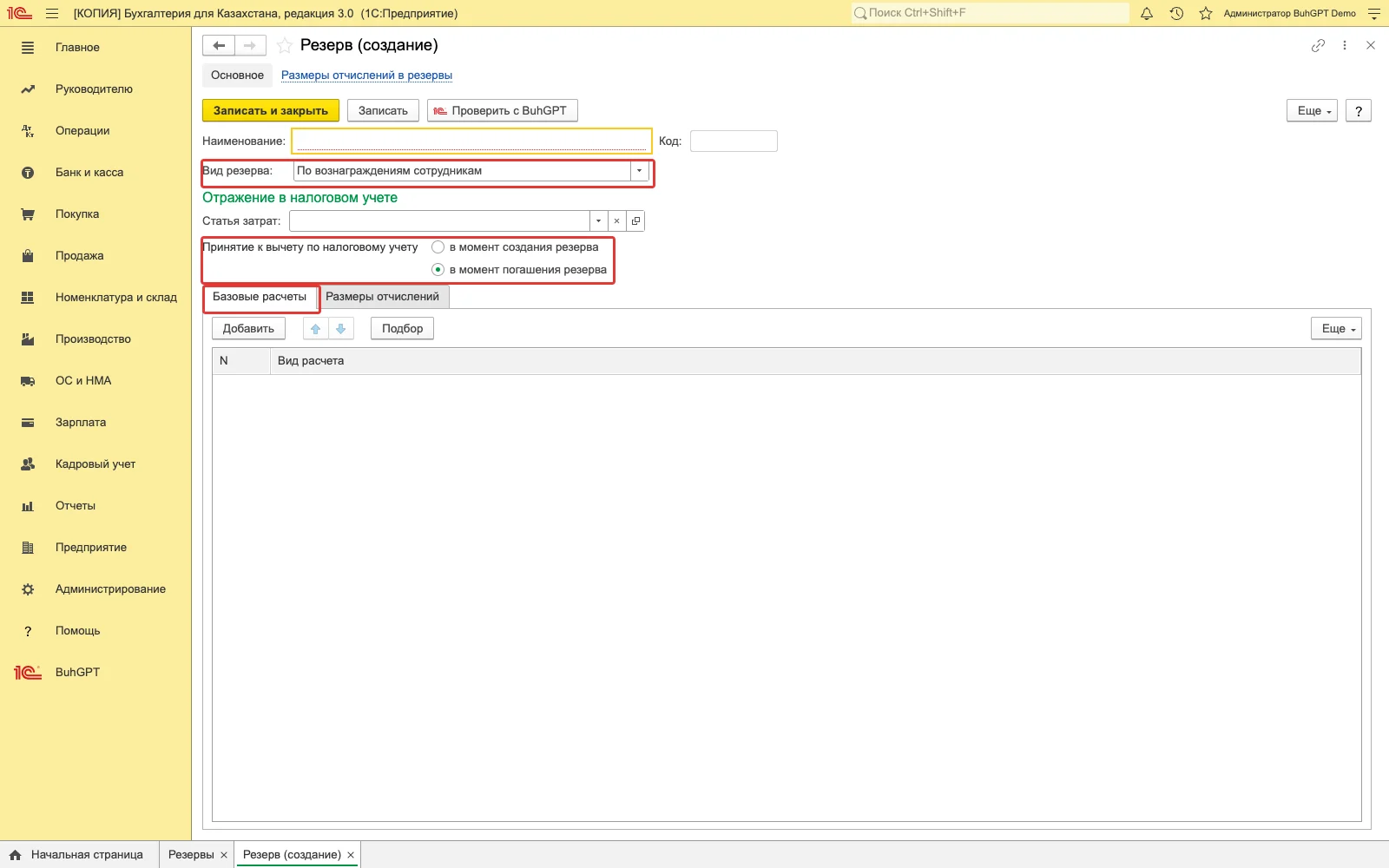
Step 1. Create the provision
- Open Payroll → Employee Benefit Provisions → Provisions.
- Click “Create” and enter a name such as “Annual Leave Provision”.
- In the “Provision Type” field, select “Employee Benefits”.
- On the “Base Calculations” tab, add earnings for time worked, such as “Salary by Days Worked”, in the “Calculation Type” column.
- Complete the “Expense Item” field and set “Tax Deduction Timing” to “When the Provision Is Recognised” or “When the Provision Is Settled” (see the tax accounting section below).
Step 2. Set the percentages
- Open Payroll → Employee Benefit Provisions → Provision Contribution Rates.
- Create a record dated 01.01.2026 and specify the “Organisation” and “Provision”.
- Enter the “Provision Contribution %”.
- Enter the “Social Tax %”, “Social Contributions %”, “Employer Mandatory Pension Contributions %” and “Compulsory Social Health Insurance Contributions %”. Complete the “Mandatory Occupational Pension Contributions %” field only if any employees are subject to these contributions.
- You can leave the “Account” field blank. The document will then credit account 3430.
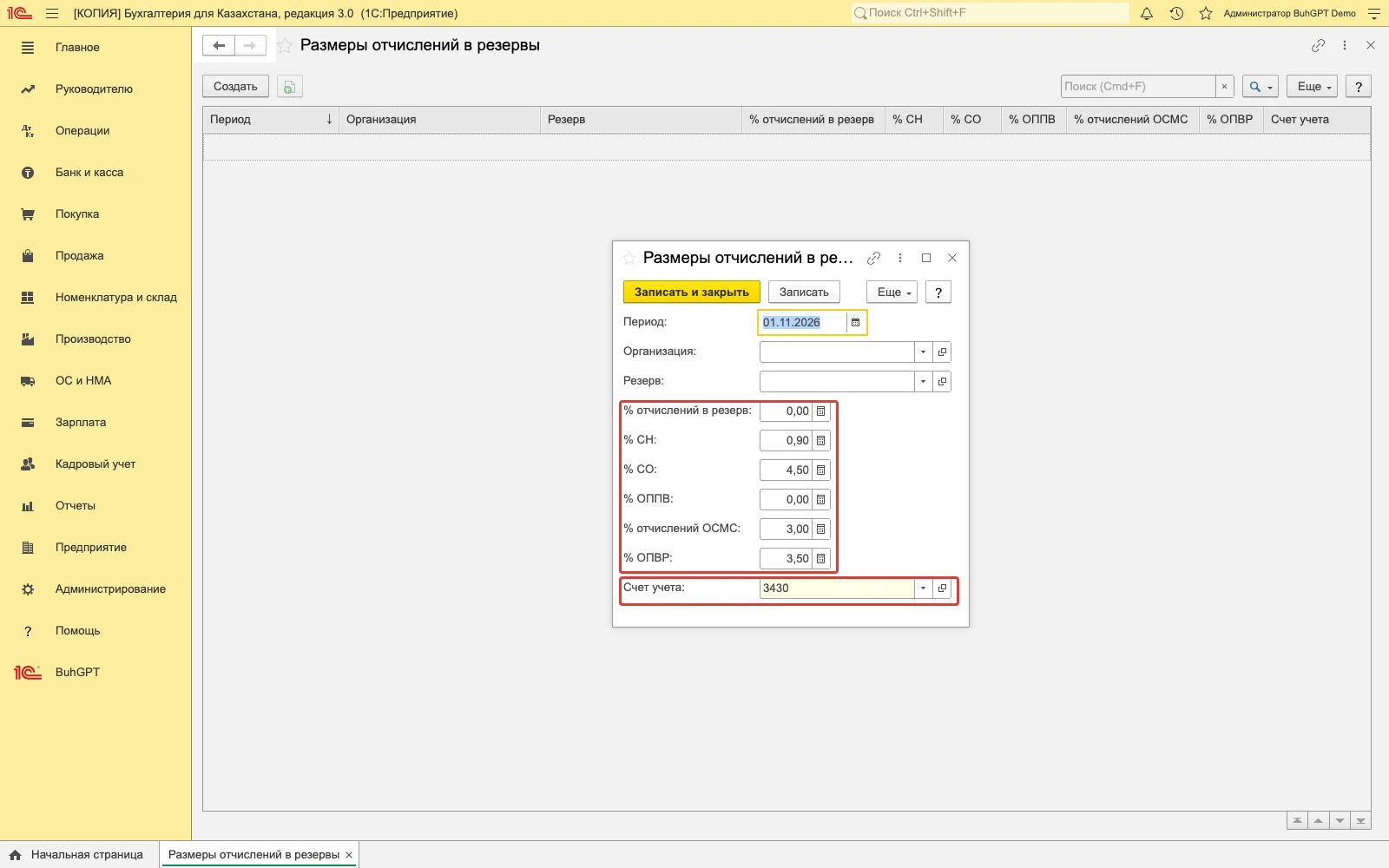
Calculate the percentage by dividing budgeted annual leave pay by total annual base earnings. 1C calculates contributions on the provision amount itself.
Example: The annual payroll budget under “Salary by Days Worked” is 12 000 000 tenge, and budgeted leave pay is 960 000 tenge. Base earnings accrued for the month total 1 000 000 tenge.
- Provision contribution rate = 960 000 / 12 000 000 = 8%.
- Monthly provision = 1 000 000 × 8% = 80 000 tenge.
- The provision for social tax is 80 000 × 6% = 4 800 tenge, and the provision for social contributions is 80 000 × 5% = 4 000 tenge.
- The provision for employer mandatory pension contributions is 80 000 × 3,5% = 2 800 tenge, and the provision for employer compulsory social health insurance contributions is 80 000 × 3% = 2 400 tenge.
- The total credit to account 3430 for the month is 94 000 tenge.
Step 3. Post leave pay to account 3430
- Open Payroll → Payroll Accounting → Payroll Posting Methods for Statutory Accounts.
- Create a method called “Leave Charged to the Provision”. Set “Debit Account (Financial Accounting)” to 3430 and select “Annual Leave Provision” as the analytical dimension.
- Open Payroll → Directories and Settings → Organisation Earnings Types and select “Leave Pay”.
- On the “Accounting” tab, in the “Financial Accounting” group, select the method you created in the “Financial Posting” field.
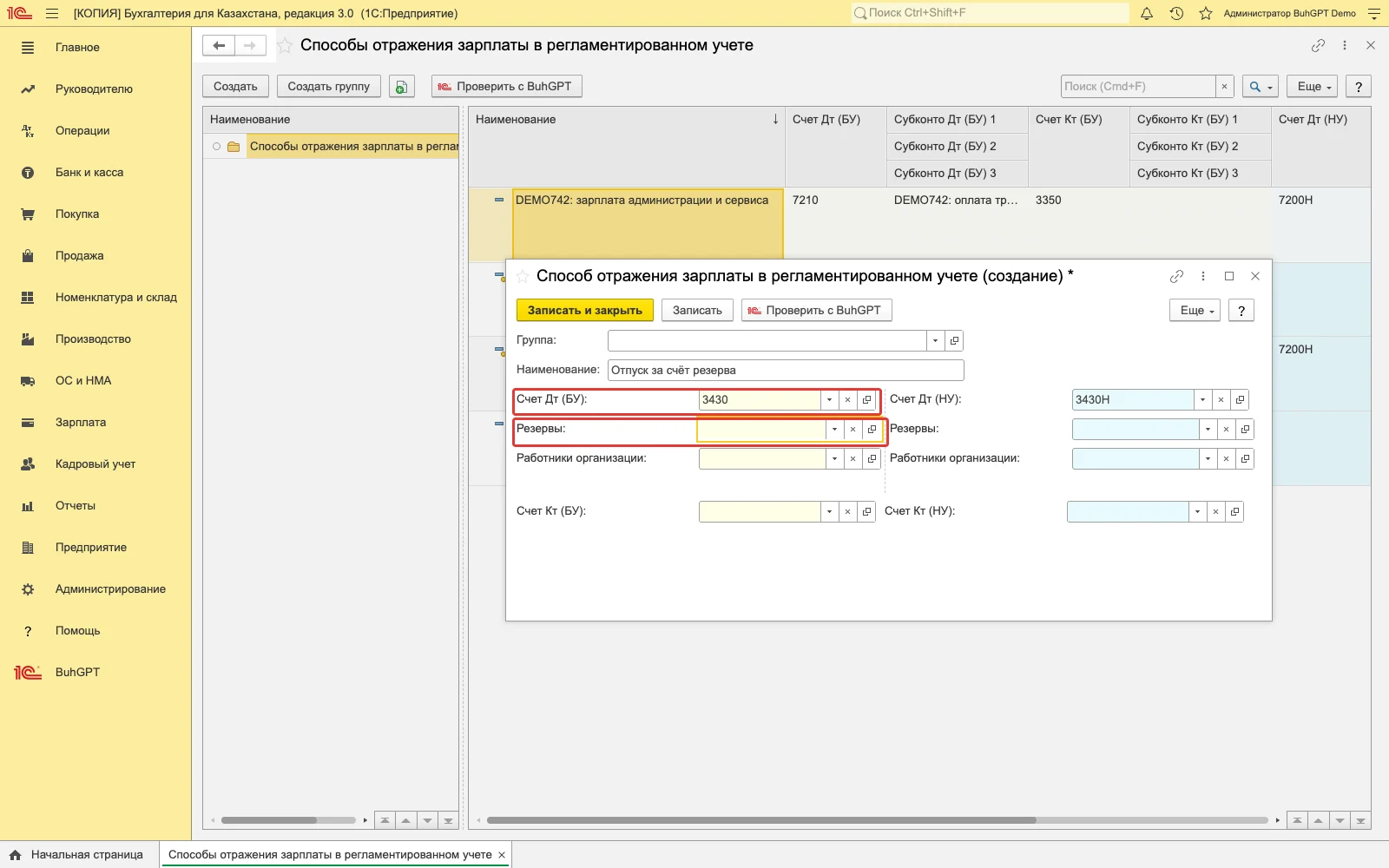
If you enter the “Social Tax %” and other contribution rates in the register, taxes and contributions on leave pay are also debited to account 3430. If a rate is blank, the corresponding contribution on leave pay is posted to the employee’s usual expense account.
Step 4. Post payroll to the accounts each month
- Open Payroll → Payroll Accounting → Payroll Posting to Statutory Accounts.
- Create a document for the month and click “Auto-fill”.
- Check the lines where “Credit Account (Financial Accounting)” is 3430. The debit should go to the expense account for the base earnings (7210, 7110 or another account).
- Post the document.
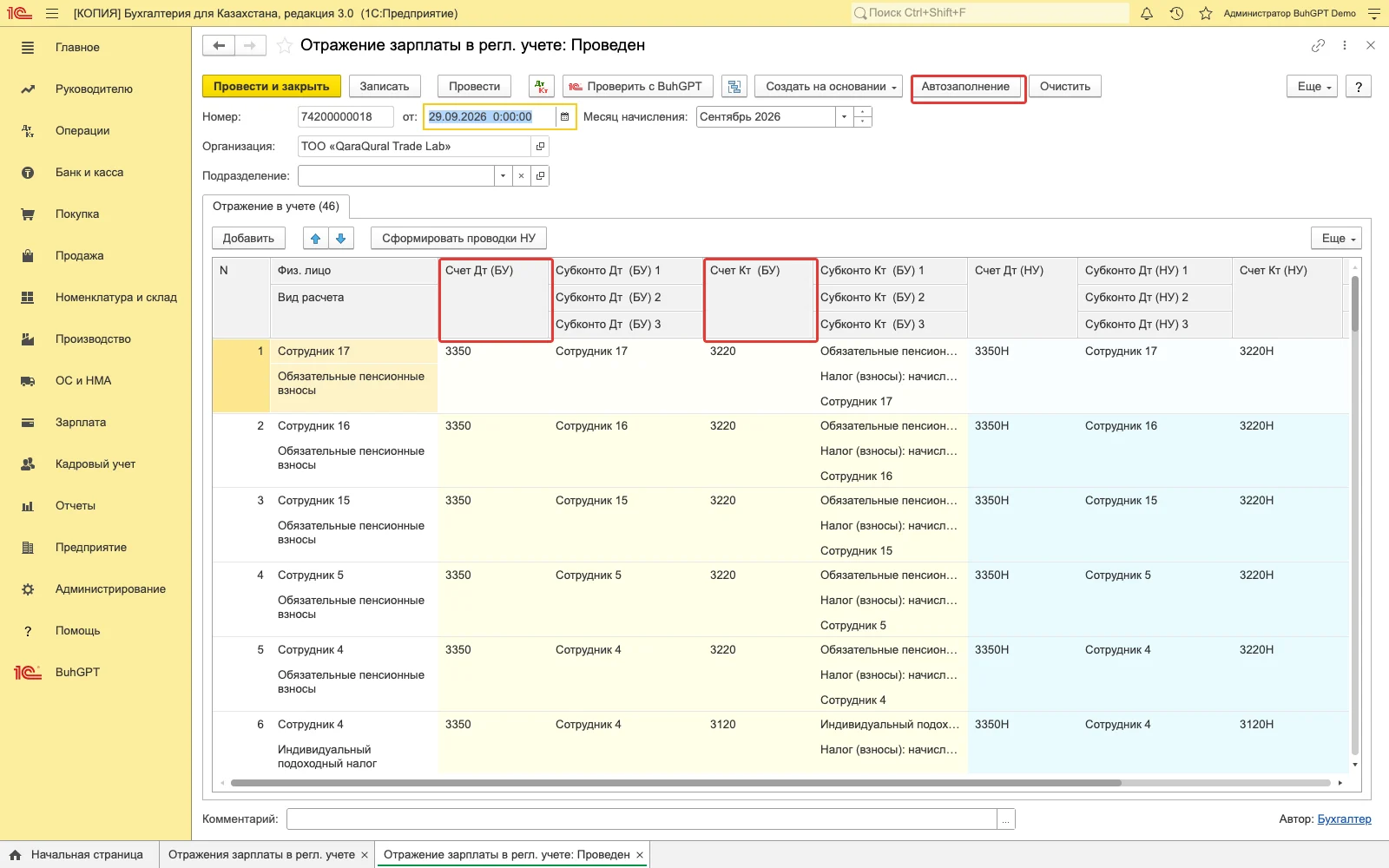
To see totals by month and employee, open Payroll → Reports → “Employee Benefit Provisions” Calculation Report.
Important: The “Provision Contribution Rates” register stores effective-dated records.
- The document uses the rates in effect at the end of the month. Enter the new 2027 rates in a new record effective 01.01.2027 to preserve the earlier rates.
- If “Provision Contribution %” is zero, the system generates no provision entries.
- If leave pay is posted outside account 3430 (step 3), the system records the expense a second time and leaves the provision balance unchanged.
Option 2: Payroll is processed in 1C:Payroll and HR 3
1C:Payroll and HR calculates the provision and related liabilities and sends them to 1C:Accounting during synchronisation. Setting up the “Provisions” directory and the rate register in 1C:Accounting as well would duplicate the provision.
- Open Payroll → Payroll Accounting (Integration with 1C:Payroll and HR 3) → Payroll Posting to Financial Accounts (Integration with 1C:Payroll and HR 3).
- Filter for documents with the transaction type “Posting Payroll Provisions” or “Posting Estimated Liabilities”.
- For provisions, check the “Payroll Provision Transaction Type” field for “Accrual”, “Review”, “Write-off” or “Adjustment”.
- Check that the journal entries credit account 3430 on accrual and debit account 3430 on write-off.
Perform the year-end review in 1C:Payroll and HR. It will be imported into 1C:Accounting as a document of the “Review” type.
Year-end review of the provision as of 31.12.2026
The percentage of earnings produces an estimate. In December, adjust the balance of account 3430 to match the calculation based on actual unused leave days.
- Post “Payroll Posting to Statutory Accounts” for December 2026.
- Open Reports → Standard Reports → Trial Balance by Account and select account 3430 and the 2026 reporting period.
- Compare the credit balance with the amount calculated using unused leave days.
- Open Transactions → Transactions and create a “Transaction” document dated 31.12.2026.
- To increase the provision, debit 7210 (or 7110 or 8110, depending on where the expense is incurred) and credit 3430 with “Annual Leave Provision” as the analytical dimension. To reduce an excess provision, post a reversal of the same entry.
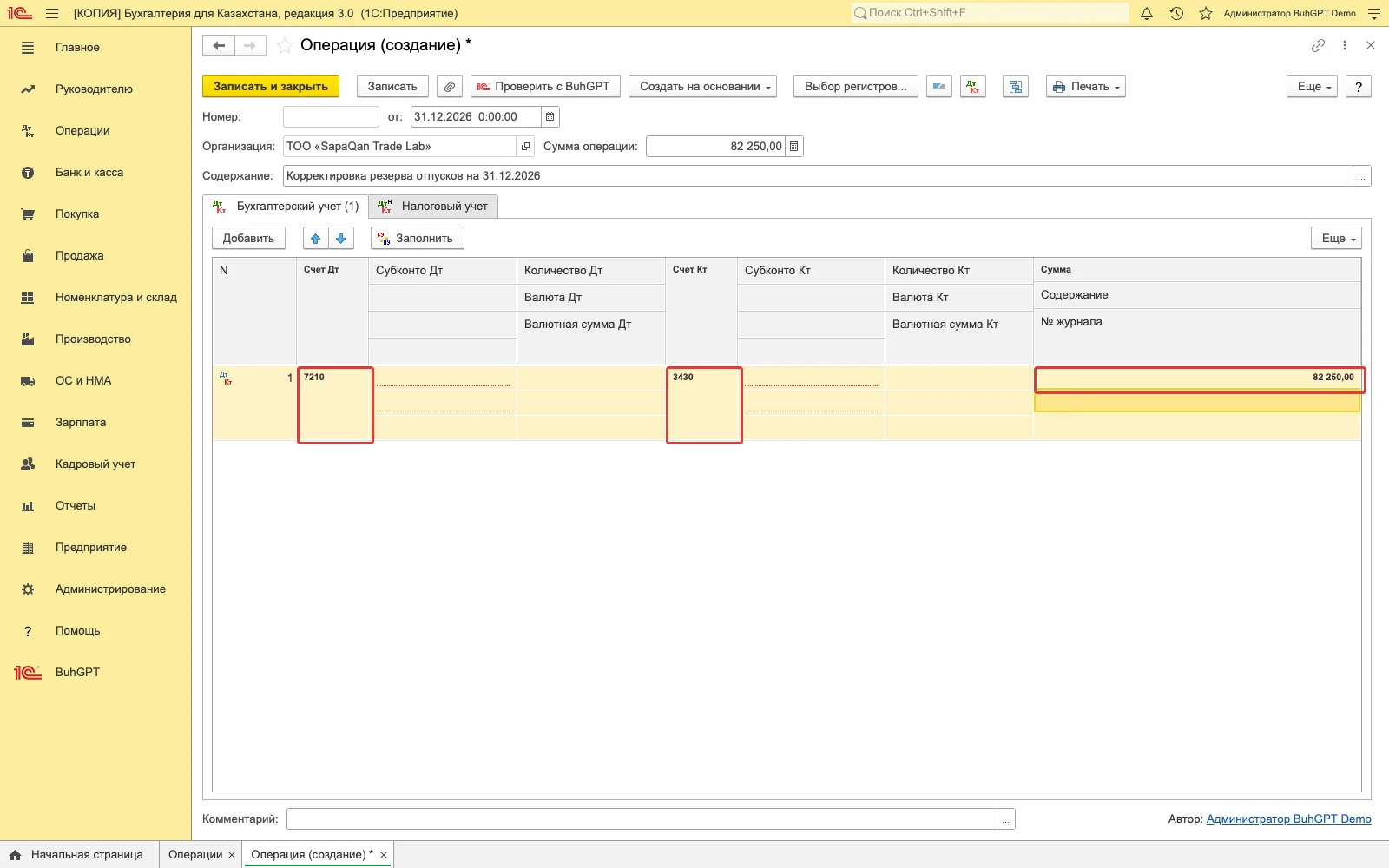
Example: Continuing the calculation for the three employees.
- The trial balance shows a credit balance of 940 000 tenge in account 3430 as of 31.12.2026.
- The calculation based on unused leave days comes to 1 022 250 tenge.
- The difference is 1 022 250 − 940 000 = 82 250 tenge.
- Journal entry dated 31.12.2026: Dr 7210, Cr 3430 for 82 250 tenge.
Important: Make the adjustment before calculating corporate income tax and posting the year-end closing entries.
- Otherwise, you will have to recalculate the result in account 5710 “Final profit (final loss)” and then in account 5610 “Retained earnings (uncovered loss) for the reporting year”.
- Employees born before 1 January 1975 and those who have reached retirement age are exempt from employer mandatory pension contributions (paragraph 6 of Article 248 of the Social Code of Kazakhstan). If many employees qualify for the exemption, the 17,5% rate will overstate the liability.
Tax accounting
The 2026 Tax Code of Kazakhstan has no separate article on deducting the annual leave provision. Employer expenses relating to taxable employee income are deductible (Article 270 of the Tax Code of Kazakhstan), and deductions are based on expenses actually incurred (Article 257 of the Tax Code of Kazakhstan). Accruing the provision does not yet give rise to employee income.
A cautious approach is to deduct leave pay when it is accrued to the employee and treat the balance of account 3430 as of 31.12 as a temporary difference for deferred tax. In 1C, set “Tax Deduction Timing” in the provision record to “When the Provision Is Settled”. When you use the balance sheet method to account for temporary differences, the tax accounting entry posts the provision amount to other expenses using the expense item specified in the provision record.
What changes from 1 January 2027
The revised Standard Chart of Accounts takes effect in 2027 (Order No. 533). It retains account 3430 under the same name. The debit accounts for expenses change from 7210 to 7030 for administrative expenses and from 7110 to 7020 for selling expenses.
Release 3.0.75.1 posts expenses to 7110 and 7210 because its chart of accounts does not include accounts 7020 and 7030. After switching to the new chart, check “Debit Account (Financial Accounting)” in the payroll posting methods and in the provision-related “Transactions”. The balance of account 3430 as of 31.12.2026 carries forward into 2027 without a transfer entry because the account number and name stay the same.
Frequently asked questions
Do small businesses need an annual leave provision? — Yes, if the entity applies IFRS Accounting Standards or the IFRS for SMEs Accounting Standard. Section 28 of the IFRS for SMEs Accounting Standard covers short-term employee benefits, including accumulating paid leave.
Can you post a single entry in December instead of accruing the provision monthly? — Yes, if you do not need interim financial reporting. Post a “Transaction” dated 31.12.2026 for the full calculated amount. Monthly accrual in 1C spreads the expense more evenly.
How do you use the provision when an employee leaves? — Charge compensation for unused leave under Article 96 of the Labour Code of Kazakhstan to account 3430 if the posting method for the “Leave Compensation on Termination” earnings type debits account 3430.
Why is the provision in account 3430 negative? — This usually happens when leave pay is charged to account 3430 and the “Provision Contribution %” is blank or too low. Check the rate register and post the year-end adjustment.
Should the provision include individual income tax, mandatory pension contributions and employee compulsory social health insurance contributions? — No. These amounts are withheld from employee income and are already included in gross leave pay. Add only contributions paid by the employer.
How should you document the calculation for the auditor? — Prepare a schedule showing unused days, average daily earnings, leave pay and contributions for each employee. The total should match the balance of account 3430 after the adjustment.
Sources
- Labour Code of Kazakhstan, Articles 88 and 96
- 2026 Tax Code of Kazakhstan, Article 270 — deduction of expenses relating to employee income
- 2026 Tax Code of Kazakhstan, Article 257 — general provisions on deductions
- 2026 Tax Code of Kazakhstan, Article 556 — social tax base and exclusions
- 2026 Tax Code of Kazakhstan, Article 557 — social tax rate
- Social Code of Kazakhstan, Article 244 (5% social contributions), Article 248, paragraph 6 (exemption from employer mandatory pension contributions), and Article 251 (3,5% employer mandatory pension contributions in 2026)
- Standard Chart of Accounts, Order No. 185 of the Ministry of Finance of Kazakhstan — account 3430
- Order No. 533 of the Ministry of Finance of Kazakhstan dated 06.08.2026 — revised Standard Chart of Accounts
- IAS 19 “Employee Benefits”, paragraphs 9, 11, 13, 16