Exchange rate differences arise in 1C 8.3 when a foreign currency receivable or payable is settled at a rate different from the rate at which it was recognized, and when foreign currency balances are revalued at period-end. In 1C:Accounting for Kazakhstan, version 3.0, the software calculates the difference using the imported exchange rates and posts gains to account 6250 and losses to account 7430 (guide for 1C:Accounting for Kazakhstan 3.0).
How exchange rate differences arise in accounting
The calculation starts with the transaction amount in foreign currency and the exchange rate recorded in the Currencies directory for the document date. When goods are received, a supplier is paid, a customer payment is received, or another foreign currency transaction occurs, 1C records the amount in foreign currency and calculates its value in tenge.
If the exchange rate has changed by the settlement date, the software compares the new tenge value with the carrying amount of the receivable or payable. The difference is recognized as a gain or loss:
- gains are recorded in account 6250, Exchange Rate Gains;
- losses are recorded in account 7430, Exchange Rate Losses;
- a journal entry may be generated when a payment document is posted or when period-end revaluation is performed.
The accounts used and the automatic calculation process are described in the guide to using the Currencies directory.
Exchange rate gains and losses are taken into account when determining taxable income for corporate income tax (CIT) purposes. Check the tax treatment against the rules of the 2026 Tax Code of the Republic of Kazakhstan and the organization's tax accounting settings. No specific article number is given here because the source material does not specify one.
Exchange rate differences in 1C 8.3: What accountants should check
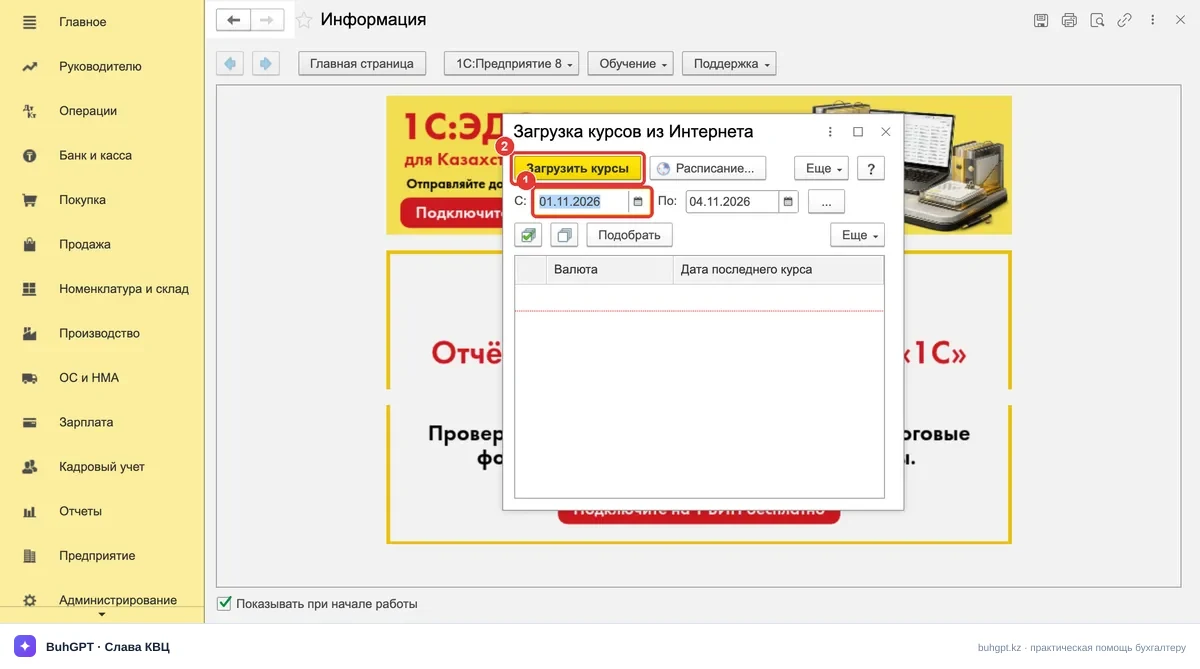
First, make sure an exchange rate has been imported for each currency in use on the relevant dates. In 1C:Accounting for Kazakhstan, version 3.0, open Directories → Currencies → Import Exchange Rates, specify the period, and run the import. The records are stored in the Exchange Rates information register, where they are retrieved by bank, cash, and settlement documents (description of the Currencies directory).
After importing the rates, check the purchase receipt, sales, and payment documents. In each document, check the date, settlement currency, exchange rate, and number of currency units to which the rate applies. An error in any of these fields distorts the tenge value and the resulting exchange rate difference.
Then generate a trial balance for the foreign currency accounts and check:
- the balance in foreign currency;
- the tenge value of the balance;
- the breakdown by counterparty and contract;
- that no receivables or payables have been duplicated or incorrectly closed.
If an exchange rate was corrected retroactively, repost the documents for the affected period and run month-end closing again. Otherwise, the next period may open with the previous valuation.
Foreign currency revaluation in 1C
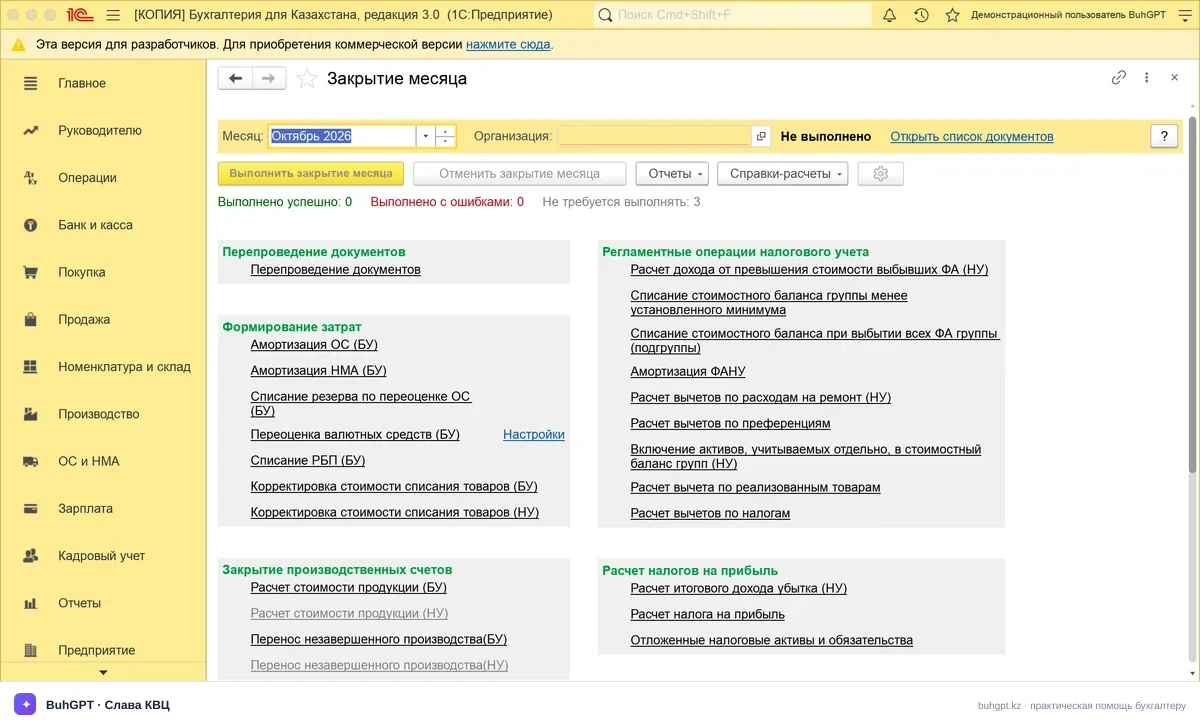
Revaluation covers foreign currency cash balances, receivables, payables, loans, and settlements with employees who have received advances in foreign currency. In 1C:Accounting for Kazakhstan, version 3.0, journal entries are generated by the routine Foreign Currency Revaluation operation in the Month-End Closing tool (description of the calculation report).
Open the Month-End Closing form, run the Foreign Currency Revaluation operation, and make sure it completes without errors. If period-end exchange rates have not been imported, the operation may fail to calculate the expected difference.
To see a breakdown of the result, open the Foreign Currency Revaluation calculation report. The report itself is not posted and creates no accounting records. It shows the account, analytical dimension item, currency, amount in foreign currency, opening and closing exchange rates, tenge value, and calculated difference (description of the calculation report).
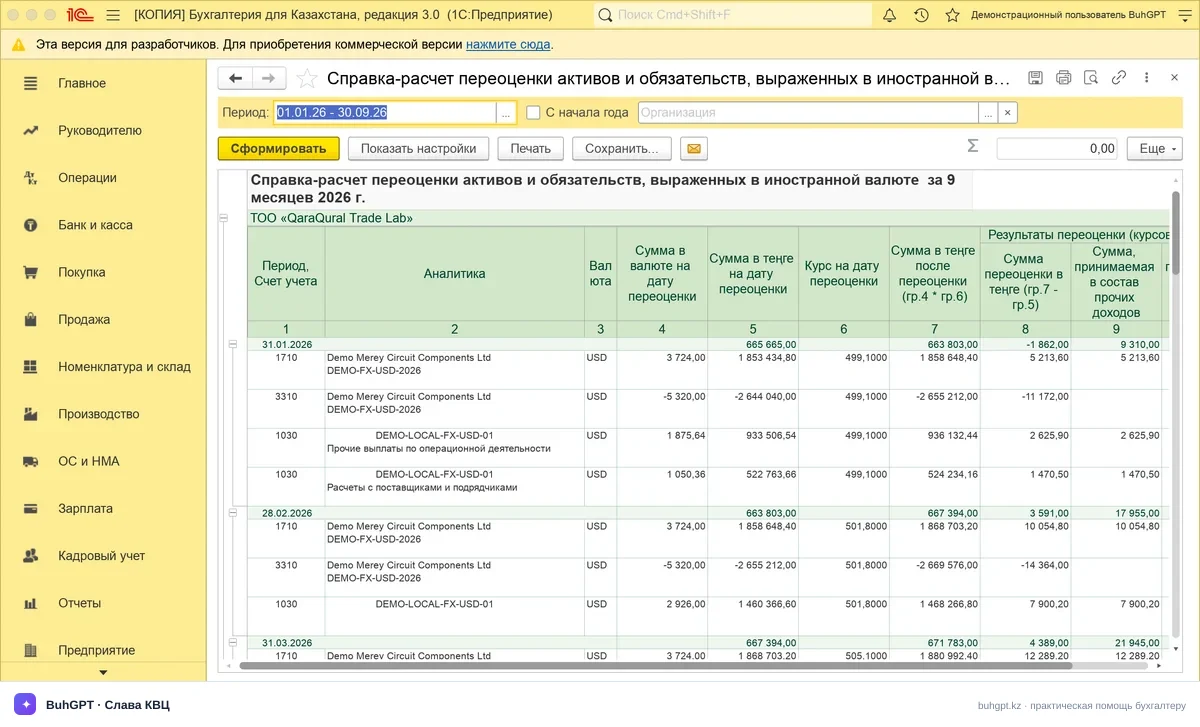
If the report is empty, check whether there are foreign currency balances and verify the status of the routine operation. If the result is zero despite a change in the exchange rate, check the rate on the revaluation date, the number of currency units to which the rate applies, and whether the analytical dimensions are correct. To verify gains and losses, compare the calculation report with the turnover on accounts 6250 and 7430.
In 1C:Trade Management for Kazakhstan, version 3.4.5.21, use the Exchange Rate Difference Calculation document. After you select Fill, the document's table remains empty if the accounts have no foreign currency balances. If there are balances, the document generates financial and tax accounting records (description of the Exchange Rate Difference Calculation document).
Frequently asked questions
When does 1C calculate exchange rate differences? — When foreign currency receivables or payables are settled and during routine revaluation of foreign currency balances. The calculation uses the rates recorded in the Currencies directory for the relevant dates.
Why did 1C fail to generate a foreign currency revaluation? — Check that a foreign currency balance exists, that the period-end exchange rate has been imported, and that the Foreign Currency Revaluation operation in the Month-End Closing form completed successfully.
Why is the calculation report empty? — The revaluation may not have been run, it may have ended in an error, or there may be no items in the accounts that require foreign currency revaluation. First, check the operation status and the balances on foreign currency accounts.
Does the calculation report create journal entries? — No. The routine Foreign Currency Revaluation operation creates the journal entries. The calculation report only provides a breakdown of the result.
Do I need to issue an electronic invoice for a foreign currency revaluation? — No. Revaluation is an internal accounting operation and does not constitute a sale (description of the calculation report).