In brief: if Payroll and HR Management (1C:ZUP) won’t open, freezes on startup, or cuts out halfway through a payroll run, don’t rush to reinstall everything. The problem is often with a service the software connects to, such as the cloud, a server, or a data exchange with government agencies. First find out where the problem is, then fix it. As for missed deadlines, there’s a section on that below, so there’s no need to panic yet.
A service outage and a problem on your end call for different fixes. A couple of minutes spent figuring out which one you’re dealing with can save you an hour of chasing the wrong problem.
Who this applies to
This applies to you if you:
manage payroll and HR in 1C:ZUP (locally, on a server, or in the 1C:Fresh cloud);
file reports and exchange data with government agencies directly from the software;
sit down in the morning to run payroll and find that the software won’t load, runs slowly, or gives you a connection error.
If a different application won’t open, you can use the same checks to troubleshoot the service you’re using.
How to tell where the problem is in 5 seconds
Is the problem widespread, or are you the only one affected? The answer determines what to do next.
Check for third-party outages in 5 seconds on the automated status page: buhgpt.kz/status. The page runs independent automated checks. If the service is down for many users, you’ll see it there before you finish looking for the cause in your own office.
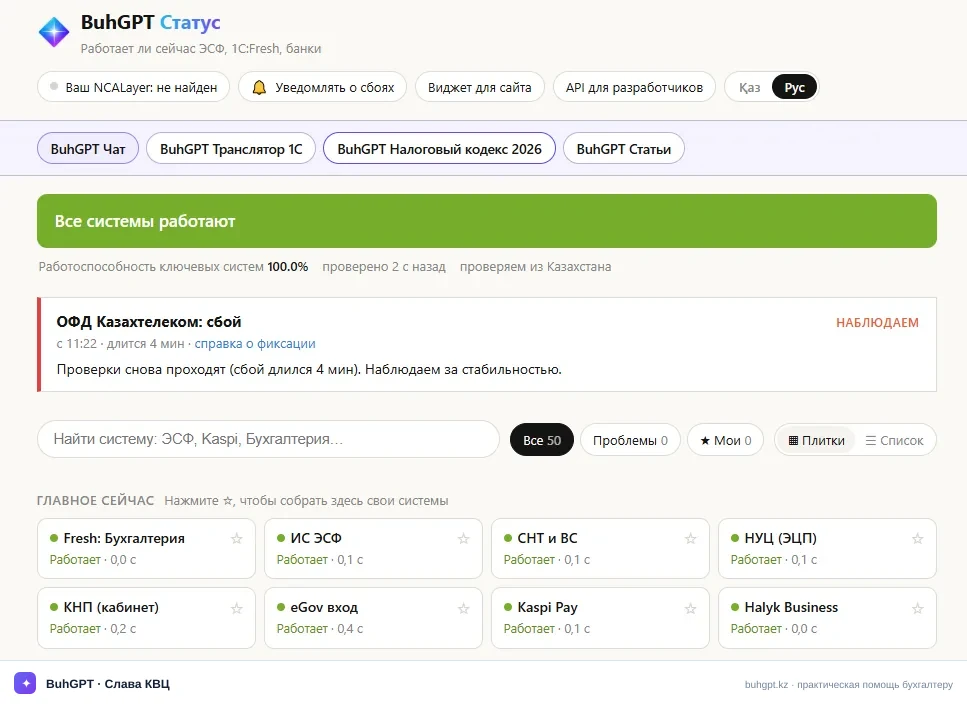
A quick way to tell whether it’s the service or something on your end:
- Ask a colleague or an accountants’ group chat whether they’re having the same problem. If it’s widespread, the issue is outside your setup.
- Open another website or service. If it loads, your internet connection is working and the problem is more specific.
- If you use ZUP in the cloud, try signing in to your 1C account through a browser. If nobody can sign in, the issue is on the service provider’s side.
What to do right now
If it looks like the service is down, hold off on making changes:
avoid deleting the database or rolling back updates “just in case,” as you could break something that was working;
take a screenshot of the error with the time visible so you have a record and can include it in a support request;
wait and check the status again. The service provider usually resolves outages on its end.
If the problem is on your end, start with the simplest checks:
- Restart the software, then restart your computer.
- Check your license or license key and your connection to the server or the internet.
- Make sure your antivirus software or firewall isn’t blocking 1C.
- Back up the database before changing anything.
- If that doesn’t help, skip asking the person at the next desk and call your 1C specialist.
What if you miss a deadline?
The most common worry is missing a filing or payroll deadline because of the outage. The exact consequences depend on the type of report or payment and where it has to go. Here’s what you can do:
document the outage with a screenshot showing the date and time and that the problem is outside your setup;
submit the document as soon as the service is back up;
if you do miss the deadline, keep evidence that the service was unavailable so you can explain the delay.
Use an external status page to confirm whether the service is down and for how long. The figures and outage status update in real time.
Frequently asked questions
How can I tell if the problem is on the service provider’s side? If colleagues and other users see the same issue while your internet connection and other applications are working, the problem is on the service provider’s side. The quickest way to check is at buhgpt.kz/status.
Should I reinstall ZUP if it won’t start? First, restart the software and check your connection, license, and antivirus settings. Reinstalling or rolling back is a last resort and should be done only after backing up the database.
Does BuhGPT Status provide official government data? No. It runs independent automated availability checks and has no official standing as a source for government agencies or banks. Data source — BuhGPT Status at buhgpt.kz/status.
Why doesn’t the article give an exact availability figure? The status changes every minute. Any figure in the article would be out of date by the time you read it, so checking the status page directly is more reliable.
What should I do if an outage affects a filing deadline? Save evidence that the service was unavailable, including the date and time, and submit the document as soon as the service is restored. The evidence helps explain the delay.