What happened
The Construction Company Accounting software has stopped working properly. It won’t open, freezes at login, fails to post documents, or stops responding midway through an operation. Your first thought is probably, “Is something wrong on my end, or is the service down?”
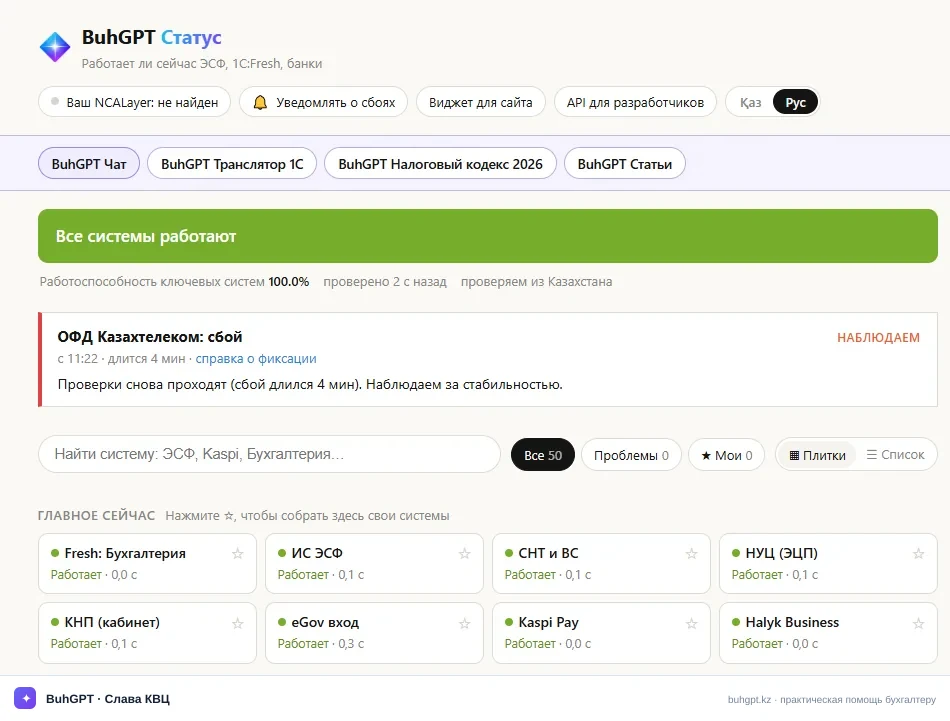
Here’s the answer that can save you half an hour of panic. In most cases, the problem is with the service. When the service goes down, it goes down for everyone at once. Reinstalling the software, clearing your cache, or restarting your router won’t help. You can tell whether it’s a service outage or a local issue in just five seconds using the independent automated checks at buhgpt.kz/status.
Who this affects
This affects accountants and payroll staff at construction companies, site supervisors who also handle the bookkeeping, and anyone who uses the software to finalize certificates of completed work, track materials, or manage payroll and taxes. An outage can feel like a disaster when a filing or payment deadline is coming up. The situation is manageable.
How to pinpoint the problem in a minute
Here’s how to quickly tell a service outage from a local issue.
It’s likely a service outage if the software won’t load on your colleagues’ computers, several employees get the error at the same time, and other websites and applications open normally for you.
It’s likely a local issue if the software works for others in your office while yours is down, your internet connection is the only one that dropped, or restarting your PC was enough to fix the issue.
To take the guesswork out of it, open the automated status page and see whether it’s currently showing an outage. The data comes from BuhGPT Status — buhgpt.kz/status. The page runs independent automated checks. Those checks often pick up a widespread outage first. For an official notice, check with the developer or the relevant government agency.
What to do right now
Take it one step at a time.
- Hold off on reinstalling the software. If the service is down, reinstalling won’t fix it, and you’ll lose time and possibly your settings.
- Check the status at buhgpt.kz/status to see right away whether to wait or troubleshoot locally.
- Ask your colleagues. Is it working for someone nearby? It’s a free check that takes 10 seconds.
- If the problem is local, restart your computer, check your internet connection, free up disk space, and check the server connection if you use a networked database.
- If the service is down, record when it stopped working by taking a screenshot of the error with the time visible. Then wait for service to resume. Avoid retrying the same operation repeatedly, as this can create duplicate documents.
- Keep the evidence. A screenshot of the error and an outage record on the status page can help if the downtime caused you to miss a filing deadline.
What to do about a missed deadline
The biggest worry during an outage is whether you’ll be able to file or pay on time. Here’s what you can do.
Avoid leaving it until the final hour. If the deadline is close and the software is down, try meeting your obligation through another available route, such as the Taxpayer Cabinet or another filing channel, if the transaction allows it.
Gather evidence of the outage. Screenshots showing the date and time and an outage record on the automated status page can help explain the delay.
Complete any pending transactions as soon as the service is back up. Do it the same day.
The exact deadlines, penalties, and steps to take after a missed deadline depend on the type of return and your tax regime. Check the current rules while you’re dealing with the outage, when details can be easy to misremember.
Frequently asked questions
How can I quickly tell whether it’s a service outage or a problem on my end? — Open buhgpt.kz/status and ask a colleague whether the software is working for them. If it’s down for everyone, the problem is with the service.
Should I reinstall the software if it freezes? — Check the status and ask your colleagues first. Reinstalling won’t help if the problem is with the service.
What should I do if the outage makes me miss a filing or payment deadline? — Document the outage with timestamped screenshots, try another filing channel, and complete the transaction as soon as the service is restored. Check the current rules for your tax regime to see what consequences apply.
Can I treat the figures on the status page as official? — The figures come from independent automated checks. They give you a quick sense of what’s happening. For official confirmation, contact the developer or the relevant government agency directly.
Why doesn’t this article give an exact figure for current availability? — The status changes every minute. Check the live status page for the latest figure.