The 2026 year-end closing in 1C:Accounting for Kazakhstan 3.0.75.1 is part of the December close. The “Calculate Net Profit or Loss (Financial Accounting)” operation closes income and expenses to account 5710. The “Year-End Closing (Financial Accounting)” operation then transfers the profit by posting Dr 5710 Cr 5610. In January 2027, use the “Transaction” document to transfer the 2026 profit to prior years’ retained earnings by posting Dr 5610 Cr 5620.
At a glance
- The old Standard Chart of Accounts (Order No. 185) applies in 2026. Account 5710 records net profit or loss, 5610 records retained earnings for the reporting year, and 5620 records retained earnings from prior years.
- 1C accrues CIT and deferred tax in December after the year-end closing operation. Rerun the closing operations to clear the balance on 7710.
- “Year-End Closing (Financial Accounting)” skips losses. Close the debit balance on 5710 manually by posting Dr 5610 Cr 5710.
- Verify the result using the trial balance, the account analysis for 5710, the account ledger for 7710, and the express accounting check.
- Make the 5610 → 5620 transfer in January 2027. The new chart of accounts (Order No. 533) retains both account numbers.
This is a quick guide to one step. For the full year-end closing procedure, see “Closing 2026 and Opening 2027”.
Which accounts are involved
These accounts come from the version of the Standard Chart of Accounts in effect through 31 December 2026 (Order No. 185 of the Ministry of Finance of the Republic of Kazakhstan, paragraphs 47, 48 and 63). The “Standard” chart of accounts in 1C 3.0.75.1 uses the same codes and names.
| Account | What it records |
|---|---|
| 5710 | Net profit or loss for the reporting period |
| 5610 | Retained earnings (uncovered loss) for the reporting year |
| 5620 | Retained earnings (uncovered loss) from prior years |
| 7710 | CIT expense (current and deferred tax) |
| 3110 | CIT payable |
| 2810 / 4310 | Deferred CIT assets / liabilities |
Important: Paragraphs 49 and 55 (Chapters 9 and 10) of the Standard Chart of Accounts state that income and expenses are closed “to account 5610 – Net profit (net loss).”
- The account number and name in that wording do not match. The account list in the same order assigns net profit to 5710.
- Follow the account list and 1C. Close income and expenses to 5710, then close 5710 to 5610.
What the December operations do
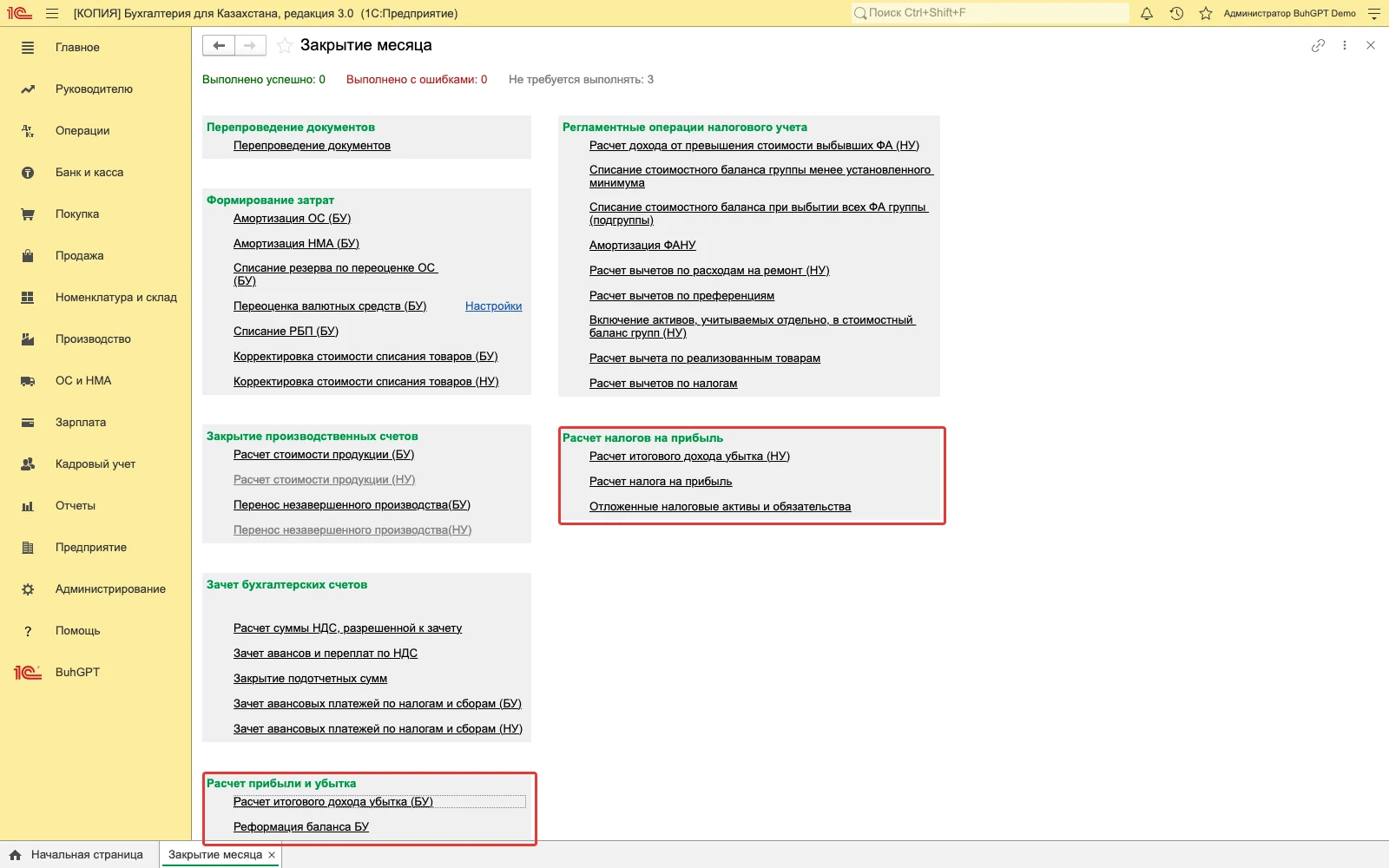
All the operations are in Operations → Periodic Operations → Month-End Closing. In configuration 3.0.75.1, they work as follows.
- “Calculate Net Profit or Loss (Financial Accounting)” closes accounts in sections 6 and 7, including 7710, to 5710. The entries use journal number “ФР” and the description “Calculate Net Profit/Loss.”
- “Year-End Closing (Financial Accounting)” takes the credit balance on 5710 and posts Dr 5710 Cr 5610 with the description “Year-End Closing.”
- “Calculate Income Tax” accrues CIT by posting Dr 7710 Cr 3110. The tax base is year-to-date income less expenses for tax accounting purposes. The rate comes from the “Tax, Fee, and Contribution Rates” register.
- “Deferred Tax Assets and Liabilities” adjusts the balances on 2810 and 4310. Deferred tax liabilities are posted as Dr 7710 Cr 4310 and deferred tax assets as Dr 2810 Cr 7710.
The “Income Tax Calculation” group is mandatory only in December. It contains three operations in this order: “Calculate Net Profit or Loss (Tax Accounting),” “Deferred Tax Assets and Liabilities,” and “Calculate Income Tax.”
The “Profit and Loss Calculation” group appears every month and runs before the tax group.
The CIT rate for most LLPs is 20% (subparagraph 5 of paragraph 2 of Article 357 of the Tax Code of the Republic of Kazakhstan). If the rate is missing from the register, the operation displays the error “The income tax rate has not been specified. Temporary differences cannot be calculated.”
How to close December 2026
First, close January–November and check that the December documents have been posted.
- Open Operations → Periodic Operations → Month-End Closing.
- Select “December 2026” and the organization.
- Click “Run Month-End Closing.”
- Scroll down to the “Profit and Loss Calculation” and “Income Tax Calculation” groups. Check that all operations completed without errors.
- Click “Calculate Net Profit or Loss (Financial Accounting)” and select “Run Operation.” This closes the CIT and deferred tax accrued after the first run to 5710.
- Click “Year-End Closing (Financial Accounting)” and select “Run Operation.”
- Click “Year-End Closing (Financial Accounting)” → “Show Journal Entries.” The “Adjust Postings” form should show Dr 5710 Cr 5610.
Important: Rerun the closing operations in steps 5–6.
- Otherwise, CIT will remain as a debit balance on 7710 and net profit on 5610 will be overstated by the tax amount.
- If you correct any December documents after closing, reverse the close and repeat the steps.
- Reconcile the amount on 3110 with the CIT reported on return 100.00. The operation calculates tax by subtracting year-to-date tax accounting expenses from income and multiplying the difference by the rate. If the return shows a different amount, post the difference to 7710 and 3110 using a “Transaction” document, then repeat steps 5–6.
- When you run “Calculate Income Tax,” 1C displays a message recommending that you calculate the tax on form 100.00 and record it in the accounts through the statutory reporting function. Use the “Post Tax Reporting to Statutory Accounts” document under Operations → Periodic Operations.
Example of closing a year with a profit
Example: An LLP uses the general tax regime, pays CIT at 20%, and has no differences between financial and tax accounting. Its 2026 turnover by account is 48 000 000 tenge in revenue on 6010, 31 500 000 in cost of sales on 7010, 3 200 000 in selling expenses on 7110, and 6 800 000 in administrative expenses on 7210.
- Profit before tax = 48 000 000 − 31 500 000 − 3 200 000 − 6 800 000 = 6 500 000.
- “Calculate Income Tax” posts Dr 7710 Cr 3110 for 6 500 000 × 20% = 1 300 000.
- After you rerun “Calculate Net Profit or Loss (Financial Accounting),” the entries are Dr 6010 Cr 5710 for 48 000 000 and Dr 5710 Cr 7010, 7110, 7210, 7710 for 42 800 000 (31 500 000 + 3 200 000 + 6 800 000 + 1 300 000).
- The credit balance on 5710 is 48 000 000 − 42 800 000 = 5 200 000.
- “Year-End Closing (Financial Accounting)” posts Dr 5710 Cr 5610 for 5 200 000.
Account 5610 shows 2026 net profit of 5 200 000 tenge. Accounts 5710 and 7710 have zero balances.
If the year ends with a loss
In 3.0.75.1, “Year-End Closing (Financial Accounting)” processes only credit balances on 5710. It skips a debit balance (loss) without issuing an error. “Calculate Income Tax” makes no entries when the tax base is negative.
- Open Operations → Transactions → Transactions and create a “Transaction” document dated 31.12.2026.
- Add an entry debiting 5610 and crediting 5710 for the debit balance on 5710 as of 31.12.2026.
- Enter “Year-End Closing — 2026 Loss” as the description and post the document.
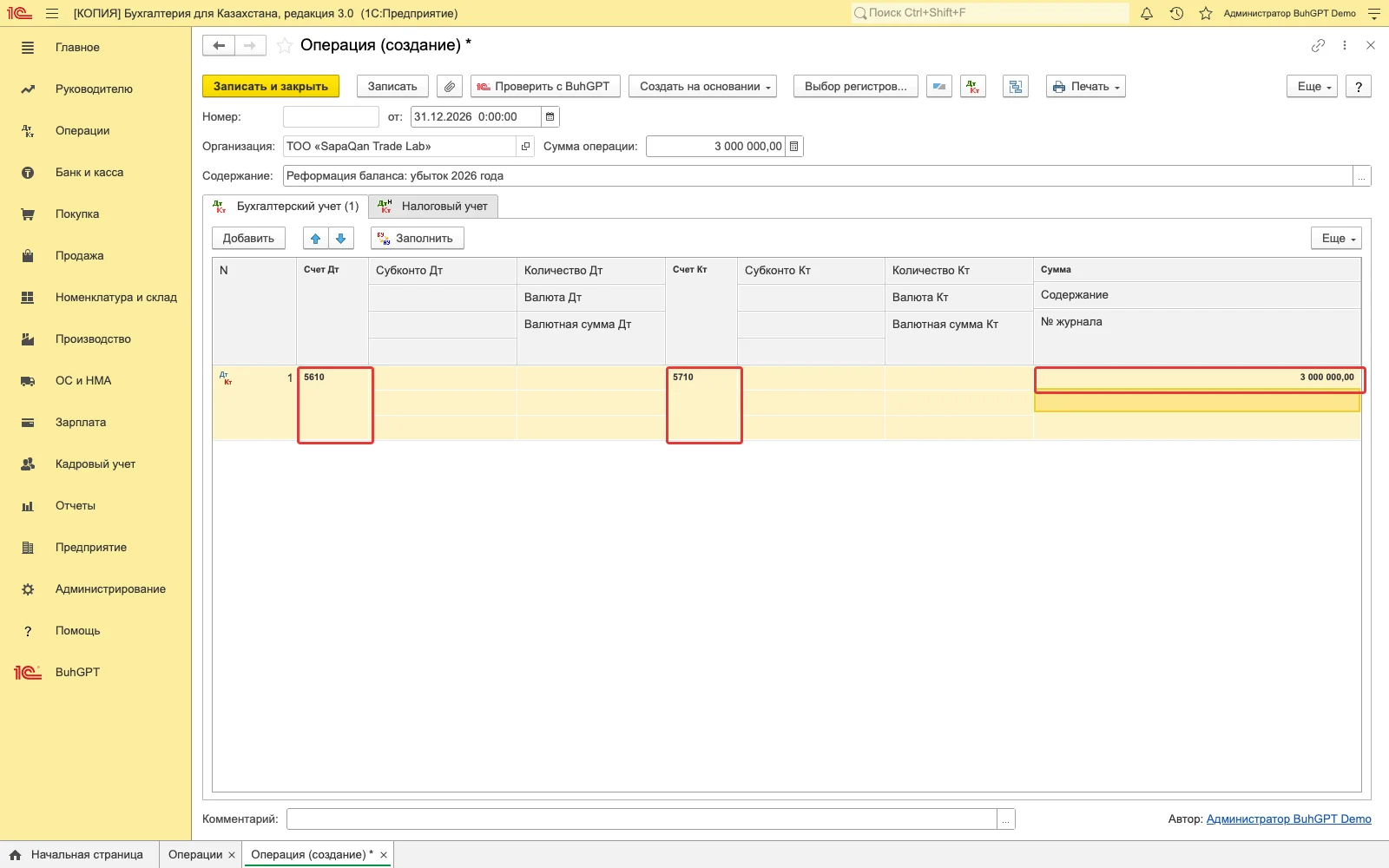
Example: In 2026, income is 20 000 000 tenge and expenses are 23 000 000 tenge, with no differences between financial and tax accounting.
- The loss is 20 000 000 − 23 000 000 = −3 000 000. No CIT is accrued.
- After “Calculate Net Profit or Loss (Financial Accounting)” runs, 5710 has a debit balance of 3 000 000. “Year-End Closing (Financial Accounting)” makes no entries.
- The “Transaction” document posts Dr 5610 Cr 5710 for 3 000 000.
Account 5610 has a debit balance of 3 000 000 tenge (the uncovered loss for 2026). Account 5710 has a zero balance.
If you ran the closing operation monthly, profits from profitable months have already been transferred to 5610. Manually close only the debit balance remaining on 5710 as of 31.12.2026.
How to verify the result using reports
Go to Reports → Standard Reports and run the reports for the same organization.
| Report | Expected result |
|---|---|
| Trial Balance (Financial Accounting) for 2026 | Zero balances as of 31.12.2026 for accounts in sections 6 and 7 and for account 5710 |
| Account Analysis (Financial Accounting) for 5710 in December | Entries against accounts in sections 6 and 7 and a transfer to 5610 |
| Account Ledger (Financial Accounting) for 7710 in December | CIT is accrued and closed to 5710, leaving a zero balance |
| Trial Balance by Account (Financial Accounting) for 5610 in 2026 | Turnover for the year equals the net profit or loss |
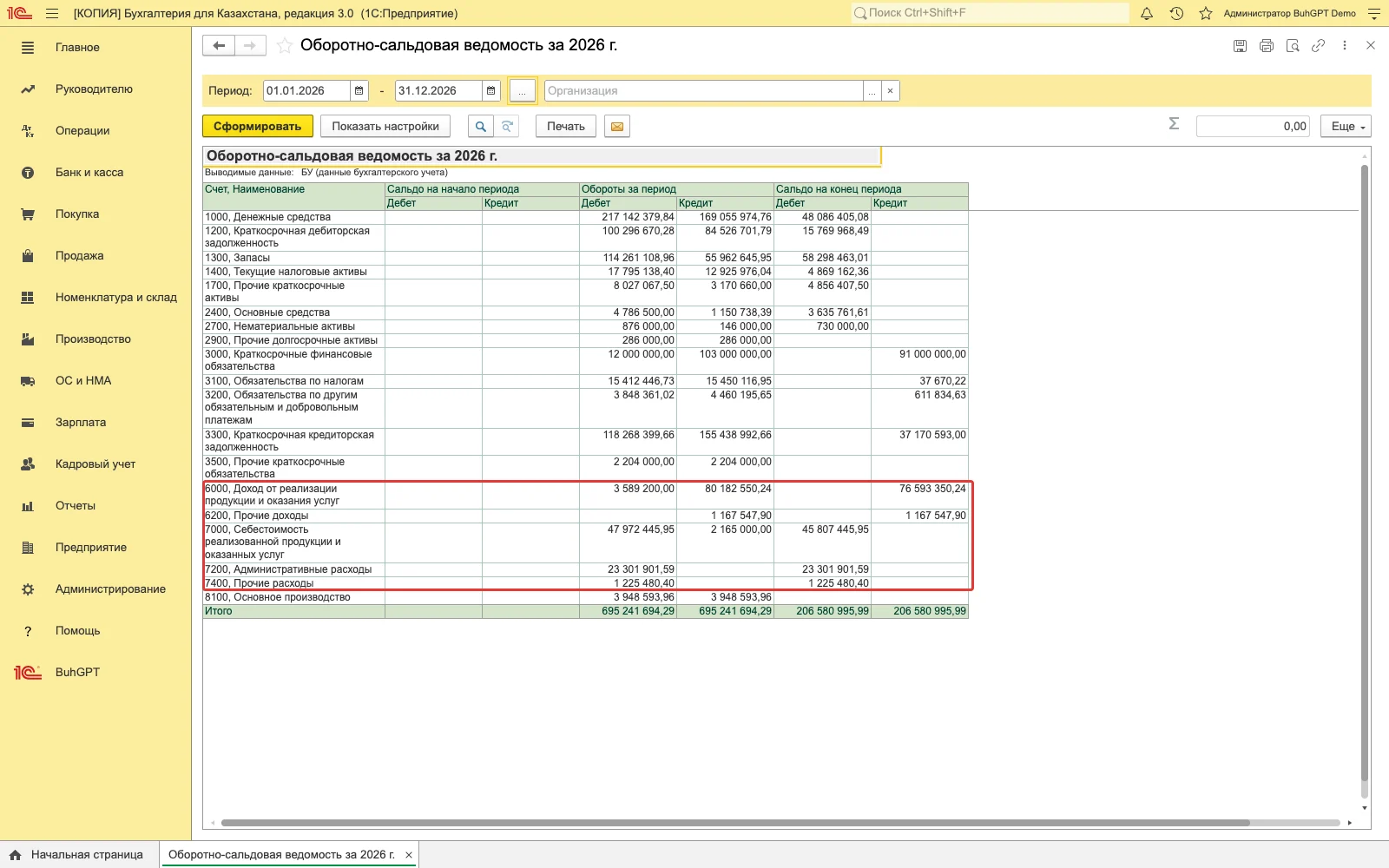
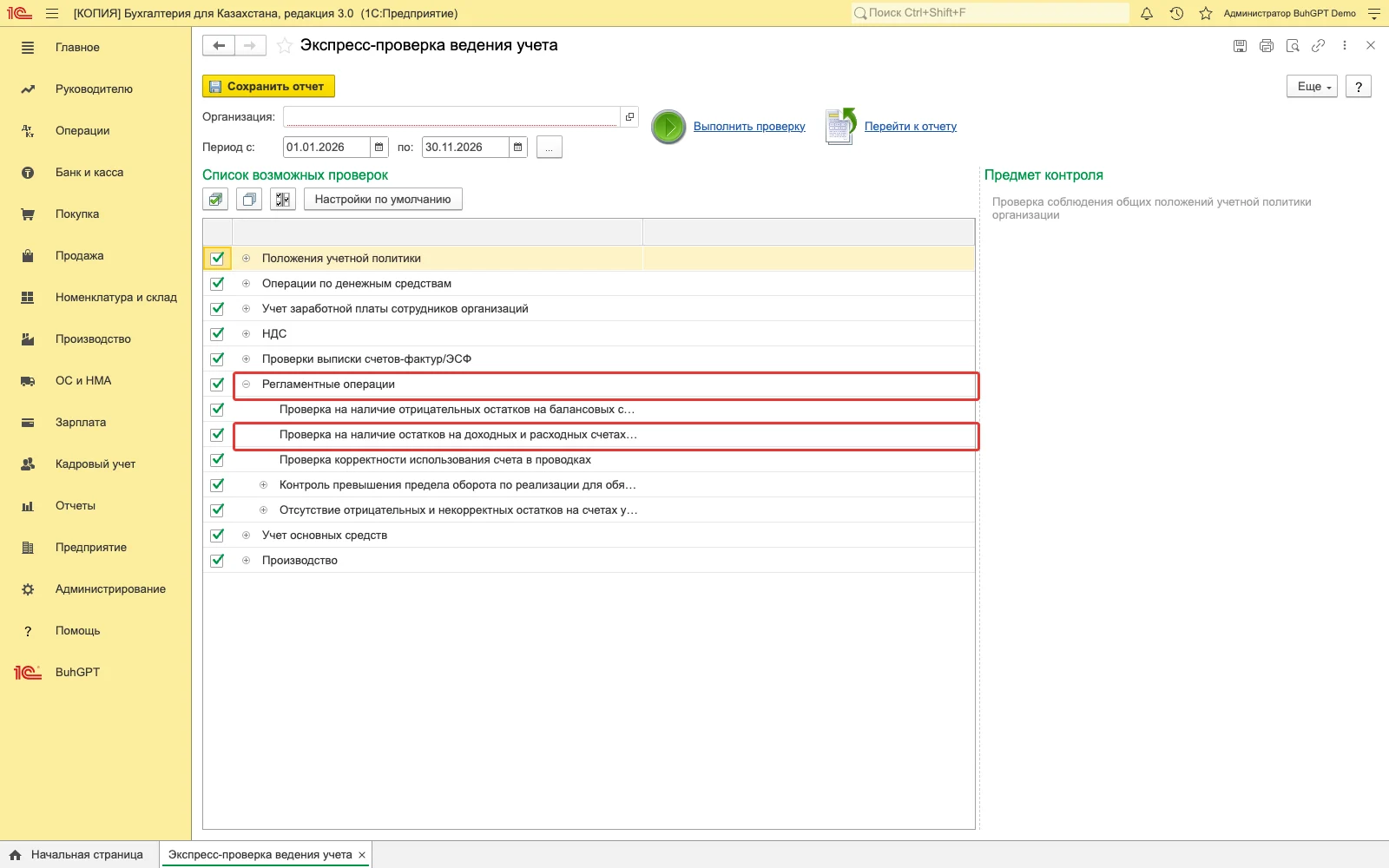
Then run Operations → Periodic Operations → Express Accounting Check for 2026. The year-end closing rule checks for balances on income and expense accounts. If the closing operation was skipped, it reports “Year-end closing was not performed during the period under review.”
Transfer from 5610 → 5620 in January 2027
At the start of 2027, profit from 2026 becomes part of prior years’ retained earnings. “Month-End Closing” in 3.0.75.1 has no separate periodic operation for this transfer.
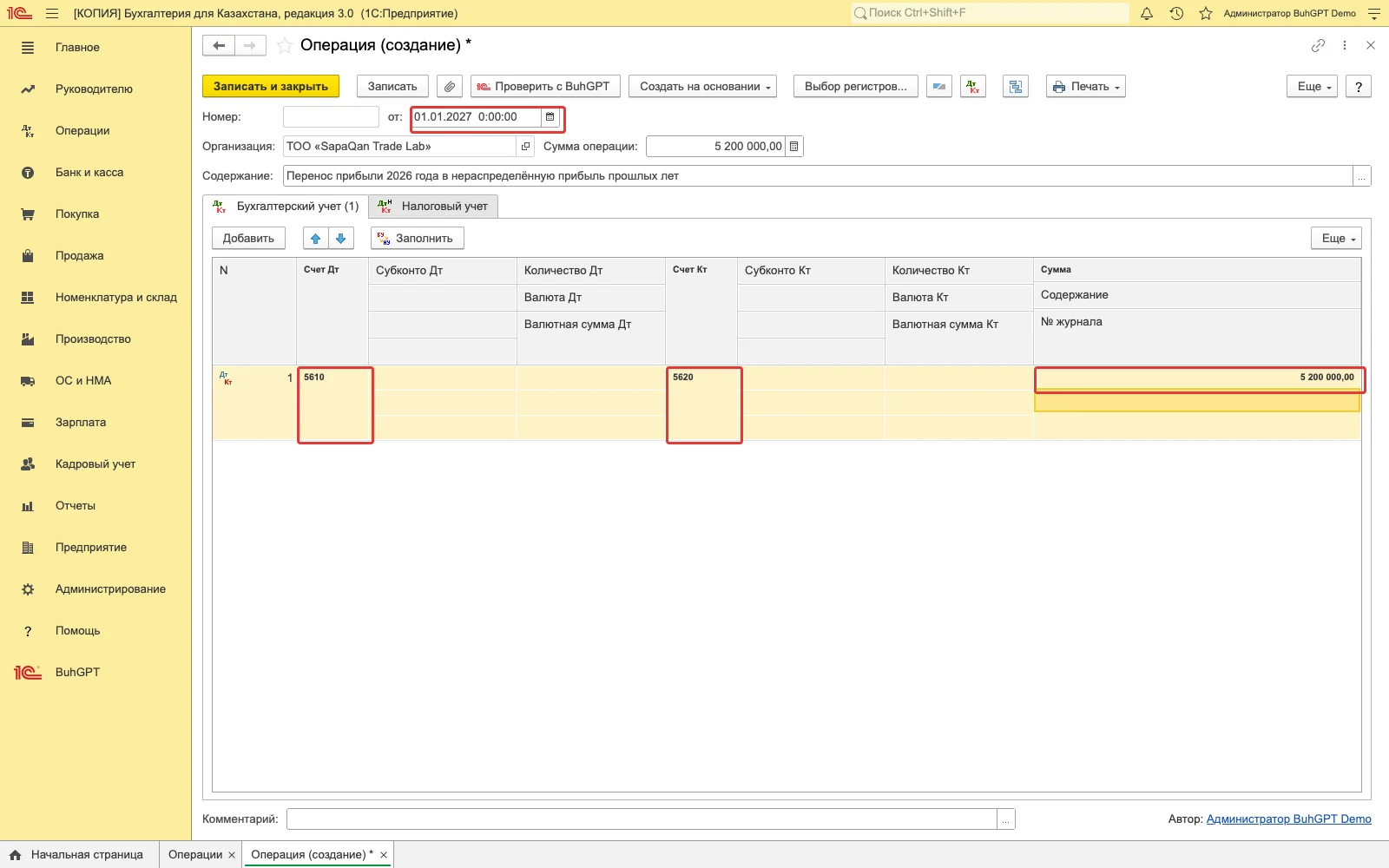
- Open Operations → Transactions → Transactions and create a “Transaction” document.
- Enter a date in January 2027, for example 01.01.2027.
- For a profit, post Dr 5610 Cr 5620. For a loss, post Dr 5620 Cr 5610. Use the balance on 5610 as of 31.12.2026.
- Post the document. The trial balance for 5610 for January 2027 should show a debit entry against 5620 for the amount of the 2026 profit.
Under Order No. 533, accounts 5610, 5620 and 5710 retain their numbers and names. From 2027, CIT expense moves from 7710 to 7510.
Version 3.0.75.1 still uses the old chart of accounts. Wait for the new release before changing any account names. For details, see “Switching to the New 2027 Chart of Accounts in 1C”.
Important: Lock 2026 against edits before transferring the balance to 5620.
- If you edit 2026 documents after the transfer and close December again, the year-end closing amount will change while the January entry will still show the original amount.
- Set the lock date to 31.12.2026 under Operations → Tools → Data Change Lock Dates.
Frequently asked questions
Which account is 2026 profit closed to, 5610 or 5710? — Income and expenses are closed to 5710 “Net Profit (Net Loss).” The balance on 5710 is then transferred to 5610 “Retained Earnings (Uncovered Loss) for the Reporting Year.” This follows the account list in the Standard Chart of Accounts and the setup in 1C 3.0.75.1.
Why does 7710 still have a balance after the December close? — CIT and deferred tax are accrued after “Calculate Net Profit or Loss (Financial Accounting)” runs. Rerun that operation, then run “Year-End Closing (Financial Accounting).”
Should I run the closing operation every month or only in December? — The operation appears in the list every month. Make sure to run it in December and verify that 5710 has a zero balance as of 31.12.2026.
Why did the closing operation skip the loss for the year? — In 3.0.75.1, the operation transfers only credit balances on 5710. Use a “Transaction” document to close the loss by posting Dr 5610 Cr 5710.
Can I transfer the balance from 5610 to 5620 on 31 December? — That would leave 5610 with a zero balance as of 31.12.2026 and put the reporting year’s profit in prior years’ retained earnings. Make the transfer in January 2027.
Do I need to wait for the new chart of accounts to transfer the balance to 5620? — No. Order No. 533 retains account numbers 5610 and 5620, and the same entry applies under both charts of accounts.
Sources
- Standard Chart of Accounts, Order No. 185 of the Ministry of Finance of the Republic of Kazakhstan dated 23.05.2007, paragraphs 47, 48, 49, 55, 63 (version in effect through 31.12.2026)
- Order No. 533 of the Ministry of Finance of the Republic of Kazakhstan dated 06.08.2026 — Standard Chart of Accounts effective from 01.01.2027
- 2026 Tax Code of the Republic of Kazakhstan, Article 357 (CIT rates) and Article 359 (tax return)
- IAS 12 “Income Taxes” — IFRS Foundation
- Export of the “1C:Accounting for Kazakhstan” 3.0.75.1 configuration, including the “ЗакрытиеМесяца” common module (“РасчетИтоговогоДоходаУбытка,” “ПроведениеРеформацииБаланса,” and “РасчетНалогаНаПрибыль” procedures), the “Types of Periodic Operations” enumeration, the “Standard” chart of accounts, and the “Express Accounting Check” tool