In 2026, you can check a taxpayer’s status by IIN or BIN on the SRC Portal. The portal offers a taxpayer lookup and provides information on tax arrears, VAT registration, and inclusion on the list of unreliable taxpayers. Compare the result with the contract and source documents and save it along with the date of the check.
Why accountants should check counterparties
Checking a counterparty helps an accountant compare the details in the contract and source documents with available official records. Pay particular attention to the supplier’s VAT registration and its status on the transaction date. Discrepancies may affect how the transaction is documented and recorded in the accounts.
A check is particularly important in the following cases:
- New counterparty — verify the details before signing the contract and making the first payment.
- Large or one-off transaction with a little-known organization or individual entrepreneur.
- Receipt of a VAT invoice — check the supplier’s details and VAT registration as of the transaction date.
- Change of details — verify the new information before updating directories and documents.
- Regular checks on recurring suppliers, since published information about their status may change.
An accountant’s independent lookup and a tax audit conducted by a state revenue authority have different purposes and consequences. The portal’s search result helps you assess the counterparty’s details and available status information, but it is not a notice of tax audit results. The tax authority issues such a notice after completing the audit if it identifies any of the violations listed in Article 171 of the Tax Code of the Republic of Kazakhstan.
How to check a taxpayer by TIN, IIN, or BIN
In Kazakhstan, a request to “check a taxpayer by TIN” usually means searching by the IIN of an individual or individual entrepreneur, or by the BIN of a legal entity. Use the identifier from the counterparty’s contract, invoice, or other document.
To run the check, follow these steps:
- Open the SRC Portal.
- Choose the type of check you need, such as taxpayer lookup or information on VAT payers, tax arrears, or unreliable taxpayers.
- Enter the 12-digit IIN or BIN without spaces or additional characters.
- Compare the organization’s name or the individual’s full name and identifier with the contract, invoice, and source documents.
- Check the dates associated with the selected status if the service displays them.
- Save the result or a screenshot and record the date of the check.
Searching by identifier is more precise than searching by name because organizations may share a name or their names may appear differently across documents. If the search returns no results, first recheck all 12 digits. If you find a discrepancy, ask the counterparty for documents with the correct details before making payment and recording the transaction. A screenshot shows that you carried out the check, but it does not correct an error in a source document.
How to check taxpayer status
When checking taxpayer status, focus on the information that matters for the specific transaction and look beyond any single general status label. On the SRC Portal, look up the taxpayer by IIN or BIN, then check VAT registration, tax arrears, and inclusion on the list of unreliable taxpayers.
- VAT registration. Check the IIN or BIN, the registration date, and any deregistration details the service displays.
- Tax arrears. Look up the information using the counterparty’s identifier and record the date of the result.
- Unreliable taxpayers. Check whether the taxpayer appears on the published list and confirm that the IIN or BIN matches.
- Tax regime. Use the separate Tax Regime Verification Service (SRC).
- Registration details. Compare the information displayed with the details in the contract, invoice, and source documents.
If an organization needs information about its own taxpayer account, arrears, or filed tax returns, it should use the Taxpayer Portal of the Integrated Tax Administration Information System. To work with electronic invoices, the Virtual Warehouse, and accompanying notes for goods, use the Electronic Invoicing Information System (EIIS). These systems serve different purposes and do not replace a counterparty check on the SRC Portal.
Why the status date matters
When checking VAT registration, use the date relevant to the specific transaction. The counterparty’s current status may differ from its status in an earlier period, so review the registration and deregistration dates displayed. If the dates differ from those in the documents, review the transaction further before recording VAT in the accounts.
In 2026, the mandatory VAT registration threshold is 10 000 MCI in turnover per calendar year, equivalent to 43 250 000 tenge (Article 99 of the Tax Code of the Republic of Kazakhstan). The application must be filed no later than five business days after the threshold is exceeded (Article 101 of the Tax Code of the Republic of Kazakhstan). The buyer’s accountant should rely on the supplier’s actual registration details and the dates relevant to the transaction, without inferring the supplier’s status solely from estimated turnover.
How to document the result of the check
To document the check internally, put together a brief counterparty file:
- Record the IIN or BIN used for the search.
- Record the name of the service you used and the date of the check.
- Save the search result or a screenshot if your organization’s internal procedures allow it.
- Attach the registration and contractual documents received from the counterparty.
- Describe any discrepancies you found and identify the documents that resolved them.
- Repeat the check before a significant transaction if the original information may have changed.
The file shows which details the accountant checked on a specific date. The lookup remains informational, and the taxpayer’s status may change later. The file carries no official conclusion from the tax authority.
How a tax authority audit differs from a taxpayer lookup
The expression “taxpayer check by the tax authority” may refer to two different procedures:
- Counterparty check by an accountant — comparing the counterparty’s details with available official information before a transaction or while processing documents.
- Tax audit — an audit by a state revenue authority, which issues a notice if it identifies violations specified by law (Article 171 of the Tax Code of the Republic of Kazakhstan).
A search result by IIN or BIN is neither a notice of tax audit results nor a decision on an appeal. If you receive a notice, review its contents, the deadlines it specifies, and the available appeal procedures (Article 171 of the Tax Code of the Republic of Kazakhstan). Appeals against a notice to the authorized body follow Articles 192–198 of the Tax Code of the Republic of Kazakhstan. Challenges in court follow the Administrative Procedural and Process-Related Code. Filing an appeal or a court claim suspends enforcement of the part of the notice being challenged (Article 191 of the Tax Code of the Republic of Kazakhstan). The current text of the Tax Code of the Republic of Kazakhstan is available in the Adilet Legal Information System.
Taxpayer details in 1C: common data entry errors
The accounting software uses taxpayer details to populate documents, registers, and reporting forms. The message “Taxpayer not specified” usually means that a field in the item being processed is blank. If you see “Taxpayer organization not selected,” check which organization you are creating the document for, especially if you use a single database to keep accounts for several organizations.
In 1C:Accounting for Kazakhstan, edition 3.0, release 3.0.74.x, go to Main → Organizations and select the organization. Compare its name and IIN or BIN with the registration documents and the information on the SRC Portal.
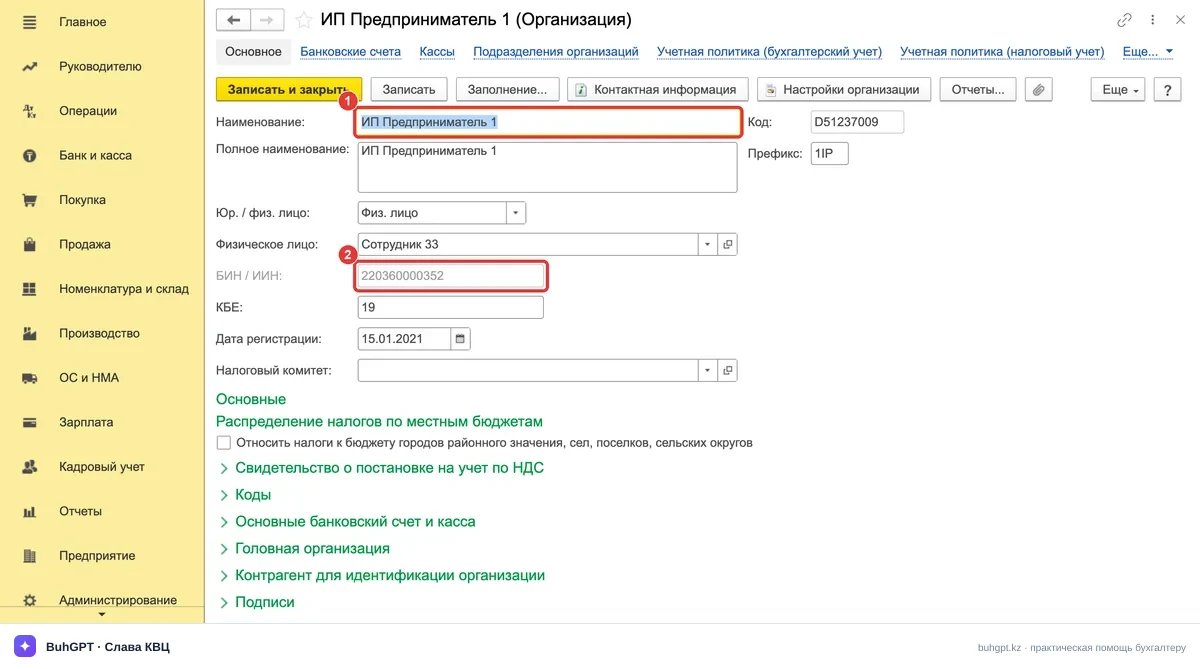
To check a counterparty, go to Directories → Counterparties and select the relevant record. Compare the name and IIN or BIN with the contract, the source documents, and the search result on the SRC Portal. Then return to the document where the message appeared and select the verified organization or counterparty record in the appropriate field.
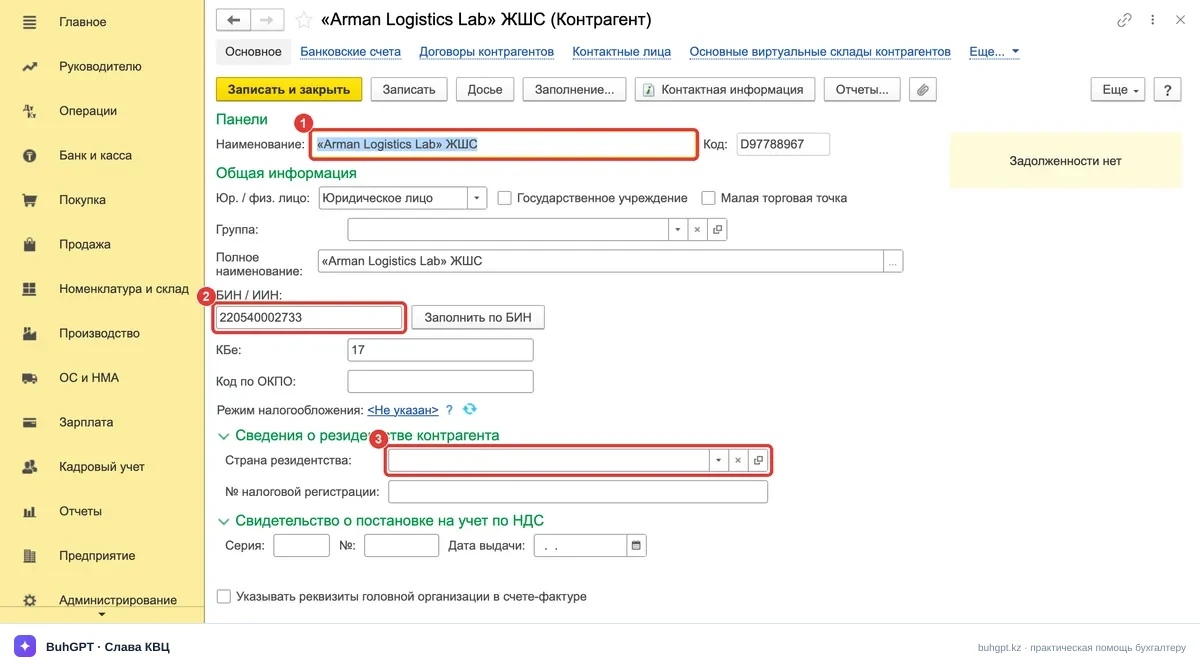
If the details have changed, avoid replacing them automatically in every existing document. First determine when the new details take effect and which items actually need to be corrected.
Frequently asked questions
How do I check a taxpayer by TIN in Kazakhstan? — Use the 12-digit IIN of an individual or individual entrepreneur, or the BIN of a legal entity. Enter it on the SRC Portal and compare the result with the contract and source documents.
Where can I check a taxpayer’s VAT status? — Information on VAT payers is available on the SRC Portal. Check the current status and any registration and deregistration dates displayed.
Is there a fee to check a taxpayer? — Use the electronic services on the SRC Portal to run the check. Each service determines its access conditions and the information it displays.
How often should I check regular counterparties? — Your organization can set the frequency in its internal procedures. For example, you can run checks when you start working with a counterparty, when its details change, when you receive documents that include VAT, and before a significant transaction.
What should I do if the counterparty’s details differ from those in the documents? — Do not change the details based on assumptions. Save the search result and ask the counterparty for the correct documents. Once you receive them, determine which contracts, source documents, invoices, and accounting entries need to be corrected.
Is a search result a decision by the tax authority? — No. The electronic search result provides information as of the date of the query. The tax authority issues a notice of tax audit results under the procedure set out in Article 171 of the Tax Code of the Republic of Kazakhstan. A decision on an appeal against that notice follows the procedure in Article 197 of the Tax Code of the Republic of Kazakhstan.
Sources
- SRC Portal — taxpayer lookup, tax arrears by BIN or IIN, VAT payers, and unreliable taxpayers.
- Tax Regime Verification Service (SRC).
- Taxpayer Portal of the Integrated Tax Administration Information System.
- Electronic Invoicing Information System (EIIS).
- 2026 Tax Code of the Republic of Kazakhstan.
- Adilet Legal Information System.