In 2026, employee CSHI contributions are withheld from employee income at a rate of 2% on a base capped at 20 minimum wages, while employer CSHI contributions are calculated at a rate of 3% on a base capped at 40 minimum wages and paid by the employer. These rules are set out in Article 28 of the Law on CSHI and Article 27 of the Law on CSHI, respectively. Both payments must be remitted by the 25th day of the month following the month in which the income was paid. If that date falls on a non-working day, the deadline moves to the next working day (Article 560 of the Tax Code of the Republic of Kazakhstan).
What CSHI and employee CSHI contributions mean
CSHI is the compulsory social health insurance system. Employee CSHI contributions are withheld from employee income. The employer also calculates separate employer CSHI contributions, which it pays from its own funds (Article 27 of the Law on CSHI, Article 28 of the Law on CSHI).
In 1C, abbreviations appear in payroll item names and calculation results. When investigating an error, first determine whether it concerns the employee CSHI contributions withheld from income, the employer CSHI contributions calculated at the employer’s expense, the amount payable, or an accounting entry for a specific month.
The employee CSHI contribution rate is 2%, and the contribution base is capped at 20 minimum wages. The employer CSHI contribution rate is 3%, and the contribution base is capped at 40 minimum wages (Article 28 of the Law on CSHI, Article 27 of the Law on CSHI). With the minimum wage set at 85 000 tenge for 2026 under the Law on the Republican Budget for 2026–2028 in the Adilet Legal Information System, the maximum base is 1 700 000 tenge for employee CSHI contributions and 3 400 000 tenge for employer CSHI contributions.
How to check CSHI contributions in Kazakhstan
What you check depends on what you need to verify. Employees should check the amount withheld and the month the payment covers. Accountants should check the contribution base, rate, individual identification number (IIN), payment period, and whether the payment order was executed. Checking the organization’s tax debt is a separate step from reconciling the employee and employer CSHI contributions calculated and remitted for each employee.
- Check the employee’s IIN, payroll month, and income type in the accounting system.
- Open the payslip and the payroll calculation breakdown, then locate the employee and employer CSHI contributions separately.
- Check the contribution bases and rates against the 2026 rules. Employee CSHI contributions are calculated at 2% on a base capped at 20 minimum wages, and employer CSHI contributions at 3% on a base capped at 40 minimum wages (Article 28 of the Law on CSHI, Article 27 of the Law on CSHI).
- Check the IIN, period, amount, recipient details, and the bank’s confirmation of execution on the payment order.
- You can also check the organization’s outstanding liabilities on the State Revenue Committee Portal and view its taxpayer account and filed forms in the ISNA Taxpayer Cabinet.
- To access an online government service available to individuals, use the eGov portal and select the service by the name listed there.
If a remitted amount does not appear, first compare the IIN and period in the payroll record and the payment document, then check the transaction status with the bank. For late payments, assess arrears separately for each month because the deadline depends on the month in which the income was paid (Article 560 of the Tax Code of the Republic of Kazakhstan).
Example calculation of employee and employer CSHI contributions
If an employee’s income subject to contributions for the month is 300 000 tenge and falls within the applicable limits, the employee CSHI contribution is 6 000 tenge (300 000 × 2%). The employer pays 9 000 tenge in employer CSHI contributions (300 000 × 3%) (Article 28 of the Law on CSHI, Article 27 of the Law on CSHI).
Individual entrepreneurs and private practitioners follow a separate rule. They pay contributions on their own behalf at 5% of 1,4 minimum wages (Article 28 of the Law on CSHI). With the minimum wage set at 85 000 tenge for 2026 under the Law on the Republican Budget for 2026–2028 in the Adilet Legal Information System, the monthly amount is 5 950 tenge (85 000 × 1,4 × 5%).
CSHI settings in 1C
Use the current release branches Accounting for Kazakhstan 3.0.74.x and Payroll and HR Management for Kazakhstan 3.1.37.x to calculate contributions under the 2026 rules. Before running the calculation, check the installed release number under “Tools and Settings” → “About”.
In Accounting for Kazakhstan 3.0.74.x, open the calculation under “Payroll” → “Payroll Accrual for Organization Employees”. Select the organization and month, open the payroll accrual for the relevant employee, and view the breakdown of the calculated employee and employer CSHI contributions.
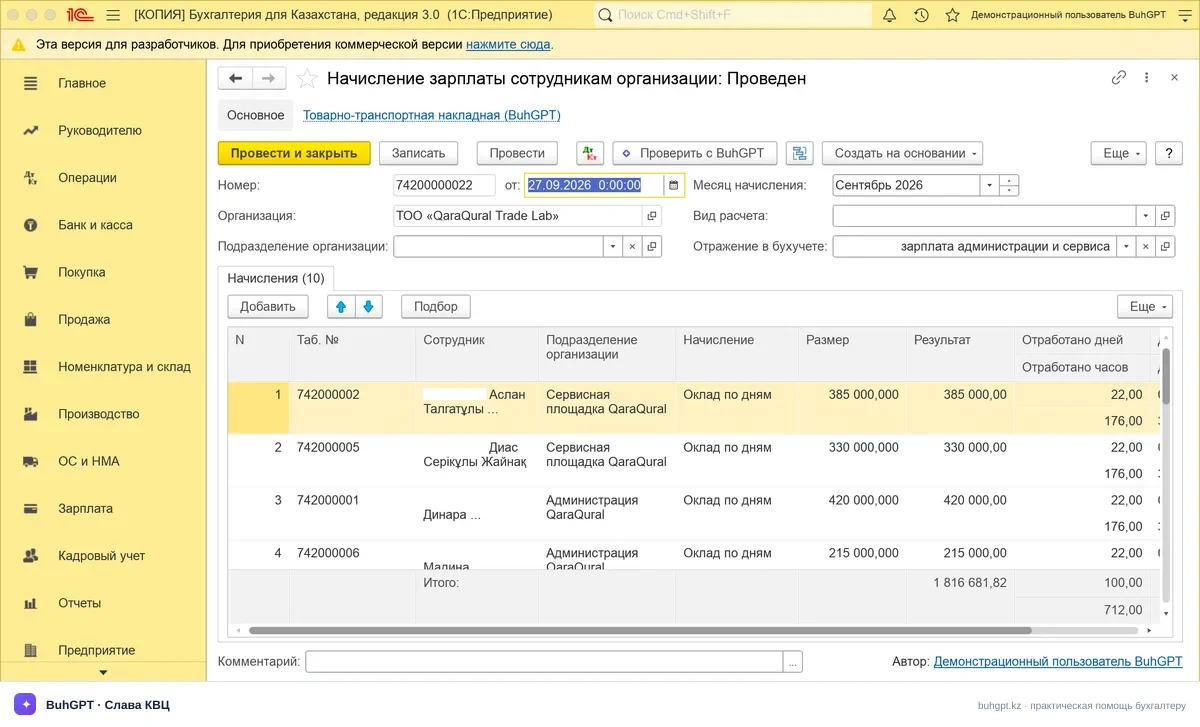
In Payroll and HR Management for Kazakhstan 3.1.37.x, go to “Payroll” → “Payroll and Contribution Accrual”. In the document, select the organization and month, find the employee, and open the calculation details for employee and employer contributions.
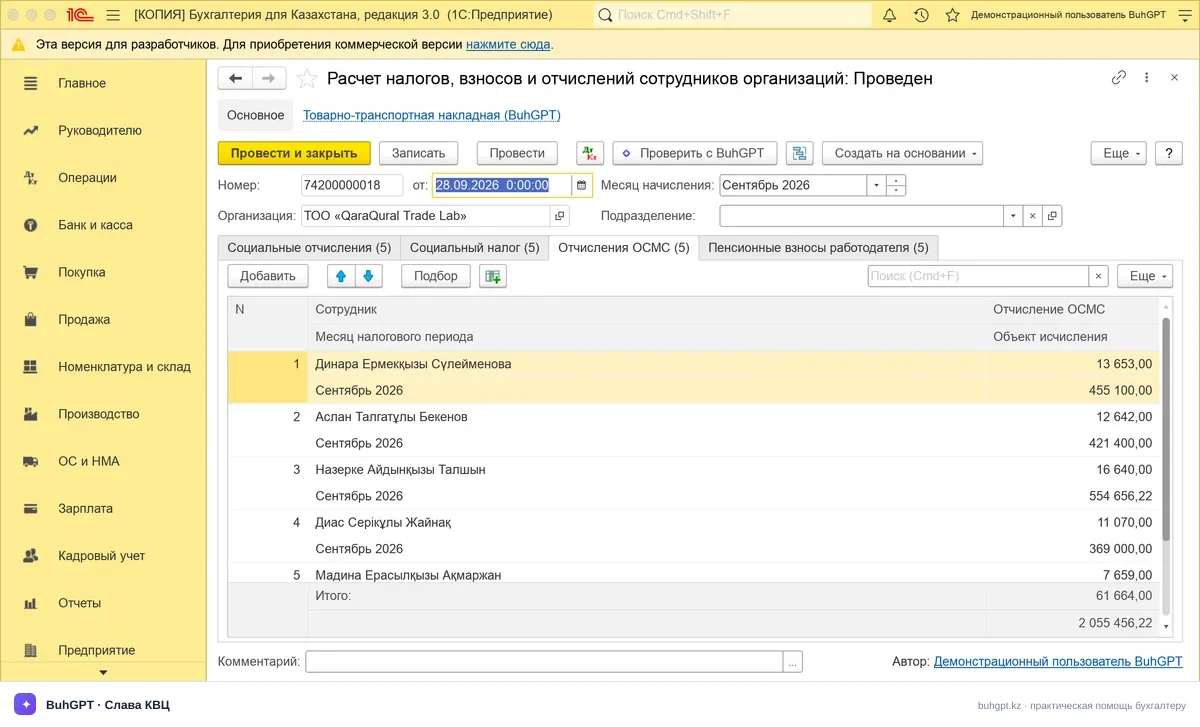
When checking the 1C database, distinguish the payroll item name from the actual calculation result. The same abbreviation can appear in the interface for different types of payments. In the breakdown, check employee and employer CSHI contributions separately against the employee, payroll month, and contribution base.
Before updating, back up the 1C database under “Administration” → “Maintenance” → “Backup and Restore” → “Create Backup”. After installing the release, run a test calculation on a copy of the database and compare the breakdown with the source data.
Verify any amount shown in the document against the payroll month, income type, individual’s IIN, contribution base, and detailed calculation breakdown. If the source data changed after the calculation, recalculate the document and check it again.
What accountants should check before calculating contributions
Work through these checks in order.
- Select the organization for which you are running the calculation.
- Check the accrual month and year, the employee’s IIN, and the income type.
- Make sure the document and the employee are associated with the correct organization.
- Check the hire and termination dates and any other HR records that affect the payroll month.
- Check for duplicate accrual documents for the same period.
- Check the installed configuration release. Use 3.0.74.x for Accounting for Kazakhstan or 3.1.37.x for Payroll and HR Management for Kazakhstan.
- Recalculate the accrual and open the detailed breakdown.
- Check the employee and employer CSHI contributions separately against the individual employee’s contribution base.
- Compare the totals with the payment order for the same period.
If a discrepancy appeared after a data transfer, an update, or a change to the accounting settings, compare the source data from before and after the change. Check the organization, employee, payroll month, income type, and whether there are duplicate documents. Compare the payroll item name and the contribution base shown in the calculation breakdown.
What to do when an error message appears
If 1C fails to post a document or run a calculation, read the full message and record the month, organization, employee, and document involved. Then open the accrual document and check the required fields, dates, entries in the table, and whether another document exists for the same period.
- Save a backup of the database and take a screenshot of the error message.
- Check the accrual month and the document date.
- Check the organization, employee, IIN, and other completed fields.
- Look for accrual documents for the same organization and month to rule out duplicate calculations.
- Open “Tools and Settings” → “About” and compare the installed release with the current release branch for the configuration.
- After fixing the issue, run a test recalculation and review the detailed breakdown.
Avoid entering an arbitrary amount just to post the document. Use the rates and caps for the applicable payroll period and payer category. Employee CSHI rules apply to employees, employer CSHI rules apply to employers, and individual entrepreneurs and private practitioners use a separate base for contributions paid on their own behalf (Article 27 of the Law on CSHI, Article 28 of the Law on CSHI).
Frequently asked questions
Are CSHI and employee CSHI contributions the same thing? — No. CSHI is the insurance system. Employee CSHI contributions are withheld from employee income, and employer CSHI contributions are paid from the employer’s own funds (Article 27 of the Law on CSHI, Article 28 of the Law on CSHI).
How can I verify employee CSHI contributions for 2026? — Check the IIN, month, contribution base, 2% rate, base cap of 20 minimum wages, and the executed payment order (Article 28 of the Law on CSHI).
When are payroll CSHI contributions due? — Employee and employer CSHI contributions must be remitted by the 25th day of the month following the month in which the income was paid. If the 25th falls on a non-working day, the deadline moves to the next working day (Article 560 of the Tax Code of the Republic of Kazakhstan).
Why won’t 1C post the document? — Review the full message and check the organization, employee, payroll month, required fields, and any duplicate documents for the same period. After fixing the issue, recalculate and open the detailed breakdown.
Will updating 1C fix the calculation? — Install an update if the installed release is outside the current release branch or if the new release notes list the fix you need. Create a backup before installing the update, then run a test calculation and compare its breakdown.
Sources
- Article 27 of the Law of the Republic of Kazakhstan on Compulsory Social Health Insurance (employer contributions).
- Article 28 of the Law of the Republic of Kazakhstan on Compulsory Social Health Insurance (contributions by employees, individual entrepreneurs, and private practitioners).
- Article 560 of the Tax Code of the Republic of Kazakhstan (payment deadline).
- Adilet Legal Information System (Law on the Republican Budget for 2026–2028).