The useful lives, residual values and depreciation methods of fixed assets must be reviewed at least once a year, at year-end, which means as of 31 December 2026 (IAS 16, para. 51). The same rule applies to intangible assets: review their useful lives and amortization methods at the end of each year (IAS 38, para. 104). Apply the revised estimate prospectively, without recalculating prior depreciation or amortization.
In «1C:Accounting for Kazakhstan» 3.0.75.1, enter changes using the «Change Fixed Asset Depreciation Parameters» and «Change Intangible Asset Amortization Parameters» documents. The general year-end closing procedure is covered in «Closing 2026 and Opening 2027».
At a glance
- The review is required at each annual reporting date, even if it results in no changes.
- A change in useful life, residual value or depreciation or amortization method is a change in estimate. Apply it prospectively without adjusting prior months.
- By default, a document dated in December in 1C 3.0.75.1 changes depreciation or amortization starting in January of the following year.
- 1C does not automatically deduct residual value from the «Depreciation Calculation Base (Book)» field. Deduct it when completing the field.
- Tax depreciation is calculated by group using the rates under Article 280 of the Tax Code of Kazakhstan and is independent of the useful life used for financial accounting.
What to review and who decides
IAS 16 requires three estimates to be reviewed for each fixed asset at year-end. If expectations have changed, revise the estimate and account for the revision as a change in accounting estimate under IAS 8.
| Item reviewed | Fixed assets | Intangible assets |
|---|---|---|
| Useful life | IAS 16, para. 51 | IAS 38, para. 104 |
| Residual value | IAS 16, para. 51 | IAS 38, para. 102 |
| Depreciation or amortization method | IAS 16, para. 61 | IAS 38, para. 104 |
IAS 16, para. 56 lists factors to consider in the review, including intensity of use, physical wear and tear, obsolescence and legal limits on use. For example, a machine that runs for one shift instead of two will last longer.
The standard does not prescribe a format for the decision. In practice, management approves an order or a committee report listing the assets, the previous and revised parameters, and their effective date. This document supports the entries in 1C.
Important. A review is distinct from an error correction.
- Recognize a change in estimate in the current and future periods (IAS 8, para. 36). Leave previously recognized depreciation or amortization in place.
- If the useful life was entered incorrectly at the outset (for example, 6 months instead of 60), this is a prior-period error. Correct it under the separate provisions of IAS 8 without using the parameter change document.
- The residual value of an intangible asset is assumed to be zero by default (IAS 38, para. 100). The 1C document for intangible assets has no residual value field.
When 1C applies the revised parameters
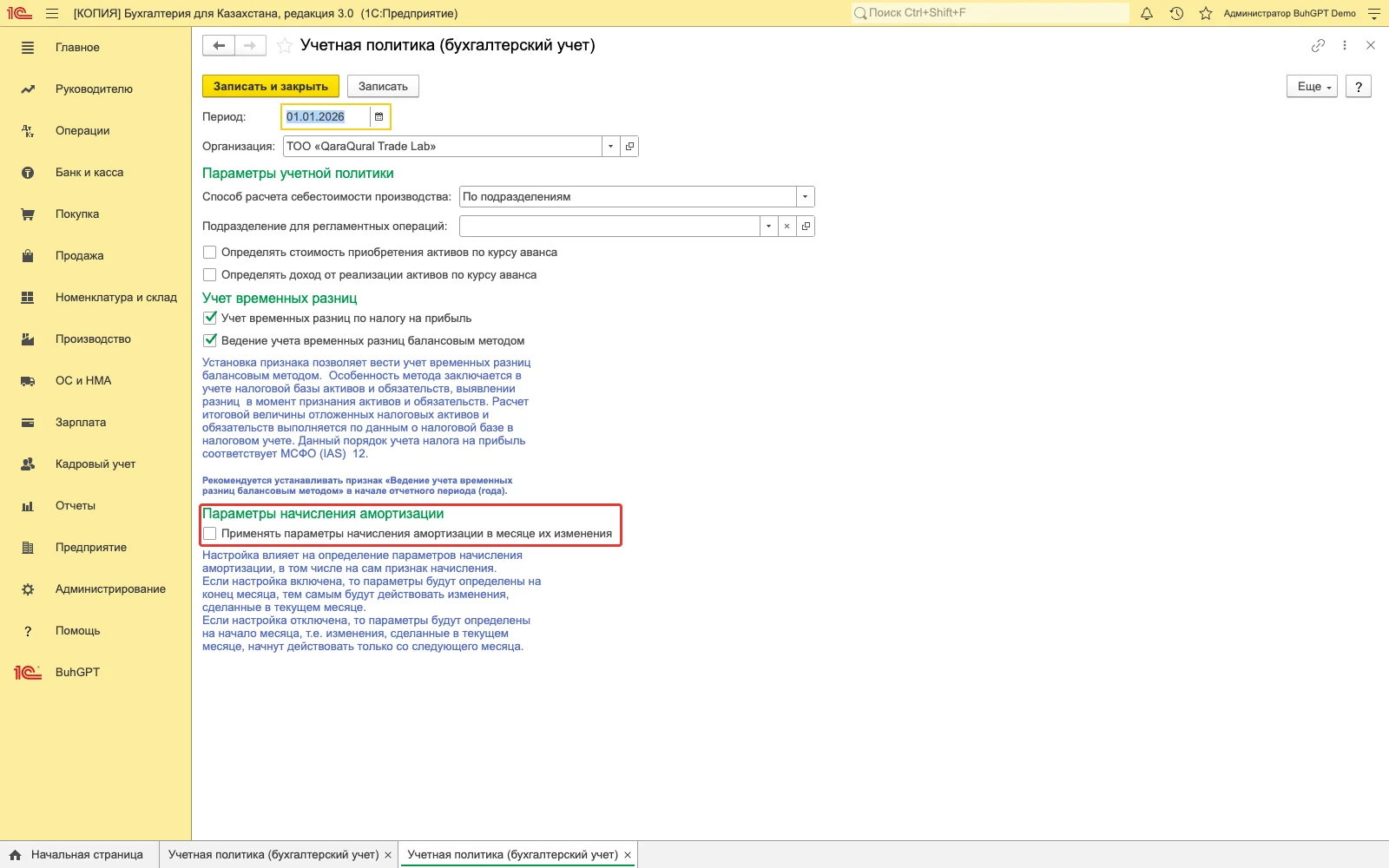
The help for the «Change Fixed Asset Depreciation Parameters» document states that the revised information is used to calculate depreciation in the month after the change. «Month-End Close» uses this timing while the «Apply Depreciation and Amortization Parameters in the Month of Change» checkbox is cleared in the accounting policy.
| Effective from | Document date | Accounting policy checkbox |
|---|---|---|
| January 2027 | December 2026, for example 31.12.2026 | Cleared |
| December 2026 | November 2026, for example 30.11.2026 | Cleared |
| December 2026 | December 2026 | Selected in the record effective in December 2026 |
The checkbox is under Enterprise → Accounting Policy → Accounting Policy (Financial Accounting), in the «Depreciation and Amortization Parameters» group. It applies to both fixed assets and intangible assets. Accounting policy records take effect on a monthly basis. The checkbox setting applies from the month specified in the «Period» field. If the decision takes effect on 01.01.2027, the accounting policy can stay as it is.
Step 1. Check the current parameters
Before the committee makes its decision, export a list of assets with their carrying amounts. In the Fixed and Intangible Assets section, use the «Fixed Asset Depreciation Schedule for the Period (Financial Accounting)» and «Intangible Asset Amortization Schedule for the Period (Financial Accounting)» reports.
- Open Fixed and Intangible Assets → Fixed Asset Depreciation Schedule for the Period (Financial Accounting).
- Specify the period from 01.01.2026 to 30.11.2026 and select the organization.
- Click «Generate».
- Save the report and attach it to the committee report.
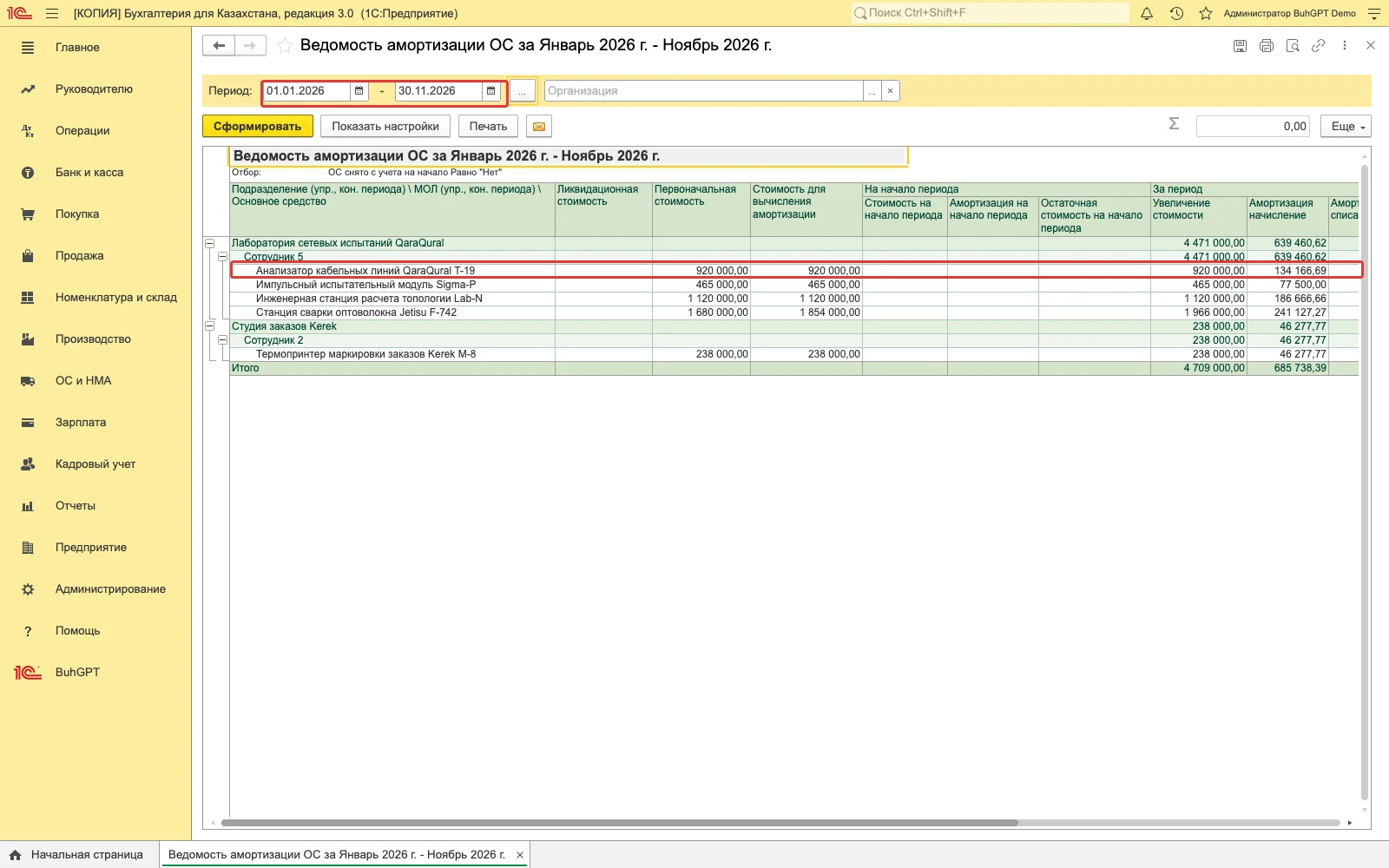
The easiest way to check each asset’s useful life and calculation base is in the parameter change document itself. The «Fill» button populates it with the current values from the accounting records (step 2).
Step 2. Complete the fixed asset document
- Open Fixed and Intangible Assets → Fixed Asset Depreciation → Change Fixed Asset Depreciation Parameters.
- Click «Create».
- Specify the organization and select a date using the table above, for example 31.12.2026.
- On the «Fixed Assets» tab, click «Select» and choose the assets listed in the order.
- Click «Fill» → «For Fixed Asset List». The current parameters will populate the rows.
- In each row, update «Useful Life (Book), Months» to the revised total useful life.
- Update «Depreciation Period (Book), Months» to the number of months remaining.
- Set «Depreciation Calculation Base (Book)» to the carrying amount less the revised residual value.
- Update «Residual Value (Book)».
- Click «Post and Close».
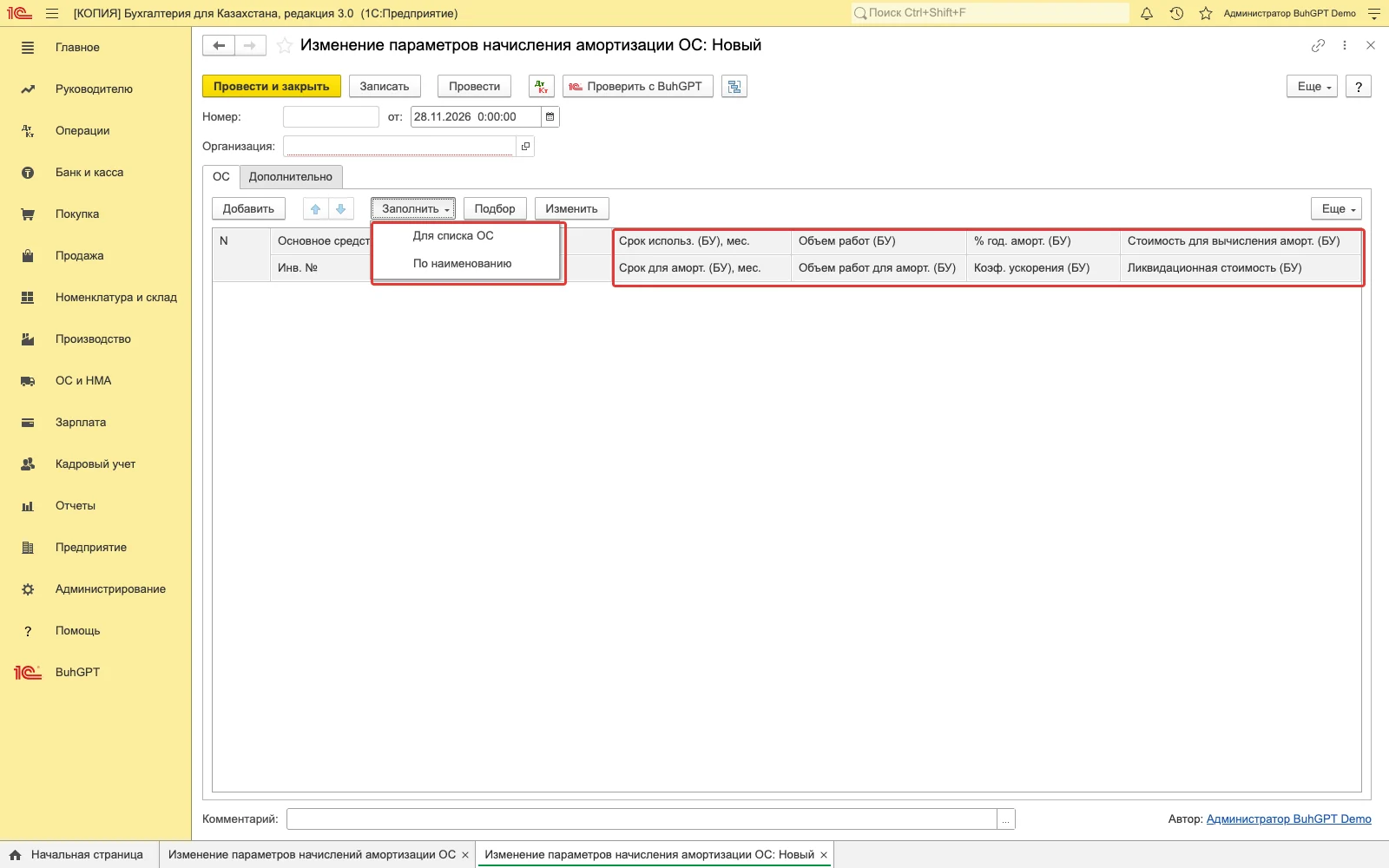
The document only records the revised parameters in the information register and creates no journal entries. 1C recalculates the «Annual Depreciation % (Book)» column automatically when «Depreciation Period (Book), Months» changes. The formula is 12 ÷ period × 100, which gives 33,33 for 36 months. The calculation uses this percentage only under the «Straight-Line Method (Rate-Based)».
Why you need to deduct residual value from the calculation base
Under the «Straight-Line Method (Useful Life-Based)», 1C 3.0.75.1 calculates the monthly amount as «Depreciation Calculation Base (Book)» ÷ «Depreciation Period (Book), Months». Residual value is excluded from this formula. It only caps the total depreciation. 1C will stop depreciating once it has charged the remaining «cost − accumulated depreciation − residual value».
Important. Check for these errors when completing the document.
- If you enter a residual value without deducting it from the calculation base, 1C will charge too much each month and leave the final months without depreciation.
- If you leave «Depreciation Period (Book), Months» at the full period (52) and use the carrying amount (720 000) as the calculation base, the monthly amount will be too low.
- The «Fill» button populates the previous values. Check all four columns in each row before posting.
Step 3. Complete the intangible asset document
- Open Fixed and Intangible Assets → Intangible Asset Amortization → Change Intangible Asset Amortization Parameters.
- Click «Create» and specify the organization and date.
- On the «Intangible Assets» tab, click «Select» and choose the assets.
- Click «Fill» → «For Intangible Asset List».
- Set «Useful Life (Book), Months» to the number of months remaining.
- Set «Amortization Calculation Base (Book)» to the carrying amount as of the document date.
- Click «Post and Close».
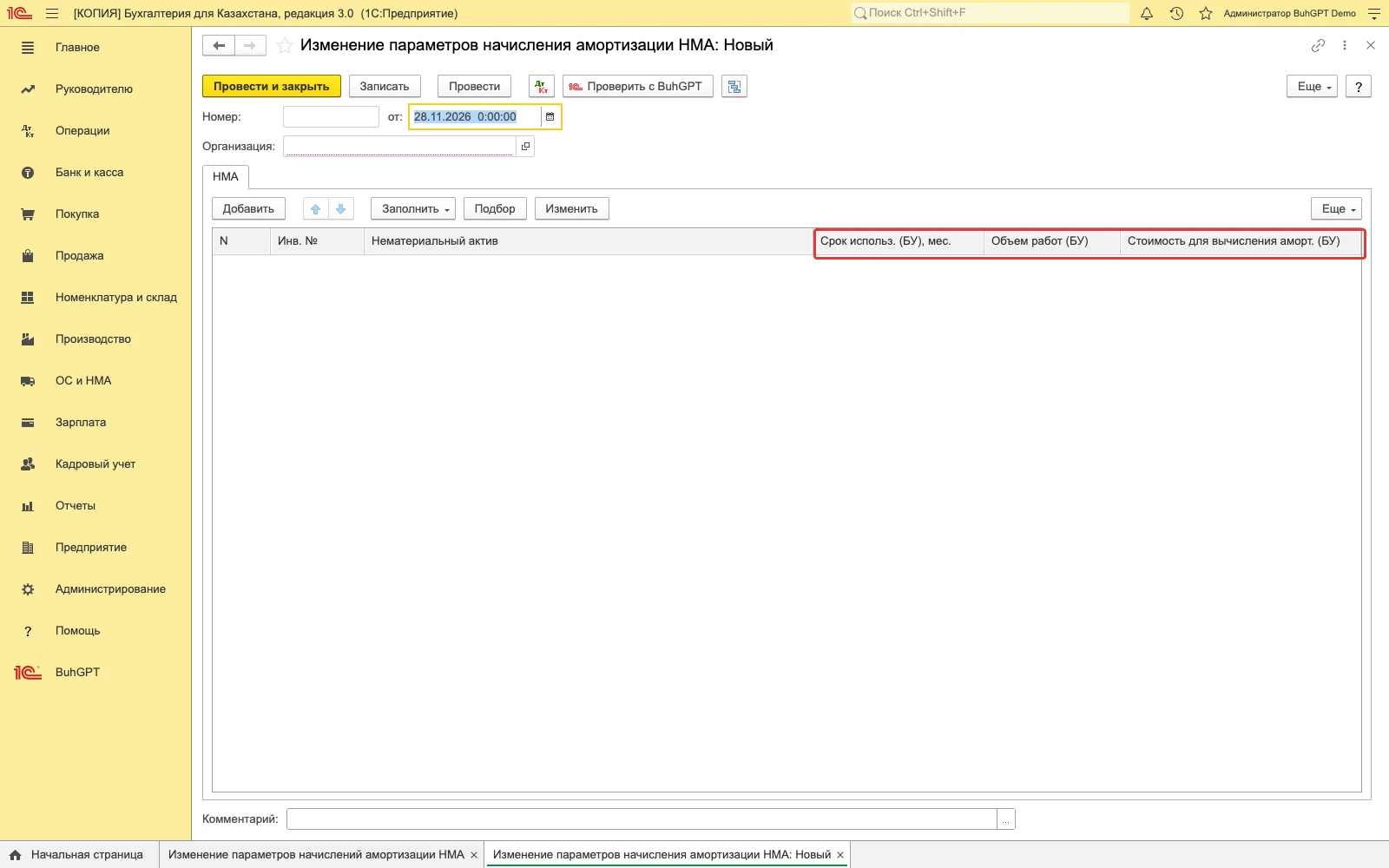
The intangible asset document has three parameters: «Useful Life (Book), Months», «Output Volume (Book)» and «Amortization Calculation Base (Book)». The document has no separate amortization period field. Monthly straight-line amortization is the calculation base divided by «Useful Life (Book), Months». Enter the remaining useful life in this field when revising the estimate.
Changing the depreciation or amortization method
In 3.0.75.1, the method is stored in the «Initial Fixed Asset Details (Financial Accounting)» information register (or «Initial Intangible Asset Details» for intangible assets). The parameter change documents have no method column and leave the method as it is. Version 3.0.75.1 offers five methods for fixed assets: «Straight-Line Method (Useful Life-Based)», «Straight-Line Method (Rate-Based)», «Reducing Balance Method», «Sum-of-the-Years’-Digits Method» and «Units of Production Method». It offers three for intangible assets: «Straight-Line», «Reducing Balance» and «Units of Production».
- Open Operations → Operations and click «Create» to open the «Operation» document.
- Click «Select Registers...» and select «Initial Fixed Asset Details (Financial Accounting)».
- Add a record for the asset by copying the values from the current record and changing only «Depreciation Method».
- On the same date, post «Change Fixed Asset Depreciation Parameters» with the revised period and calculation base.
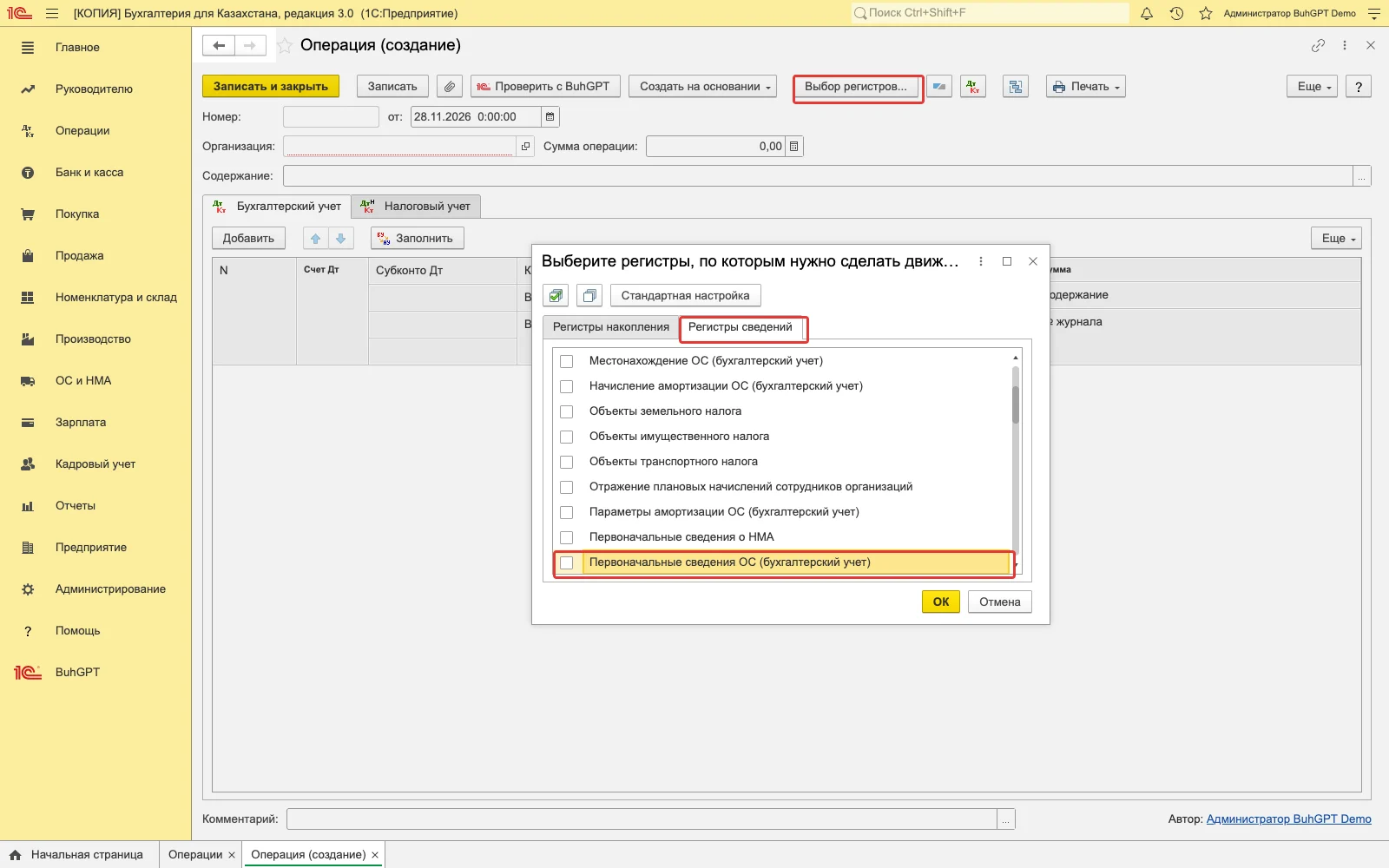
After posting the document, check January depreciation against a manual calculation.
Calculation example
Example. Equipment was recognized at 1 200 000 tenge with a useful life of 40 months and is depreciated using the straight-line method. By 31.12.2026, depreciation had been charged for 16 months. The committee extended the remaining useful life from 24 to 36 months effective 01.01.2027.
- Monthly depreciation before the review was 1 200 000 ÷ 40 = 30 000 tenge.
- Accumulated depreciation was 30 000 × 16 = 480 000 tenge.
- The carrying amount was 1 200 000 − 480 000 = 720 000 tenge. To check, multiply 30 000 × 24 remaining months = 720 000.
- In the document dated 31.12.2026, enter «Useful Life (Book), Months» = 16 + 36 = 52, «Depreciation Period (Book), Months» = 36, «Depreciation Calculation Base (Book)» = 720 000 and «Residual Value (Book)» = 0.
- The revised monthly amount is 720 000 ÷ 36 = 20 000 tenge. To check, multiply 20 000 × 36 = 720 000.
- Depreciation is 30 000 tenge for December 2026 and 20 000 tenge per month from January 2027.
Example. For the same asset, the committee also estimated a residual value of 72 000 tenge (the price it expects to receive for scrap metal in 3 years).
- «Depreciation Calculation Base (Book)» is 720 000 − 72 000 = 648 000 tenge.
- «Residual Value (Book)» is 72 000 tenge.
- The monthly amount is 648 000 ÷ 36 = 18 000 tenge. Verify both calculations: 18 000 × 36 = 648 000 and 648 000 + 72 000 = 720 000.
- Depreciation is 18 000 tenge per month from January 2027, and the asset will have a carrying amount of 72 000 tenge at the end of its useful life.
Step 4. Verify the result
- Run Operations → Period-End Operations → Month-End Close for the month in which the revised parameters take effect.
- Open the «Fixed Asset Depreciation (Book)» operation and click «Show Journal Entries».
- Check the amount for the asset against your calculation. In the example, account 2420 is credited for 20 000 tenge.
- For intangible assets, check the intangible asset amortization operation and the credit to account 2740.
If the revised parameters take effect in December 2026, verify the amounts in December. Version 3.0.75.1 uses the chart of accounts under Order No. 185. In the revised Standard Chart of Accounts effective 01.01.2027 (Order No. 533), accounts 2420 «Depreciation of Fixed Assets» and 2740 «Amortization of Other Intangible Assets» retain their numbers and names.
Check the debited expense account against the chart of accounts that will be in the database in January 2027. The depreciation and amortization parameters are independent of the chart of accounts because the parameter change document creates no journal entries.
Tax accounting and deferred tax
For corporate income tax, depreciation is calculated on the tax value balance of a Group I asset or of Group II–IV, using the rate the taxpayer sets in the tax register up to the applicable limit (Article 280 of the Tax Code of Kazakhstan). The maximum rates are 10% for buildings and structures (Group I), 25% for machinery and equipment (II), 40% for computers, software and information processing equipment (III), and 15% for other fixed assets (IV). The formula excludes the useful life used for financial accounting.
A revision to useful life therefore leaves tax deductions unchanged. It changes the difference between the carrying amount and the tax base of the asset. Recalculate deferred tax under IAS 12 as part of the annual calculation, taking the revised depreciation into account.
Frequently asked questions
What should we do if the useful lives can stay the same? — Carry out the review and record the decision as «parameters unchanged». No entry in 1C is required in this case.
Can we recalculate depreciation for 2026 using the revised useful life? — No. Apply the change in estimate prospectively (IAS 8, para. 36) and keep the amounts recognized before the effective date of the change.
We posted the document on 31 December and December depreciation stayed the same. Is that an error? — No. If the «Apply Depreciation and Amortization Parameters in the Month of Change» checkbox is cleared, 1C applies the revised parameters from January. To change December depreciation, use a document dated in November (if the decision was made in November) or select the checkbox in the accounting policy record effective in December 2026.
What happens if the residual value exceeds the carrying amount? — Stop depreciating the asset until its residual value falls below its carrying amount (IAS 16, para. 54). In 1C, set the residual value equal to the carrying amount. The remaining amount to depreciate will be zero and «Month-End Close» will charge 0.
We apply the IFRS for SMEs Standard. Is the review annual under that standard too? — Under the IFRS for SMEs Standard, review the useful life, residual value and method if there are indications of a change (para. 17.19, or para. 18.24 for intangible assets). Check for these indications at each reporting date.
Does shortening the useful life change tax depreciation? — No. The corporate income tax deduction is calculated on the group’s tax value balance using the rates under Article 280 of the Tax Code of Kazakhstan. It is independent of the useful life used for financial accounting.
Sources
- IAS 16 «Property, Plant and Equipment», paras. 51, 54, 56, 61
- IAS 38 «Intangible Assets», paras. 100, 102, 104
- IAS 8, para. 36, IAS 12 and the IFRS for SMEs Standard, paras. 17.19, 18.24 — IFRS Foundation
- 2026 Tax Code of Kazakhstan, Articles 274, 276, 280
- Standard Chart of Accounts, Order of the Ministry of Finance of Kazakhstan dated 23.05.2007 No. 185 (2026 version)
- Order of the Ministry of Finance of Kazakhstan dated 06.08.2026 No. 533 — revised Standard Chart of Accounts effective 01.01.2027
- The «1C:Accounting for Kazakhstan» 3.0.75.1 configuration includes the «Change Fixed Asset Depreciation Parameters», «Change Intangible Asset Amortization Parameters» and «Operation» documents, the «Accounting Policy (Financial Accounting)» register, and the «Fixed Asset Depreciation Schedule for the Period (Financial Accounting)» and «Intangible Asset Amortization Schedule for the Period (Financial Accounting)» reports