Why the previous code remains in the electronic invoice
As a result, the user sees the new code in the product card, but the previous value continues to be inserted into the “Product code” column of the electronic invoice. Reopening the document or simply refreshing the item card does not necessarily resolve the discrepancy: first, you need to check the source used to populate the electronic invoice line.
In addition, the data on the product’s sources of origin and the electronic invoice settings may affect how the field is populated. Therefore, it is best to make the correction in sequence: check the register, then the settings, and only then repopulate the document lines.
How to replace the old code
Open the required item card and go to the “Item barcodes” information register. Find the existing entry relating to the product and open it.
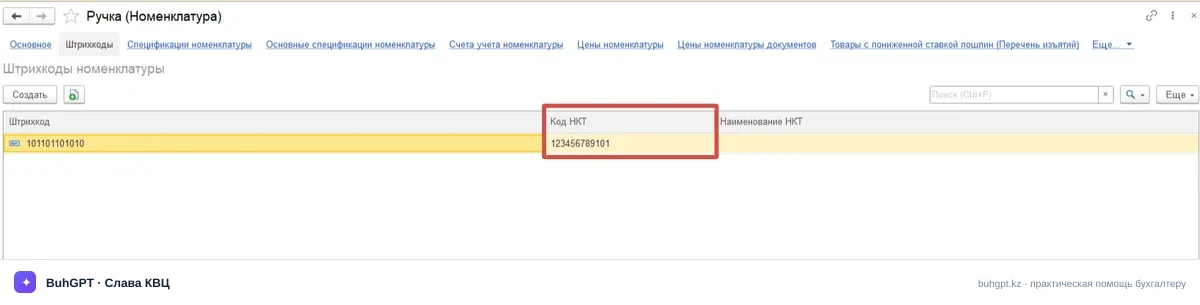
Then check the “NCG code” line:
- if it contains the previous code, replace it with the current one;
- if the old entry should no longer be used, remove the NCG code from it;
- make sure that the change is being made for the correct item and its barcode;
- save and close the modified entry.
After that, return to the electronic invoice. Select all product lines for which the value needs to be updated and run the “Populate product codes” command. If the document was created before the reference data was changed, the code in an already populated line may not update automatically: it must be explicitly repopulated.
Before sending the electronic invoice, compare the code in the document with the current NCG code. Check identical or similar items particularly carefully: the error may relate to only one entry, product variant, or barcode.
What to check if repopulating did not help
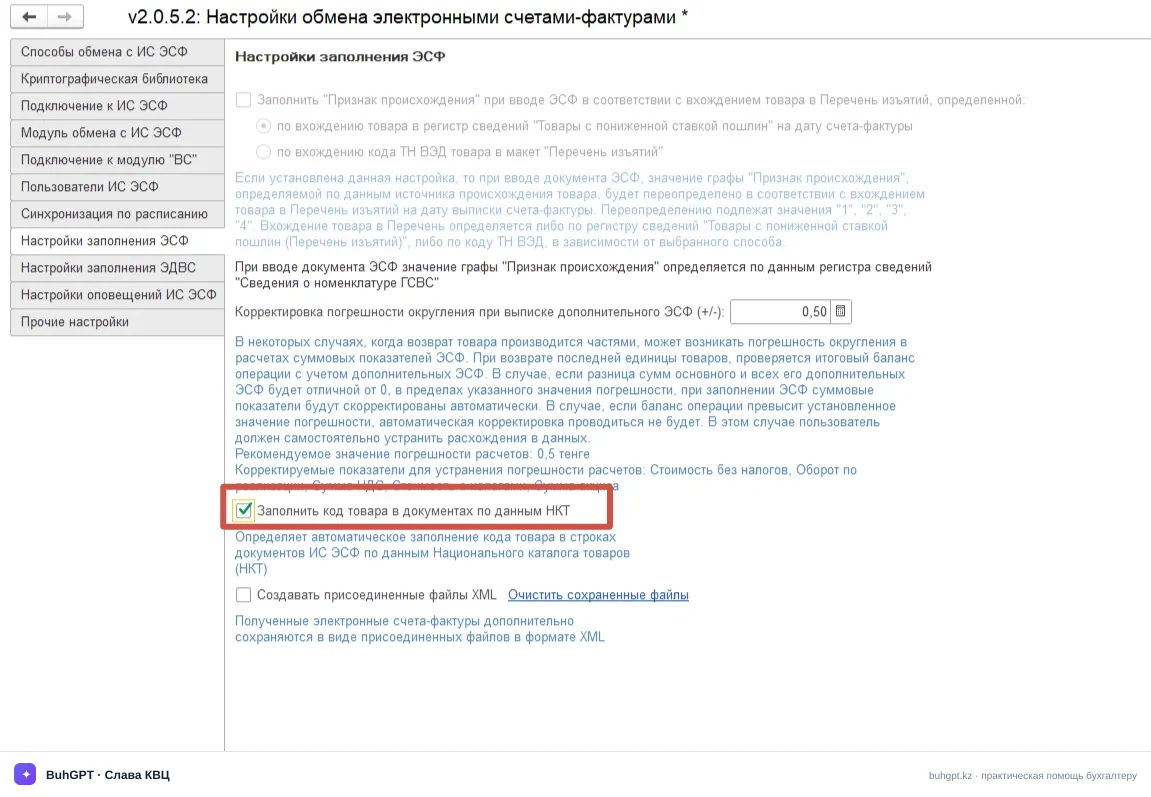
Start with the automatic population settings. In “Administration” → “General settings” → “Electronic invoice settings,” the “Automatically populate NCG codes in items” option must be enabled. If it is disabled, the expected automatic transfer of data to documents may not occur.
Then check the product’s sources of origin. The associated data may be used to populate the electronic invoice and may contain a value different from the code in the item card. It is important not to change such information without checking it first: determine which batch or transaction the document line relates to and compare the data with the actual product.
A useful diagnostic sequence:
- Verify the new code in the item card.
- Check the entry in the “Item barcodes” register.
- Check the settings for automatically populating NCG codes.
- Check the associated sources of origin.
- Select the electronic invoice lines and repopulate the product codes.
- Before signing and sending the document, make sure that the required code appears in the column.
If the problem persists, record which configuration and software version are being used, which document was used to create the electronic invoice, and when the code was changed. Images of the item card, the barcode register entry, the population settings, and the electronic invoice line will also be useful. This information will help a specialist compare the data sources rather than merely replacing the value manually in a single document.
Frequently asked questions
Why is changing the code directly in the item card not sufficient? — When populating the electronic invoice, the software may use a linked entry from the “Item barcodes” register. If the previous NCG code remains there, it may be inserted into the document again.
Do I need to create the electronic invoice again after correcting the entry? — Not necessarily. First, select the product lines in the existing document and run the “Populate product codes” command, then check the result.
What should I do if the old code reappears after repopulating? — Check the automatic NCG code population setting, barcode entries, and sources of origin. The previous value is probably retained in one of the linked data sources.
Can I simply replace the code manually in the electronic invoice line? — A manual correction may fix an individual document, but it does not eliminate the cause. The next time the fields are populated, the software may retrieve the old value again, so it is best to correct the item data and associated registers first.
Do I need to update the software? — Check the data and settings first. If they are correct, compare the installed version with the available releases and descriptions of changes for your configuration; the mere availability of a newer version does not prove that an update will resolve this particular problem.