What the error means
The message “The IIN does not match the EDS certificate” usually appears during authorization or when signing an electronic invoice. The system matches the user on whose behalf the operation is performed against the details in the selected certificate. If one user is specified in 1C but the certificate was issued to another person, the ESF cannot be sent.
In the situation described, the error occurred after the EDS key was replaced and a new user was created in 1C for the chief accountant. Therefore, the first thing to check is not the ESF document itself, but the link between “IS ESF user — employee’s IIN — new EDS — user and profile in 1C”.
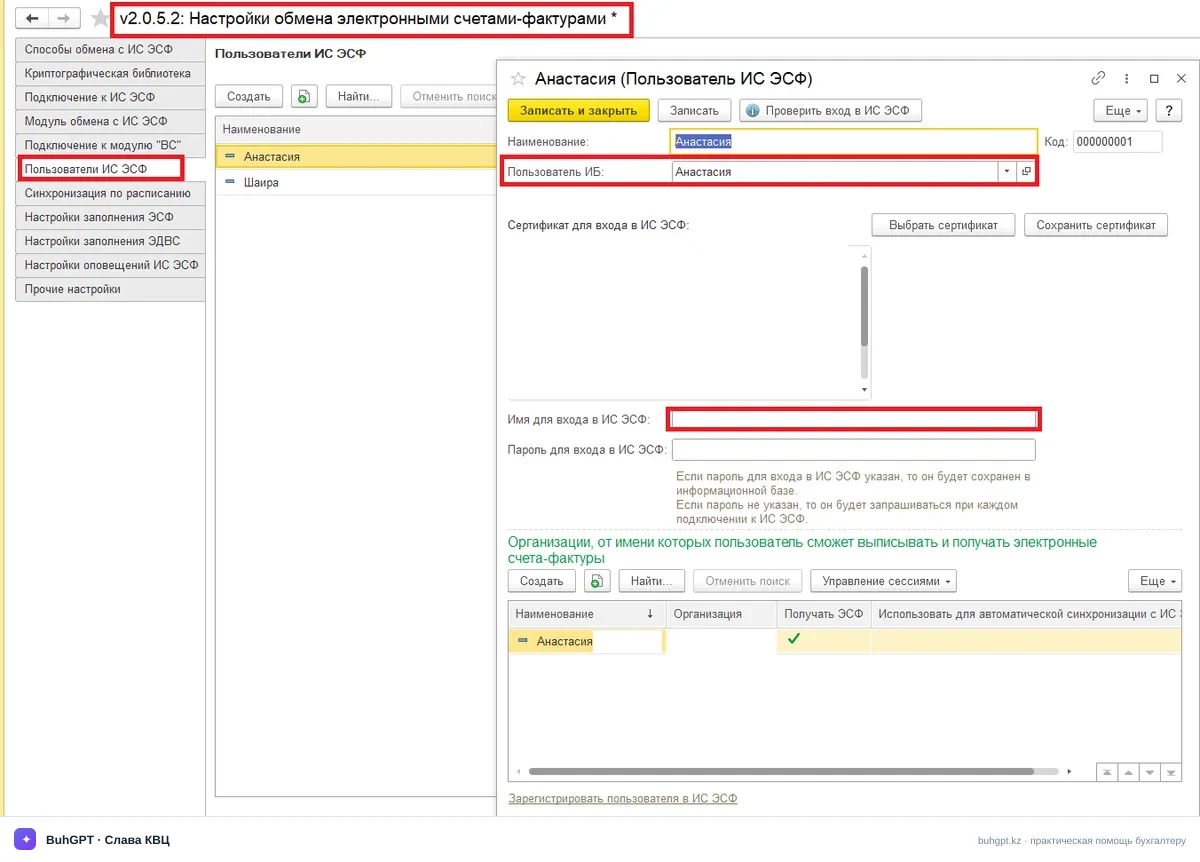
The cause may be one of several settings: the previous registration remains saved in 1C, another employee’s certificate has been selected, the new chief accountant has not been linked to the organization in IS ESF, or the exchange profile continues to operate on behalf of the former user. The error message alone does not make it possible to reliably determine exactly where the mismatch occurred, so a step-by-step check is required.
Who and what needs to be checked
First, it is necessary to clarify who should sign the ESF: the new chief accountant, the head of the organization, or another authorized employee. This person’s IIN must match the IIN in the EDS certificate being used and the account used for data exchange with IS ESF.
It is convenient to perform the check in the following order:
- log in to IS ESF using the organization’s account and make sure that the required employee has been invited and linked to the organization;
- check that the employee’s own new EDS is being used, rather than the key of the head of the organization, the former accountant, or another file from the certificates folder;
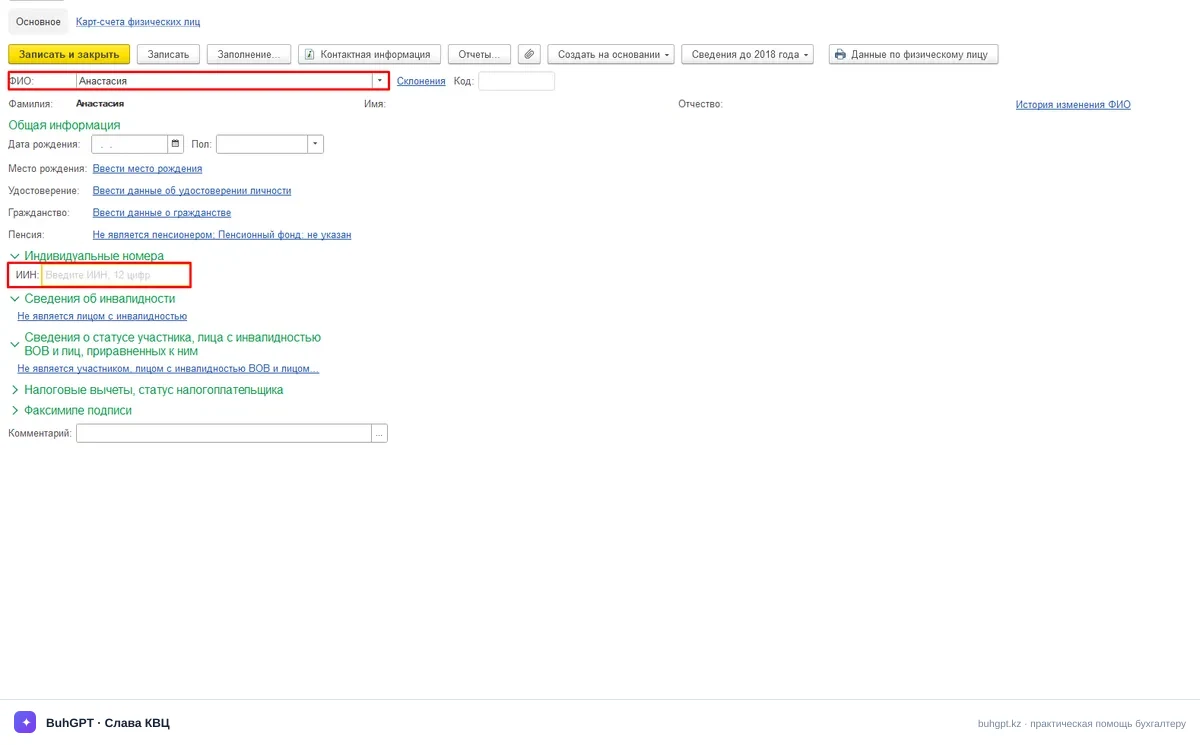
- compare the employee’s IIN in IS ESF with the IIN of the new user created in 1C;
- check which user and which profile are actually used when sending the problematic ESF;
- rule out a saved authorization session for the former user;
- make sure that the new certificate is selected during reauthorization and signing.
It is important to separately check authorization directly in IS ESF. If the new chief accountant cannot log in correctly or act on behalf of the organization outside 1C, changing settings only in the accounting software will not eliminate the cause. If authorization on the portal is successful and the error occurs exclusively in 1C, the main focus should be on user registration and linking the exchange profile.
What to do after replacing the EDS
The practical procedure is as follows.
1. Check the new EDS. When selecting the certificate, make sure that it belongs to the new chief accountant. Relying solely on the file name or folder name is unsafe: the same directory may contain old and new keys belonging to different employees.
- Check the employee in IS ESF. Log in to the system on behalf of the organization and check whether the new chief accountant has been invited as an employee. If the invitation has not been issued or the linking process has not been completed, the account in IS ESF must be put in order first.
- Check the 1C user. Creating a new 1C user may not be sufficient. This particular user must be linked to the correct IS ESF account and the new EDS.
- Reregister the user for data exchange. After replacing the EDS, it is advisable to reauthorize the IS ESF user in 1C and link the authorization to the new chief accountant user. Command names and setting locations may differ depending on the configuration and its version, so parameters should be changed only after checking the current profile.
- Check the organization profile. The database may still contain a profile created for the former signatory. Make sure that documents are sent on behalf of the required organization and the new employee, rather than through an old saved setting.
- Try sending one document again. After adjusting the settings, it is best to test one ESF. Do not repeatedly sign and send the entire batch of documents until it has been confirmed that authorization has been restored.
Before making changes, it is useful to record the full error message, the user under whose account the 1C session is open, the selected organization, and when the failure occurs: during login, synchronization, signing, or the actual sending operation. This will help avoid changing unnecessary settings.
Engaging a specialist is justified if the actual configuration, current IS ESF profile, and selected certificate need to be examined. Diagnostics will require access to the workstation in the presence of the responsible employee. The EDS password should not be provided to third parties in advance: it must be entered by the key owner directly during the check.
How to tell that the configuration has been restored
The correction can be considered successful when the new chief accountant completes authorization, acts on behalf of the required organization, and sends a test ESF without a message stating that the IIN does not match the certificate.
After a successful check, make sure that the former user is no longer selected automatically and that employees understand which certificate to use. It is advisable to store old keys separately from active ones to reduce the risk of selecting the wrong key. If the organization has several signatories, each of them needs a clear and correct link between their own account, IIN, and certificate.
The time required to resolve the issue cannot be determined in advance: it depends on whether the mismatch is found only in the 1C profile or whether the employee’s link in IS ESF also needs to be restored. Therefore, it is best to start by checking the portal and then proceed with reregistering the user in 1C.
Frequently asked questions
Do I need to create the ESF again? — Usually, authorization and the user link should be checked first. The document itself may not be the cause of the error, so recreating the ESF without diagnosing the settings may not help.
Why did the error appear immediately after the EDS was reissued? — One possible reason is that 1C continues to use the previous registration or old profile, while the new certificate was issued to another or newly linked user.
Is it enough to create a new “Chief Accountant” user in 1C? — No, the user name alone is not sufficient. The user’s IS ESF account, IIN, new EDS, and link to the exchange profile must be checked.
Can the head of the organization’s EDS be used for testing? — The certificate should not be substituted without checking the authority and settings. First, determine who should sign the document and configure that user.
What should be prepared for a remote connection? — A workstation with 1C, access to IS ESF, the new EDS, and the presence of the key owner to enter the password. A screenshot of the full error message and information about the stage at which it appears will also be useful.
The error “The IIN does not match the EDS certificate” is an authorization configuration issue, not an error in the document itself. When keys are replaced or the responsible person changes, simply adding a user in 1C is not enough. The key solution is to consistently restore the entire chain: check the employee’s link on the IS ESF portal, verify the IIN, select the correct EDS file, and reregister the exchange profile in 1C itself. Thoughtlessly recreating documents or substituting certificates will not solve the problem; diagnostics should always begin by checking the account on the portal.