In short, the issue is probably on the service side
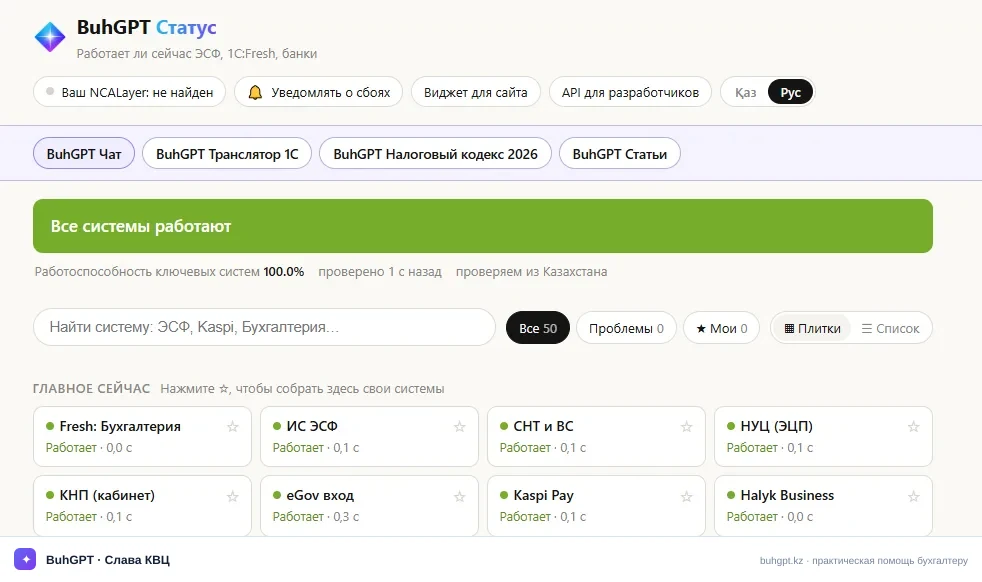
If Virtual Warehouse freezes, your accompanying waybill for goods (AWB) won’t go through, and the warehouse record won’t open, take a breath. When the outage is on the Electronic Invoicing Information System (EIIS) side, it’s easy to spot because everyone runs into the same problem. You can check where the issue is in five seconds on the status page at buhgpt.kz/status. Independent automated checks show whether Virtual Warehouse and the AWB module are responding right now.
It’s simple. An EIIS outage is a service-side issue. There’s no need to rush into reinstalling 1C. Document the outage and wait for the service to come back online.
Who is affected
Problems with Virtual Warehouse and AWBs affect anyone required to document the movement of goods through the EIIS.
Importers and businesses handling goods subject to traceability and labeling requirements need an AWB for each shipment.
Wholesalers and manufacturers who write off goods and record stock receipts through Virtual Warehouse.
Accountants using 1C (Trade Management, Small Business Management, or Accounting for Kazakhstan) will find that the exchange with the EIIS stalls during export.
Individual entrepreneurs and limited liability partnerships (LLPs) facing an imminent deadline to issue a waybill.
If you only issue standard electronic invoices and don’t handle goods subject to traceability requirements, today’s Virtual Warehouse outage will probably pass you by.
First, check whether the issue is with the service or on your end
A failed submission can have a local cause. The error message often tells you what went wrong.
“The warehouse address does not match the actual address” indicates a local issue. Open the Virtual Warehouse record and click “Update warehouse”. The system will reload the data so the submission can go through.
“An error occurred while creating the virtual warehouse” usually means one of the warehouse details or settings is missing or incorrect. Check the fields in the record before trying again.
Virtual Warehouse configuration error. If you’re connecting the module for the first time, complete the setup steps before exporting documents.
If the record is filled in correctly, everything worked yesterday, and today the system is freezing for both you and your colleagues, it looks like a service-side outage. Go to the status page.
What to do, step by step
- Check the status. Open buhgpt.kz/status and see whether Virtual Warehouse and the AWB module are responding. If the automated checks show an outage, wait for the service to recover.
- Take screenshots. Capture the error message in 1C and the status shown on the status page, including the date and time. This is your evidence that the missed deadline was outside your control.
- Check your own setup. If the error is about the warehouse address, click “Update warehouse.” If it concerns the warehouse details, check the fields in the record.
- Avoid repeated submissions. Dozens of retries during an outage won’t help and may create duplicate documents. Wait for the service to come back online.
- Resubmit the AWB when the status returns to normal and make sure it went through and you received confirmation.
If you miss the deadline
The biggest worry during an outage is “I won’t be able to issue the AWB on time.” If the service was down, the screenshots of the error and the status give you evidence. Issue the document as soon as the service is restored and save the submission confirmation. The specific consequences and the steps to take after a missed deadline depend on your circumstances. Check the procedure currently in force. You can always verify the exact date and time of the outage on the status page.
Data from BuhGPT Status — buhgpt.kz/status (independent automated checks from an unofficial source).
Frequently asked questions
How can I tell in a minute whether the service is down or the issue is on my end? — Open buhgpt.kz/status. If the automated checks show that Virtual Warehouse and the AWB module are unavailable, the issue is on the service side.
I see “The warehouse address does not match the actual address.” Is this an outage? — No. This is a local issue. Open the Virtual Warehouse record, click “Update warehouse,” and try submitting again.
What should I do if I see “An error occurred while creating the virtual warehouse”? — Check the details and settings in the warehouse record. Usually, one of the fields is blank or contains an incorrect value.
Should I keep clicking “Submit” during an outage? — No. Repeated attempts during an outage won’t help and may create duplicate documents. Wait until the service is restored, then try once more.
How can I protect myself if an outage causes me to miss the deadline? — Save screenshots of the error in 1C and the system status, including the date and time. This documents that the delay was outside your control.