In brief: Your e-invoice won't go through, and the problem is probably with the service
You click “Send,” and the E-Invoice Information System (EIS) stops responding, loads endlessly, or displays an authentication error. An accountant’s first thought in that moment is “I broke something.” Stay calm. Most of the time, the problem is with the EIS service itself. Your computer, digital signature, and accounting system are all fine. Take a minute to confirm that the outage is widespread, document your attempt to issue the invoice, and stay calm about the deadline. As a general rule, if the service is unavailable, prepare the document and enter it into the system once service is restored.
How to tell in a minute whether the problem is with the service or on your end
Before calling support or reinstalling your keys, check where the problem is.
What to check | Likely service outage | Likely problem on your end |
|---|---|---|
Other websites and eGov | They open normally | Nothing loads, which points to an internet connection problem |
Digital signature in other services | The key works | The key has expired or none of the services can read it |
Error in the EIS | Timeout, “Service unavailable,” 5xx | “Invalid certificate,” “No access to profile” |
What colleagues are saying in group chats | Everyone is reporting the problem at the same time | You’re the only one reporting the problem |
If everything else loads, your digital signature works, and the EIS alone is failing, the issue is on the service side. Independent automated checks give you a quick way to verify what you’re hearing. Check in 5 seconds at buhgpt.kz/status. You can see whether the service is still down or has already recovered. The outage is on the service side.
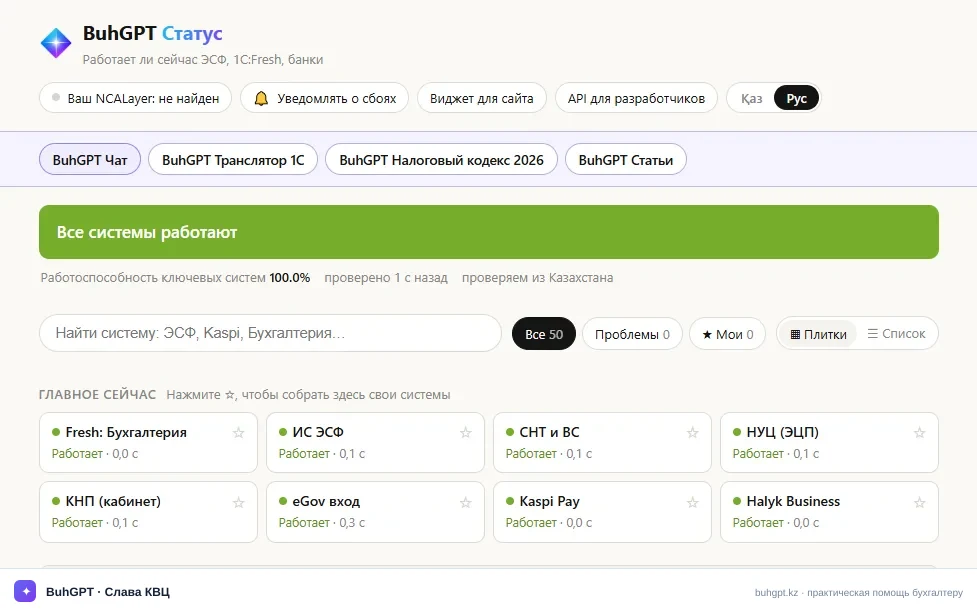
If the status page has no data from a monitoring node, the service status is still unknown. Wait for a confirmed status before assuming the service is up.
What to do about the deadline and issuing the invoice
The biggest concern is “What if the outage prevents me from issuing an e-invoice on time?” The Tax Code and the Rules for Issuing E-Invoices govern how to handle this. Regulations set the deadlines for issuing invoices electronically, and the EIS provides a procedure for situations where an electronic document cannot be issued. The e-invoice form has a separate field labeled “Date of issue in paper form”. Fill it in when you enter a paper invoice into the EIS. The system is designed to let you prepare the document while the service is unavailable and enter it later.
If the service goes down, take these steps.
Take the outage into account when assessing responsibility for a missed deadline. The cause is outside your control.
Keep evidence of the outage in case a dispute arises.
Avoid submitting the same e-invoice multiple times in the hope that one submission will go through. This can create duplicate invoices once the service is restored.
Check the current versions of the Rules and the Tax Code for the deadlines and procedures that apply to your transaction. These can change, so verify the exact deadline in the original source.
What to do during an outage
- Use the table above to confirm that the service is down by checking your internet connection and digital signature.
- Open buhgpt.kz/status and check whether an EIS incident has been recorded.
- Take a screenshot of the error with the date and time visible on the screen.
- Document the attempt by saving a draft in your accounting system.
- Wait for the service to recover and try sending the invoice again. Pending documents usually go through once the service is back up.
- If there is a dispute over the deadline, rely on your evidence of the outage and the rules for entering a paper document into the EIS.
Frequently asked questions
How can I tell whether the problem is with the service or on my end? Open a couple of other websites and eGov, then test your digital signature in another service. If the EIS is the only service failing and colleagues are reporting the same problem, the issue is on the service side. Check quickly at buhgpt.kz/status.
Will I be penalized if an outage prevents me from issuing an e-invoice on time? The system failure is outside your control. Keep evidence that the service was unavailable and check the current Rules and Tax Code for the procedures and deadlines that apply to your situation.
Can I issue a paper invoice while the service is down? The e-invoice form has a field labeled “Date of issue in paper form” for entering a paper invoice into the EIS later. This confirms that there is a procedure for when the service is unavailable. Consult the original source for the details that apply.
Is BuhGPT Status an official government source? No. It provides independent automated availability checks. The data is available from BuhGPT Status at buhgpt.kz/status. Check with the EIS operator for the official position on the incident.
Should I send the document several times in a row? No. Repeated submissions during an outage can create duplicates after the service is restored. Save the draft and resend it once the service is back up.