
Alimony is processed in 1C in two stages. First, register the writ of execution, run payroll, and withhold the amount using the “Employee Deduction Calculation” document. Then transfer the amount to the recipient using the “Writ of Execution Payments to Recipients” document. The procedure below applies to 1C:Accounting for Kazakhstan, edition 3.0, release 3.0.74.2 (guide to the “Writ of Execution Payments to Recipients” document).
How to record alimony withholding
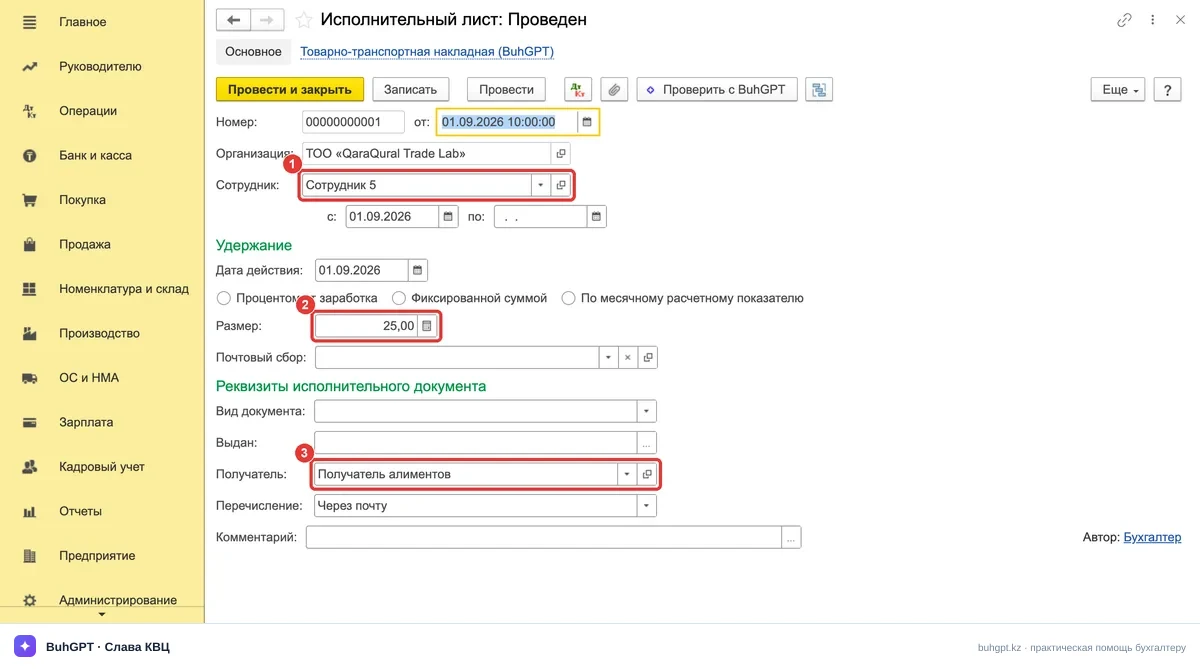
Before running payroll, the accountant needs to register the employee’s writ of execution. Enter the employee, the recipient, the method for calculating the deduction, the effective period, and the payment details in the record.
After registering the writ of execution, run payroll for the relevant month, then create an “Employee Deduction Calculation” document for the same month. On the “Other Deductions” tab, check that the employee has a separate deduction row and that the writ of execution appears in the “Supporting Document” column. At this stage, 1C calculates the amount that can then be prepared for payment to the recipient.
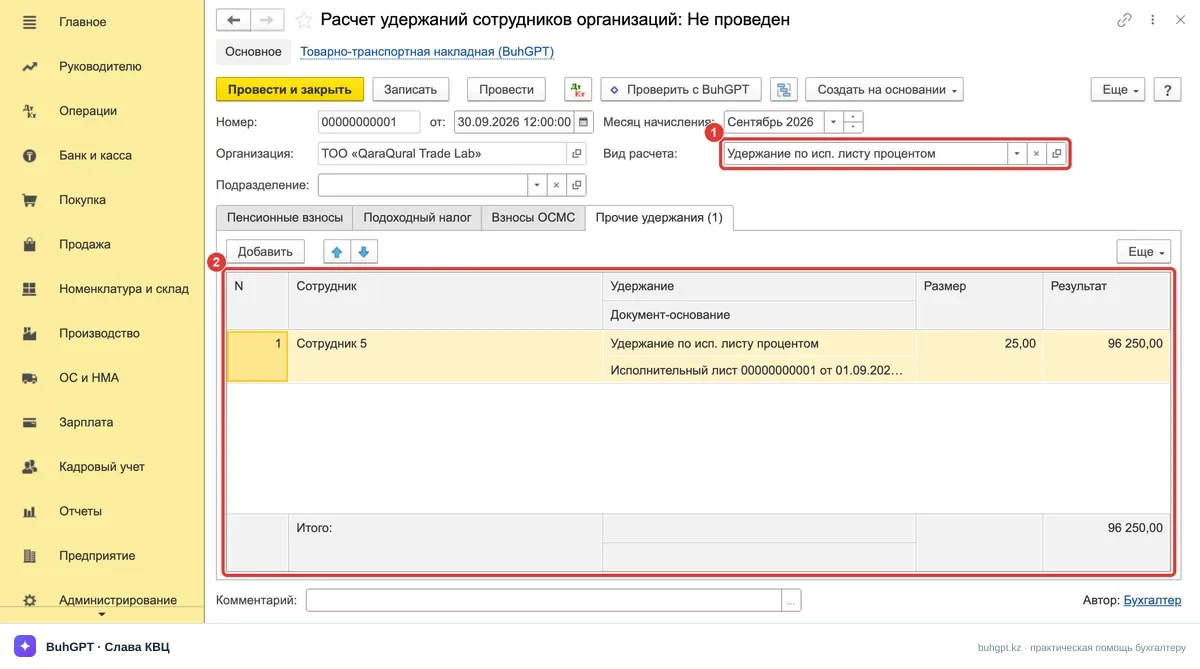
Before posting the document, check the calculation against the enforcement document. Use the details of the specific enforcement document and the applicable legal provisions when setting the withholding share, limit, or calculation method. You can look up the legislation in the Adilet Legal Information System.
How to pay withheld alimony
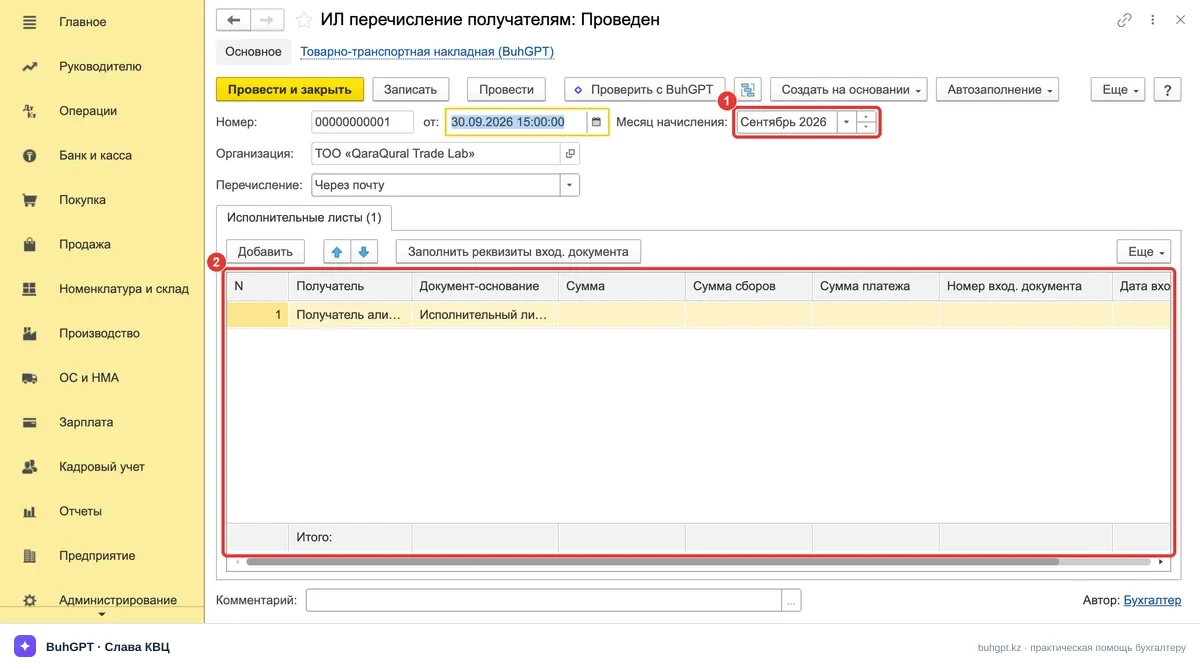
To prepare the payment, use the “Writ of Execution Payments to Recipients” document. Include the employees and their registered writs of execution for the selected month. The document creates a separate row for each recipient with the amount to transfer (description of the document in 1C).
Follow these steps.
- Create a “Writ of Execution Payments to Recipients” document.
- Specify the organization and the month for which the amount was withheld.
- Fill in the table with the amounts withheld.
- Check the employee, recipient, and amount in each row.
- Specify the payment method.
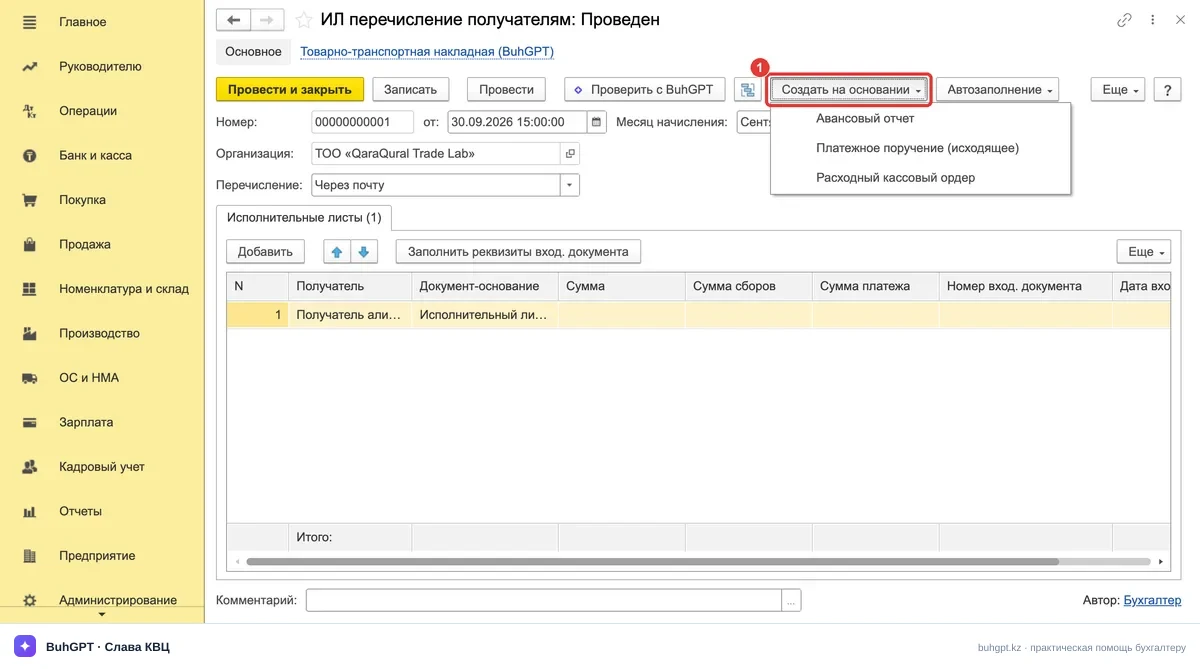
- Post the document and use it to create a payment document.
For a bank transfer, use the document to create a “Debit from Current Account,” a payment order, or a bank transfer list. For a cash payment, select “Through Cash Desk” as the payment method and create a “Cash Disbursement Order” (guide for release 3.0.74.2).
The “Writ of Execution Payments to Recipients” document generally clears the balances due under the writs of execution. The payment document created from it records the movement of funds and generates the bank or cash journal entry. Under the cited procedure, bank payments are recorded as Dr 3390 Cr 1030, and cash payments as Dr 3390 Cr 1010.
What to check after payment
After posting the payment document, generate a trial balance for account 3390 with a breakdown by recipient. If the withheld amount has been paid in full and there are no other transactions with the recipient, the corresponding balance should be zero.
If only part of the withheld amount is being paid, change the “Amount to Transfer” field in the document row. Under the procedure for release 3.0.74.2, the unpaid balance stays on record and can be included in the next payment.
If the withheld amounts do not appear in the document, check the following in order.
- Whether an “Employee Deduction Calculation” document was posted for that month with a row for the writ of execution
- Whether the payroll month matches the transfer month
- Whether the writ of execution specifies the recipient
- Whether all details required for the selected payment method have been entered
Check the bank fee or postal charge separately. The “At the Organization’s Expense” option may apply to the transfer row. The option selected must be consistent with the supporting documents the accountant uses to process the payment.
Electronic invoices (EIs) and accompanying waybills for goods (AWBs) are not issued when withheld alimony is transferred. Under the cited procedure, the transaction is a payment of the withheld amount and does not constitute a sale of goods, works, or services. Payroll is processed separately, and the taxes and contributions already recorded in payroll are unaffected.
To check the version of your 1C installation, select “Help” → “About.” This displays the 1C:Enterprise platform version and the configuration release. If the release differs from 3.0.74.2, check the forms and field locations against the documentation for your release before processing actual payments.
Frequently asked questions
Why does the alimony amount not appear in the transfer document? — Check that the “Employee Deduction Calculation” document has been posted, that the selected month matches the payroll month, and that the writ of execution specifies the recipient. An error in any of these items prevents the list from being populated.
Can alimony be paid in cash? — Yes. Select “Through Cash Desk” as the payment method in the document, then use it to create a “Cash Disbursement Order.”
Can several recipients be included in one document? — Yes. The table can contain several employees and writs of execution, with a separate row for each recipient.
How do I record a partial payment? — Enter the amount actually being paid in the “Amount to Transfer” field. Track the remaining balance using the writ of execution records and the settlement account.
Where can I check the 1C release? — Open “Help” → “About.” The procedure described here was prepared for edition 3.0, release 3.0.74.2.