In 2026, payroll and HR records are maintained in Payroll and HR Management for Kazakhstan 3.1.37.x. Payroll calculation results are transferred to Accounting for Kazakhstan 3.0.74.x using the “Payroll Posting (Integration with Payroll and HR Management 3)” document.
What is Payroll and HR Management for Kazakhstan, and who needs it?
Payroll and HR Management for Kazakhstan helps separate payroll calculation from statutory accounting. An accountant or HR specialist maintains employee records, earnings, and deductions in the payroll configuration, then transfers the resulting data to 1C:Accounting for Kazakhstan.
This setup suits organizations that run payroll in a separate database. The payroll configuration supplies the calculation data, and the receiving accounting configuration records the results in the financial and tax accounts.
When payroll is calculated directly in Accounting for Kazakhstan, the accounting database generates journal entries from its own payroll accrual documents. Before setting up data exchange, determine which configuration runs payroll.
From 1 January 2026, the minimum wage is 85 000 tenge and the monthly calculation index (MCI) is 4 325 tenge. Article 7 of the Law of the Republic of Kazakhstan “On the Republican Budget for 2026–2028” sets these amounts. The text is available in the Әділет Legal Information System. Apply the tax and social insurance parameters in the current versions of the Tax Code of the Republic of Kazakhstan, the Social Code of the Republic of Kazakhstan, and the Law of the Republic of Kazakhstan “On Compulsory Social Health Insurance”.
How data moves from Payroll and HR Management 3 to Accounting
First, run payroll for the selected month in Payroll and HR Management. Once the calculation is complete, prepare the data for posting, including accrued wages, employer contributions, deductions from employee income, statutory deductions, and provisions. For civil law contracts, the document can also transfer transaction amounts that the receiving configuration uses for VAT purposes.
In Accounting for Kazakhstan version 3.0, release 3.0.74.x, go to “Payroll” → “Payroll Posting (Integration with Payroll and HR Management 3)”. This document supports transfers from Payroll and HR Management 3 to Accounting. Use it after calculating payroll in the source database.
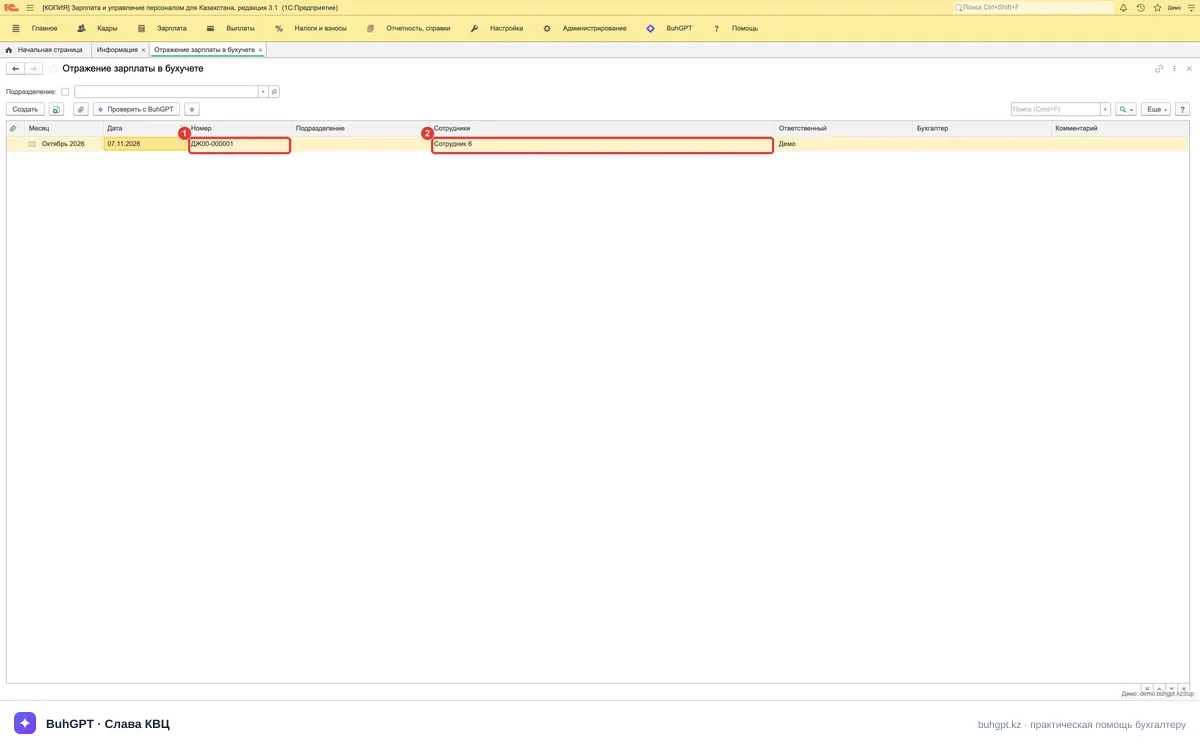
Menu path — Payroll → Payroll Posting → open the document.
- Find the training document in the list.
- Check the employee listed.
In the document, check the organization, accrual month, date, and transaction type. The transaction type determines which data is posted, including earnings and contributions, deductions, statutory deductions, reserves, or transactions under civil law contracts. Then reconcile the document lines with the payroll calculation reports in Payroll and HR Management.
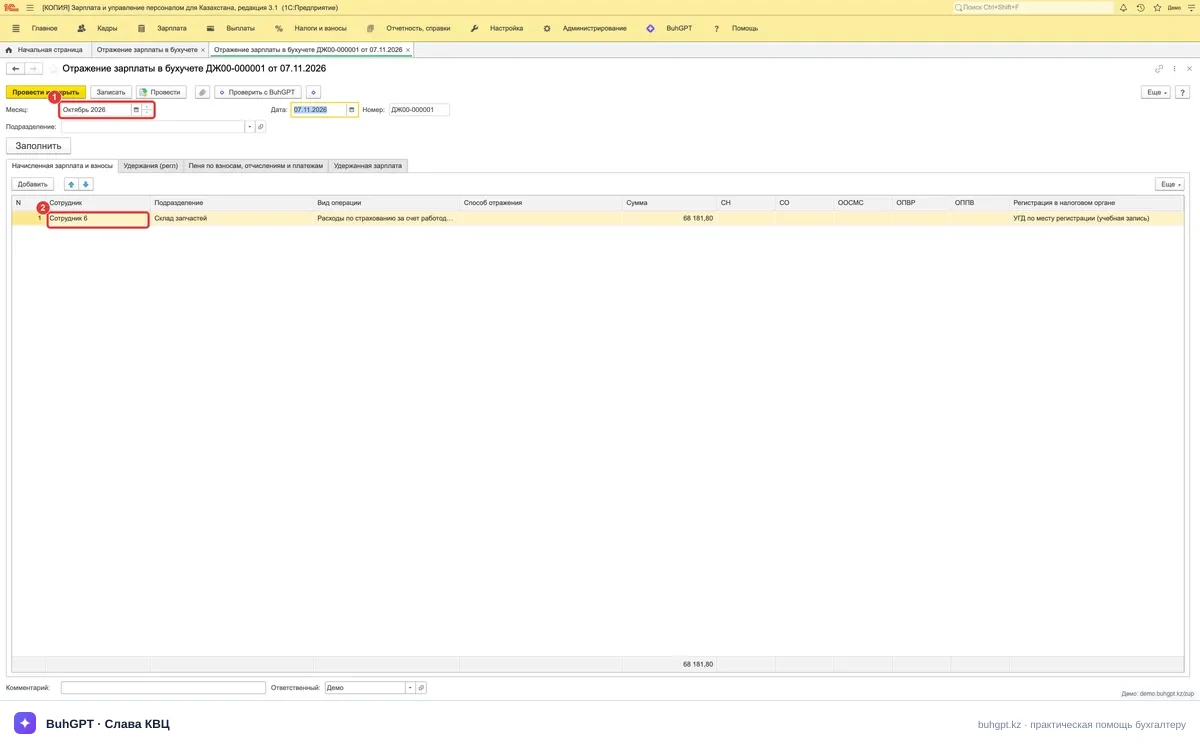
- Check the posting month.
- Check the sample employee row.
The document in Payroll and HR Management prepares data for exchange and records transactions in the accumulation registers. Check the journal entries in the receiving accounting configuration after synchronization is complete.
What accountants should check after the transfer
Once the data has loaded and synchronization reports success, reconcile the results using the following checks.
- Compare earnings and deductions with the payroll summary in Payroll and HR Management.
- Check the organization and accrual month.
- Verify that each line has the appropriate transaction type and posting method.
- Reconcile tax and contribution amounts with the payroll calculation reports.
- Check the journal entries in the receiving accounting database.
- Verify that each document was loaded only once.
If some amounts are missing from the accounting database, check the posting methods and how they are mapped in the receiving configuration. If the net pay amount differs, first reconcile earnings and deductions with the payroll summary, then check the exchange status and verify that the document was loaded only once.
The “Posting method not specified” error indicates that a posting rule is missing for an earning, employee, or department. Once you configure the posting method, regenerate the document. To allocate costs across departments or cost categories, use different posting methods. The accounting database maps incoming data from Payroll and HR Management to its own accounting settings.
The Payroll Posting document transfers payroll calculation results to statutory accounting. The Electronic Invoice Information System (EIIS) handles electronic invoices, the Virtual Warehouse, and electronic consignment notes for goods (SNT).
Frequently asked questions
Do “ZUP Kazakhstan” and “ZUP RK” refer to the same product? — In search queries, both terms usually refer to the payroll and HR management solution for Kazakhstan. When choosing instructions, check the exact configuration name and release.
Why are there no journal entries after I post the document in Payroll and HR Management? — In this setup, Payroll and HR Management prepares the data for exchange. Check the posting results in the receiving accounting configuration.
Where can I find the payroll transfer document? — In Accounting for Kazakhstan 3.0.74.x, go to “Payroll” → “Payroll Posting (Integration with Payroll and HR Management 3)”.
What should I do if the document did not populate? — Check whether payroll has been calculated for the required month, whether the correct organization and period are selected, and whether posting methods are configured. After making any corrections, repopulate the document.
Can I allocate payroll across different cost categories? — Yes. Use different posting methods for employees, departments, or earnings, then map those methods to the settings in the accounting database.