A payroll timesheet records time actually worked and time not worked. It provides the basis for calculating pay for the period. In the «Payroll and HR Management for Kazakhstan 3.1» configuration, the «Working Time Timesheet» serves this purpose. Its entries take precedence over work schedules and are used to calculate payroll accruals.
What is a payroll timesheet?
The terms «payroll timesheet», «salary timesheet» and «timesheet for payroll» are commonly used to refer to a working time timesheet. The timesheet itself does not list amounts earned or paid. It shows how much time an employee worked and records absences and specific categories of working time.
The timesheet records information for each employee and each day of the selected period. Depending on what actually occurred, you can record any of the following.
Attendance and hours worked
Night hours
Business trips
Time not worked
Shift, work location and working conditions, when these details are needed for recordkeeping
Select time categories from the corresponding list in the software. Accountants should record what actually occurred and then check the calculation. Changing a time category solely to produce an expected payroll amount would misstate the record.
Who completes the payroll timesheet and how?
A timekeeper, HR specialist or payroll clerk can complete the timesheet, depending on how the organization assigns responsibilities. Timesheets are usually prepared monthly by department. The system also allows entries for part of a month if payroll calculations or internal procedures require the period to be split.
Before completing the timesheet, check the employee list and what actually occurred during the period, including attendance, absences, business trips, night hours and shifts. If an employee worked different hours from those scheduled, enter the verified hours they actually worked.
Follow these steps to complete the timesheet.
- Select the organization, department and timekeeping period.
- Fill in the employee list for the department.
- Check the time category and number of hours for each day.
- Compare the timesheet with HR and payroll documents for the same period.
- Post the document and proceed with payroll calculation only after completing the checks.
Pay particular attention to whether the period, department and employee list match. If an employee is missing from the timesheet or hours are recorded in the wrong period, the payroll calculation may differ from what you expect.
Payroll timesheets in 1C: Where to find them and how they affect payroll calculations
In «Payroll and HR Management for Kazakhstan 3.1», open the document from the «Payroll» section → «Timesheets».
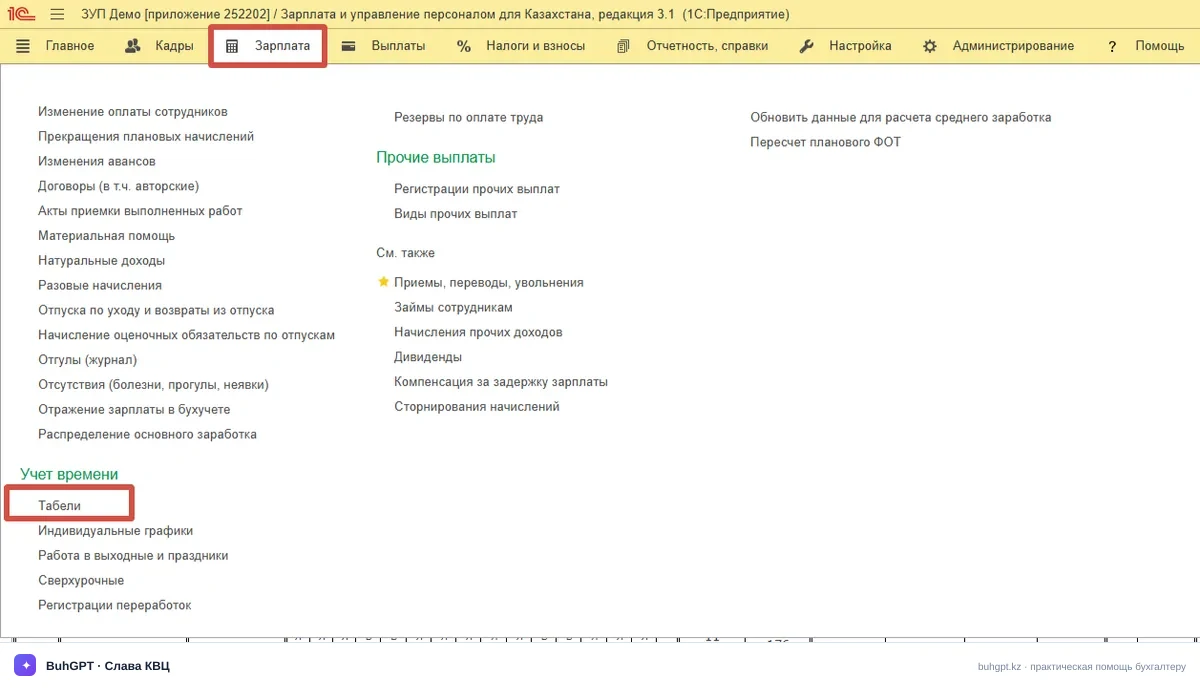
An entered timesheet takes precedence over the work schedule. Once you record the actual time, the software uses the timesheet entries for individual and consolidated time records and then for payroll calculations. If a timesheet already contains different hours for the same period, changing the schedule alone is insufficient.
When checking payroll calculations, start with the source records and work through to the result.
Open the timesheet for the relevant period.
Find the employee and check the time category and hours for each day.
Make sure the relevant deviations from the schedule are recorded.
Check the documents recording leave, sick leave or business trips.
Recalculate payroll accruals after making corrections.
The software lets you enter corrections. It links the corrected timesheet to the original document and separately identifies employees whose records changed. This preserves the link between the original entries and the correction and prevents uncontrolled edits from overwriting the timekeeping history.
Sample payroll timesheet: What to include
A general-purpose payroll timesheet should clearly identify the organization, department, timekeeping period, employee, calendar day, time category and number of hours. The print layout depends on the software and timekeeping settings, so creating a standalone payroll timesheet template outside the accounting system carries risks.
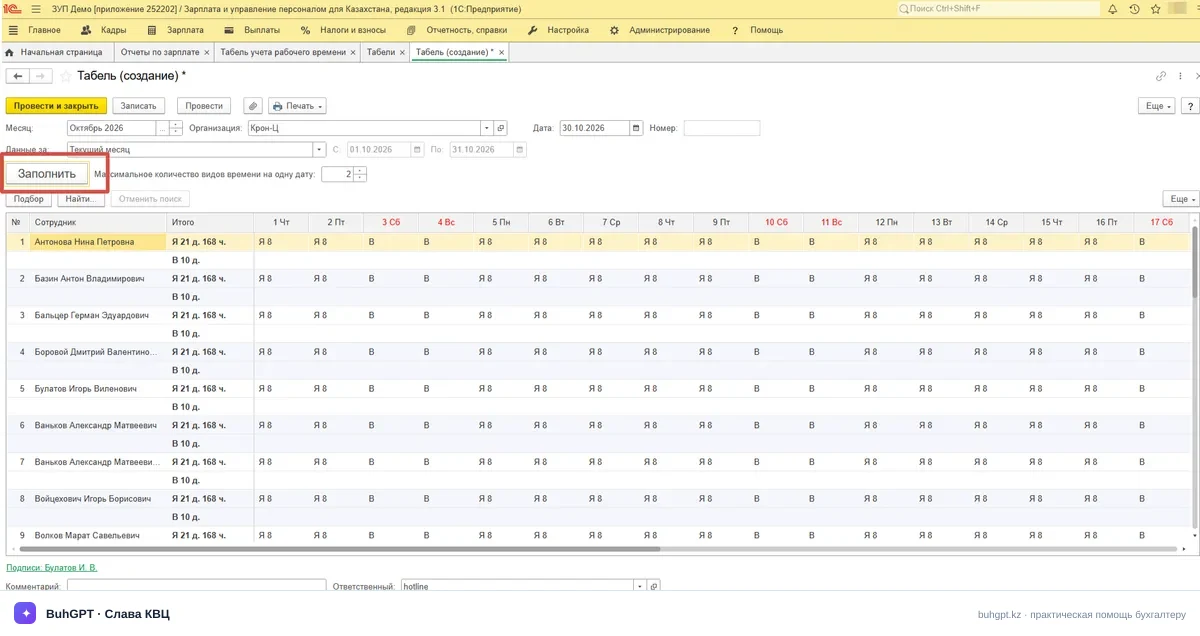
A practical template can use rows for employees and columns for the days in the period. Each cell shows the time category and hours. Include the following when preparing your own template.
Organization and department names
Period covered by the timesheet
Employee identification
Calendar days in the period
Time category recorded
Number of hours
Details of who is responsible for completing and checking the timesheet
The timesheet provides source data for payroll calculations. The payroll register, payslip and payroll payment register each serve a separate purpose. Pay, deductions and contributions are calculated later in the payroll process and do not need to be entered manually in the timesheet.
Frequently asked questions
Are a payroll timesheet and a payroll register the same thing? — No. The timesheet records time worked and time not worked. The payroll register shows the amounts calculated for payroll.
Where can I find the payroll timesheet in 1C? — In «Payroll and HR Management for Kazakhstan 3.1», go to the «Payroll» section → «Working Time Timesheet».
Can I complete a timesheet for part of a month? — Yes. You can select the period for entering time records and record time for part of a month.
Which takes precedence in payroll calculations, the work schedule or the entered timesheet? — The entered timesheet takes precedence over the schedule. If the records differ, the calculation uses the actual time recorded in the timesheet.
How do I correct a payroll timesheet I already entered? — Enter a correction that references the document you are correcting and identifies the employees whose records are changing.