In 1C:Accounting for Kazakhstan, edition 3.0, release 3.0.75.1, per diems are recorded on the Other tab of a separate expense report. The Business Trips document records the trip and the calculation of pay for its working days. The expense report applies the amount advanced to the employee against expenses.
What documents are required for per diems?
The employer must pay the employee a per diem for each calendar day of the business trip, including travel time, and cover transportation and accommodation expenses. The terms and duration of the trip are set by the employment contract, a collective agreement, or an act of the employer (Article 127 of the Labour Code of the Republic of Kazakhstan).
Before recording per diems in 1C, agree on the following details.
The employee, destination, and purpose of the trip
The start and end dates of the business trip
The per diem rate
The method of paying the advance
The documents the employee will use to substantiate transportation, accommodation, and other expenses
Set the per diem rate in an internal employer document. For tax deduction purposes, Article 260 of the Tax Code of the Republic of Kazakhstan treats transportation, accommodation, per diems at the rate set by the taxpayer, and the entry and exit expenses listed in that article as business trip reimbursements. The deduction is available when supporting documents, including electronic documents, are available (Article 260 of the Tax Code of the Republic of Kazakhstan).
Both the business trip order or directive and the expense report are required. The order or directive confirms the basis, destination, and dates of the trip. The expense report records the settlement with the employee and the recognition of expenses.
How to register a business trip in 1C
These instructions apply to Accounting for Kazakhstan, edition 3.0, release 3.0.75.1. First, check the release under Tools and Settings → About. The window displays the platform version and configuration release.
Open Payroll → Business Trips → Create. In the Business Trips document, enter the organization, employee, start and end dates, destination, and purpose of the trip. This document registers the employee’s absence, and the software uses it to calculate pay for working days during the trip. Record per diems, tickets, and accommodation separately in the expense report.
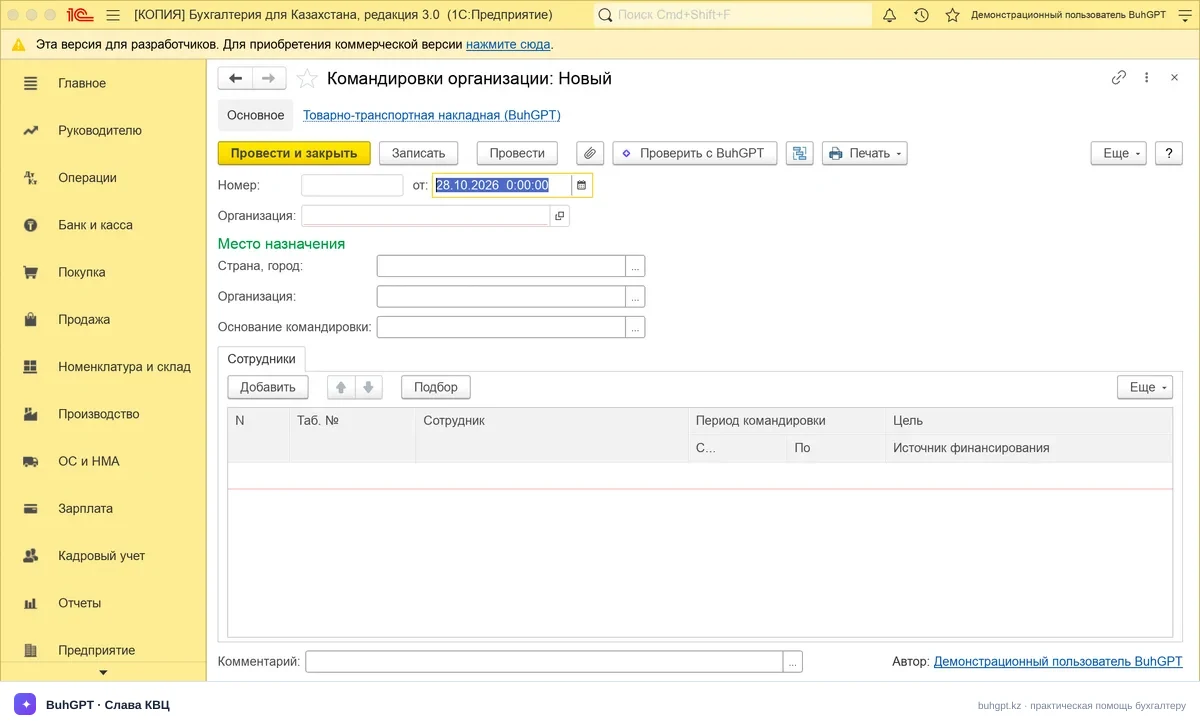
The dates in the personnel document must match those in the order and the trip documents. For tax accounting purposes, determine the duration of the business trip from the order or directive and the departure and arrival dates shown on the travel documents. If travel documents are unavailable, use other evidence of the dates as provided for in the company’s tax accounting policy (Article 260 of the Tax Code of the Republic of Kazakhstan).
How to post per diems using an expense report
You can pay the employee an advance in cash using a cash disbursement voucher or transfer it to the employee’s card using the Payment Order (Outgoing) document. Under the accounting procedure for release 3.0.75.1, settlements with the employee are recorded in account 1251 “Short-term receivables from accountable persons.”
After the employee returns, create an Expense Report document and select the organization and the accountable person. On the Other tab, add a separate line for per diems.
Describe the expense.
Enter the per diem amount specified by the order and the employer’s internal act.
Select an expense account that matches the purpose of the trip, such as 7210 for administrative expenses.
Select No VAT.
Enter the expense dimensions specified in the organization’s accounting policy.
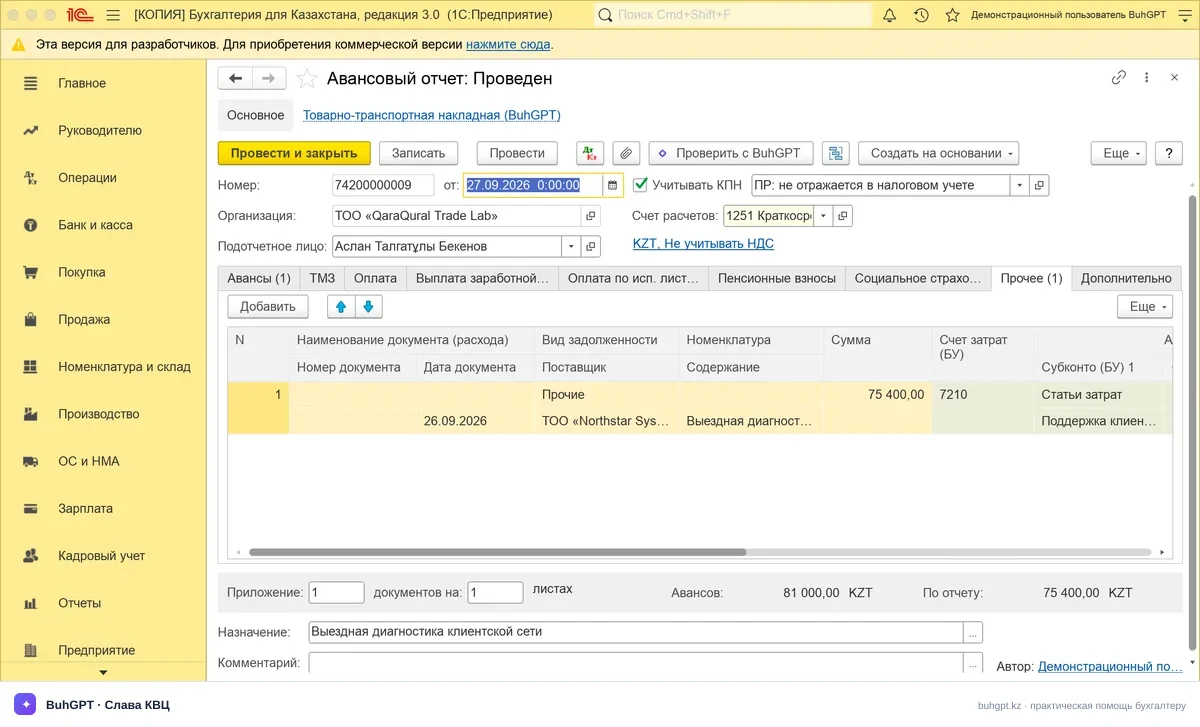
Per diems are payments to employees and involve no purchase of goods or services from a supplier. Leave the counterparty and electronic invoice details blank. Enter tickets, accommodation, and other documented expenses on separate lines from per diems.
After posting the document, check that the expense report reduced the employee’s outstanding balance in account 1251 and charged the per diems to the selected expense account. To deduct business trip expenses for tax purposes, you must substantiate them with documents and show that they relate to the trip (Article 260 of the Tax Code of the Republic of Kazakhstan).
What to check after posting
Run a trial balance for account 1251 with a breakdown by employee. Compare the advance paid with the approved expenses.
If part of the advance is unused, record its return by the accountable person.
If the employee spent more than the advance, record reimbursement of the excess.
If the balance is zero, the trip is fully settled.
If a balance remains, open the breakdown and find the outstanding document.
For a cash return, create a cash receipt voucher with the transaction type “Return from Accountable Person.” Use a cash disbursement voucher to pay an additional amount in cash or a bank document to transfer it to the employee.
Before closing the month, cross-check the dates on the order, personnel document, travel documents, and expense report. Verify that the per diem rate matches the employer’s internal act and that the expenses are allocated to the correct departments and expense items.
Frequently asked questions
Where do I enter per diems in 1C? — Enter them on the Other tab of the Expense Report document. The Business Trips document has no entry for per diems.
Does VAT apply to per diems? — No. Select “No VAT” on the per diem line because the payment goes to the employee and involves no purchase from a supplier.
Which document do I use to record the business trip itself? — In release 3.0.75.1, go to Payroll → Business Trips → Create and complete the Business Trips document.
What do I do with the unused advance? — Record the cash return using a cash receipt voucher with the transaction type “Return from Accountable Person.” After posting, check the settlements in account 1251.
Can I combine per diems, tickets, and hotel costs on one line? — No. Record per diems on the Other tab with no VAT. Enter substantiated transportation and accommodation expenses on separate lines using the relevant supporting documents.