In 1C:Accounting for Kazakhstan 3.0.74.x, the write-off document depends on the type of asset. Use the “Fixed Asset Write-off” document for fixed assets and the “Intangible Asset Write-off” document for intangible assets. For goods, select a document based on the reason for disposal and the accounting method.
Writing off goods in 1C 8.3: Determine the reason first
A search for “1C Accounting write-off” can refer to spoilage, a shortage, a transfer of inventory to production, a sale, or the disposal of consigned goods. These are different business transactions, so there is no single document for every reduction in stock.
Before posting the transaction, determine the basis for it and select the supporting documents, such as inventory count results, a committee report, an internal memo, a management decision, or another source document specified in the organization’s accounting policy. Then check the following:
- which organization owns the goods;
- which warehouse the goods are recorded in;
- why the goods are being removed from stock;
- who bears the loss;
- how the transaction is recorded for VAT purposes;
- whether the same transaction has already been recorded in another document.
For goods owned by the organization, choose a document that reflects the nature of the transaction. Use the appropriate documents for each transaction so that inventory transferred for internal use is recorded as an internal transfer and goods sold are recorded as a sale. If there is a shortage, first compare the actual quantity with the accounting records and inventory count documents, then record the confirmed shortage.
If goods are held by a consignee but owned by the consignor, a standard internal write-off captures only part of the transaction between the parties. In 1C:Trade Management for Kazakhstan, use the “Write Off Goods Shortages” operation in the intercompany consignment report to record a shortage at the consignee. Record the units sold and the units lost separately, using the sales report for sales and the shortage write-off operation for losses.
After posting the document, check the remaining consignment stock and the balances between the organizations. If an electronic invoice is issued for the transaction, use the Electronic Invoice Information System (IS ESF). Under the 2026 Tax Code of the Republic of Kazakhstan, the tax treatment depends on the actual nature of the disposal and the supporting documents. The “write-off” label alone is insufficient to classify the business transaction.
Writing off fixed assets and intangible assets in 1C 8.3
In 1C:Accounting for Kazakhstan 3.0.74.x, use the “Fixed Asset Write-off” document to retire or otherwise dispose of a fixed asset without a sale. The exact path is “Fixed Assets and Intangible Assets” → “Fixed Asset Write-offs” → “Create”. The document form has four tabs: “Fixed Assets”, “Expense/Income Allocation Account”, “Inventory”, and “Additional Information”.
On the “Fixed Assets” tab, specify the asset being written off. To populate its cost, accumulated depreciation, and carrying amount, select “Fill” → “For Fixed Asset List”. Use “Fill” → “By Name” to select multiple assets with the same name.
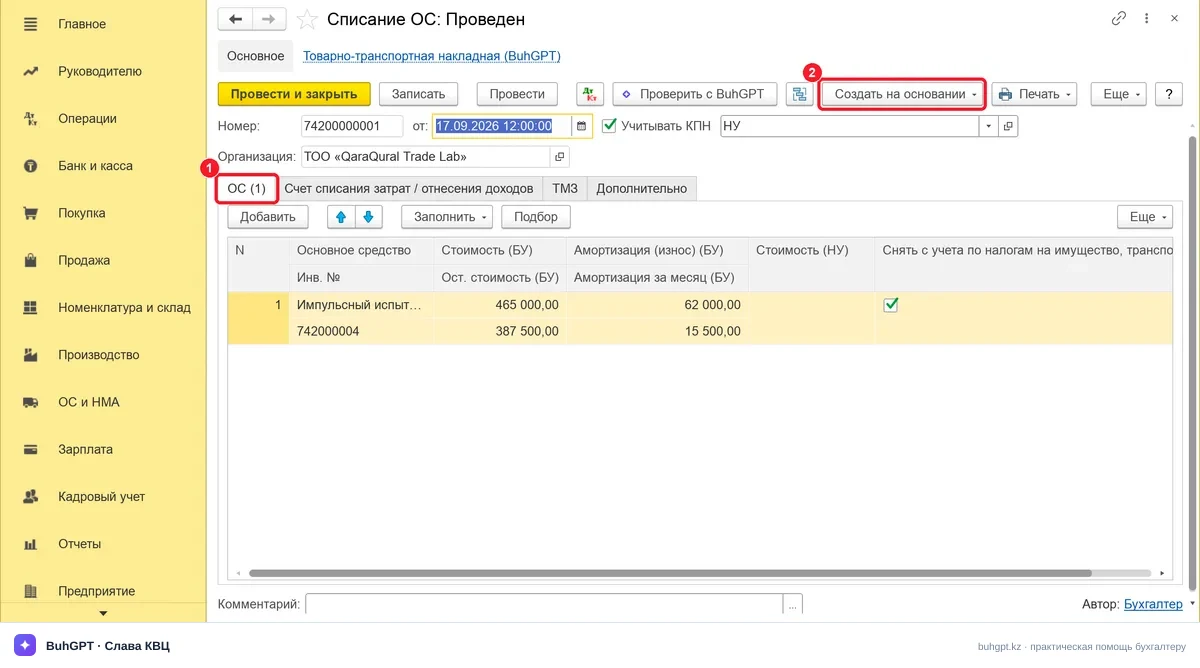
Before posting, compare the document details with the fixed asset record and the committee report. Check the organization, disposal date, department, asset, cost, accumulated depreciation, carrying amount, and expense allocation account. If the automatically populated figures differ from the accounting records, review the asset documents to identify the cause before changing any totals.
Assess the tax treatment of the fixed asset disposal separately from the posting of the document in 1C. Determine whether a VAT adjustment is required under the 2026 Tax Code of the Republic of Kazakhstan by considering the reason for disposal, the asset’s acquisition history, and the VAT previously recorded. Article 485 of the Tax Code of the Republic of Kazakhstan covers VAT adjustments for doubtful liabilities and the write-off of liabilities. The fact that a fixed asset disposal is also called a “write-off” is insufficient grounds for applying that article to the disposal.
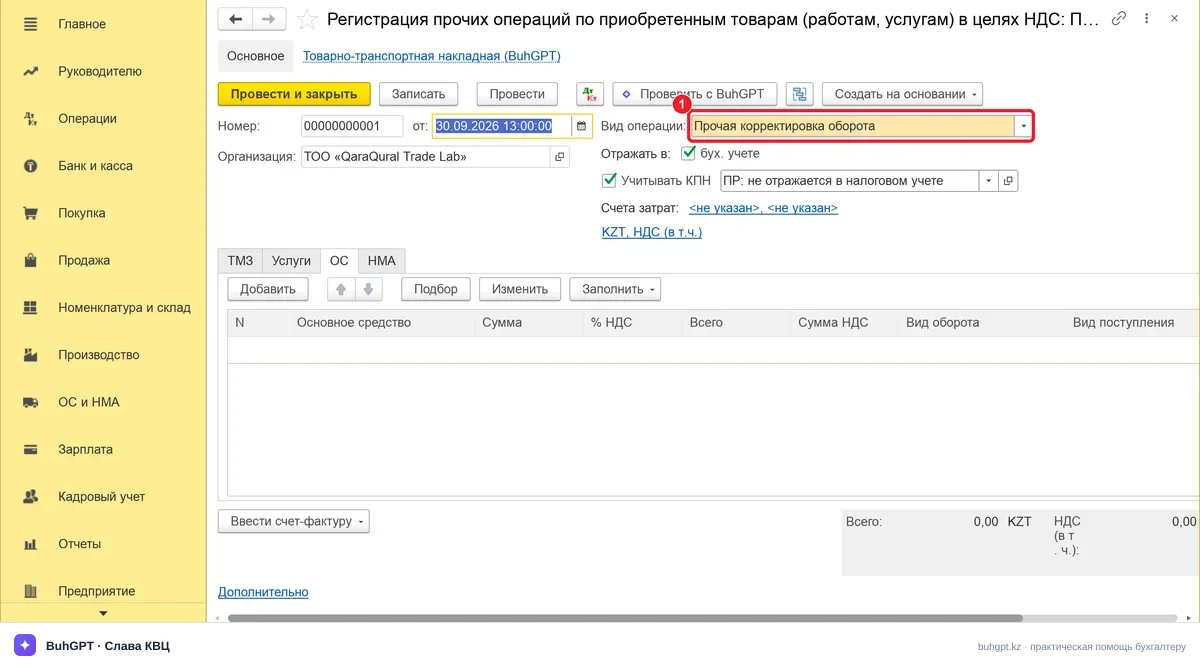
If the tax assessment shows that an adjustment for the acquired asset must be recorded in the accounting system, use the “Record Other Transactions for Purchased Goods for VAT Purposes” document with the “Other Turnover Adjustment” operation type. Create it from the “Fixed Asset Write-off” document. Enter the operation type, date, and amount based on the supporting documents for the transaction.
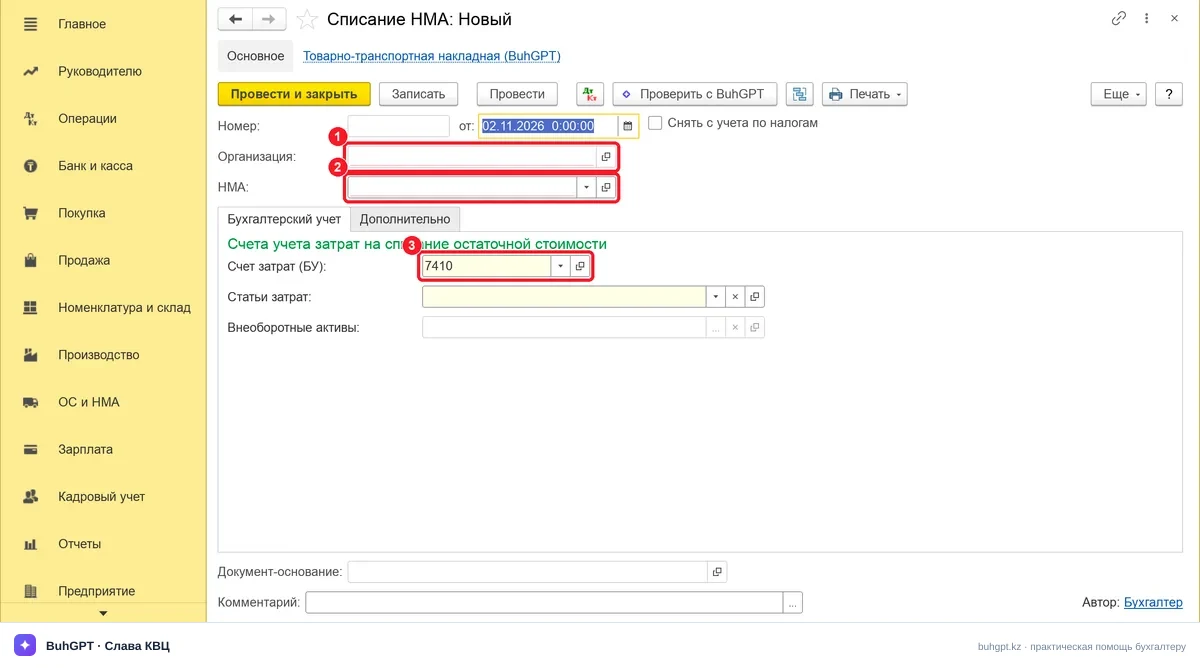
For intangible assets in 1C:Accounting for Kazakhstan 3.0.74.x, the exact path is “Fixed Assets and Intangible Assets” → “Intangible Assets” section → “Intangible Asset Write-offs” → “Create”. Use this document to derecognize an intangible asset without recording a sale or transfer to another party.
In the document, enter the organization, actual disposal date, reason for the write-off, and intangible asset in that order. The software generates the document number. After selecting the intangible asset, check its initial cost, accumulated amortization, carrying amount, and expense account. Compare these details with the asset record and the document confirming its disposal.
To check the configuration version, go to “Help” → “About”. This guide uses the 3.0.74.x release series as its reference. In the “About” window, check the platform version as well as the line showing the name and release of the “Accounting for Kazakhstan” configuration.
What to check after posting a write-off
After posting the document, open its posting entries and confirm that the correct asset was written off, the correct organization and warehouse or department were specified, the relevant stock or ledger balance was reduced, and the expense was posted to the selected account.
Carry out the following checks:
- reconcile the quantity and amount with the report or inventory count sheet;
- review the document’s financial accounting and tax entries;
- check the remaining balance for the goods, fixed assets, or intangible assets after posting;
- verify that the VAT treatment reflects the nature of the transaction;
- check for duplicate entries for the same disposal;
- reconcile any related consignment documents, electronic invoices, and accompanying waybills for goods (SNT) issued for the transaction.
Review the document’s posting entries before deleting or reposting it to change reported figures. First identify whether the discrepancy comes from an incorrect organization, warehouse, department, date, expense account, asset, or source document, or from a duplicate transaction. After making the correction, regenerate the trial balance or the other register used for reconciliation for the same period.
If the electronic invoice has already been sent, compare the correction in the accounting system with the current status of the document in the Electronic Invoice Information System (IS ESF). Use this system to check information on electronic invoices, the Virtual Warehouse, and accompanying waybills for goods (SNT).
Frequently asked questions
How do I write off goods in 1C 8.3 Accounting for Kazakhstan? — First determine the reason for disposal, who owns the goods, and which warehouse holds them. Then select a document that reflects the nature of the transaction. Shortages, transfers to production, sales, and write-offs of consigned goods are recorded using different operations.
How do I record a fixed asset write-off in 1C 8.3? — In 1C:Accounting for Kazakhstan 3.0.74.x, go to “Fixed Assets and Intangible Assets” → “Fixed Asset Write-offs” → “Create”, add the asset, and select “Fill” → “For Fixed Asset List”. Before posting, check the cost, accumulated depreciation, carrying amount, and expense allocation account.
How does writing off a fixed asset differ from selling it? — Use the “Fixed Asset Write-off” document for a disposal that does not involve a sale. Record a sale using a sales document and determine its tax treatment based on the terms of the transaction and the 2026 Tax Code of the Republic of Kazakhstan.
Where do I find the intangible asset write-off option? — In 1C:Accounting for Kazakhstan 3.0.74.x, go to “Fixed Assets and Intangible Assets” → “Intangible Assets” → “Intangible Asset Write-offs” → “Create”.
Do I have to charge VAT on every write-off? — The decision depends on the nature of the transaction, ownership, the reason for disposal, the supporting documents, and the VAT previously recorded. Determine the tax treatment under the 2026 Tax Code of the Republic of Kazakhstan without applying the rules for writing off liabilities to write-offs of goods, fixed assets, or intangible assets.
Where can I check an electronic invoice that has already been sent? — Check the status and contents of the document in the Electronic Invoice Information System (IS ESF).