A 1C instructor training accountants in Kazakhstan should teach them how to use a specific configuration and release, rather than giving only a general overview of the software. For hands-on training, look for an instructor who can distinguish between steps in 1C and legal requirements, demonstrate tasks in a training database, and check legal questions against the versions of the Tax, Labour and Social Codes of the Republic of Kazakhstan in force in 2026.
How to choose a 1C:Accounting instructor
Start by identifying the software and the specific tasks the course will cover. The claim “I teach 1C” is too broad: an instructor may know how to track sales and inventory but have no experience with accounting in Kazakhstan, payroll, electronic invoices (e-invoices) or statutory reporting.
Before paying for the course, ask for the following details:
- the full name of the configuration;
- the edition and release of the training database;
- the list of tasks the learner will complete independently;
- how homework is assigned and errors are reviewed;
- how the materials are updated when the configuration changes;
- where software training ends and tax advice begins.
One way to assess an instructor is to ask them to show you where to check the software version. In 1C:Accounting for Kazakhstan, edition 3.0, go to “Help” → “About”. The window should display the platform version and the configuration release. The directories covered in the reference materials were tested on release 3.0.74.2 (guide to digital signatures and encryption).
A good instructor checks whether instructions for the Russian configuration apply before using them with the Kazakhstan configuration. They also verify where to find system objects and features in the release the learner is using, since behaviour can vary between releases.
What a 1C instructor should be able to teach accountants
The course should cover complete workflows, from entering source data and recording a transaction to checking the result and finding errors. Along with seeing the completed document, accountants need to understand what data to enter, what the software generates and where to verify the result.
Set aside a module for the technical features used for digital signatures and electronic document exchange. For example, the “Digital Signature and Encryption Programs” directory stores information about cryptographic providers. The directory itself does not create accounting entries, calculate VAT or generate e-invoices (directory description). The instructor should explain what the setting controls so learners know where to correct an accounting transaction.
In release 3.0.74.2, the documented path to the setting is “Administration” → “Electronic Document Exchange” → “Digital Signature and Encryption” → “Programs”.
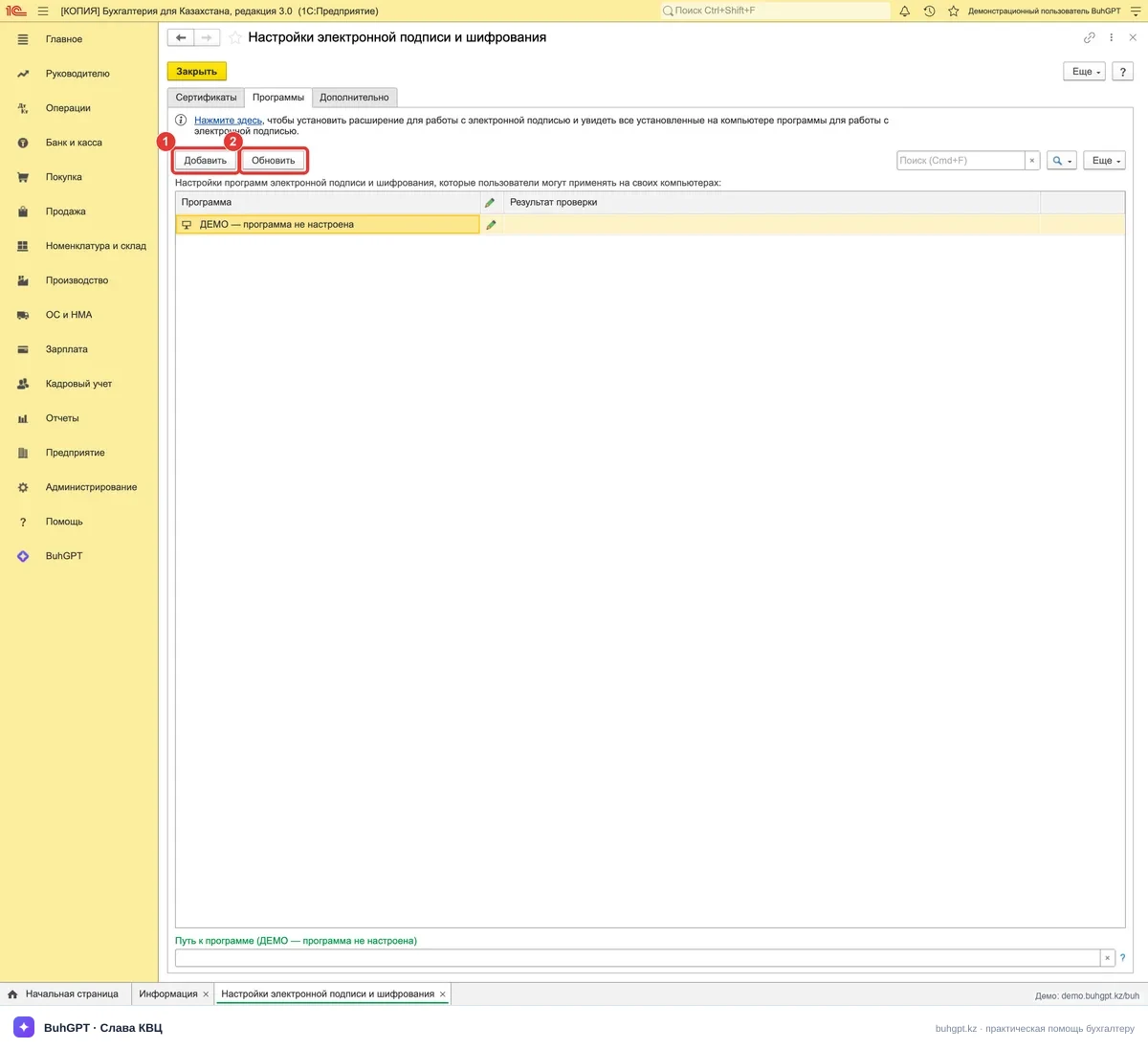
Path: Administration → Electronic Document Exchange → Digital Signature and Encryption → Digital Signature and Encryption Settings → Programs.
- Find the “Add” button.
- Find the “Update” button.
When teaching e-invoicing, the instructor should demonstrate the process in the training environment and explain separately that e-invoices are actually sent through the E-Invoice Information System. Use the E-Invoice Information System to check e-invoices yourself. For questions about obtaining a digital signature or checking its validity, consult the National Certification Authority.
Instructors for 1C and records management
If you are looking for a 1C instructor who teaches records management, agree on the course content in detail. Records management, HR documentation, payroll and accounting are distinct areas. Before training begins, specify exactly which documents the learner should be able to create, such as incoming and outgoing correspondence, orders, HR documents, contracts or source accounting documents.
If the course covers employment relations, the instructor can show how to enter and process data in the software. They should verify any legal conclusions against the Labour Code of the Republic of Kazakhstan. For social obligations, consult the Social Code of the Republic of Kazakhstan. For tax accounting, consult the 2026 Tax Code of the Republic of Kazakhstan. Any obligation, deadline or rate applied by the software must have a basis in an applicable legal provision.
Ask the instructor to cover one document from start to finish in a trial lesson. The learner should independently locate the form, fill it in with training data, post the document, check the resulting register entries and correct a deliberately introduced error. This exercise gives you a better sense of the quality of the teaching than an extended screen demonstration.
How to assess an instructor before paying for a course
Hold a short interview and ask practical questions. For example, ask the instructor to explain the difference between a directory, a document, a report and a technical setting. Then ask them to troubleshoot an error connecting an external component.
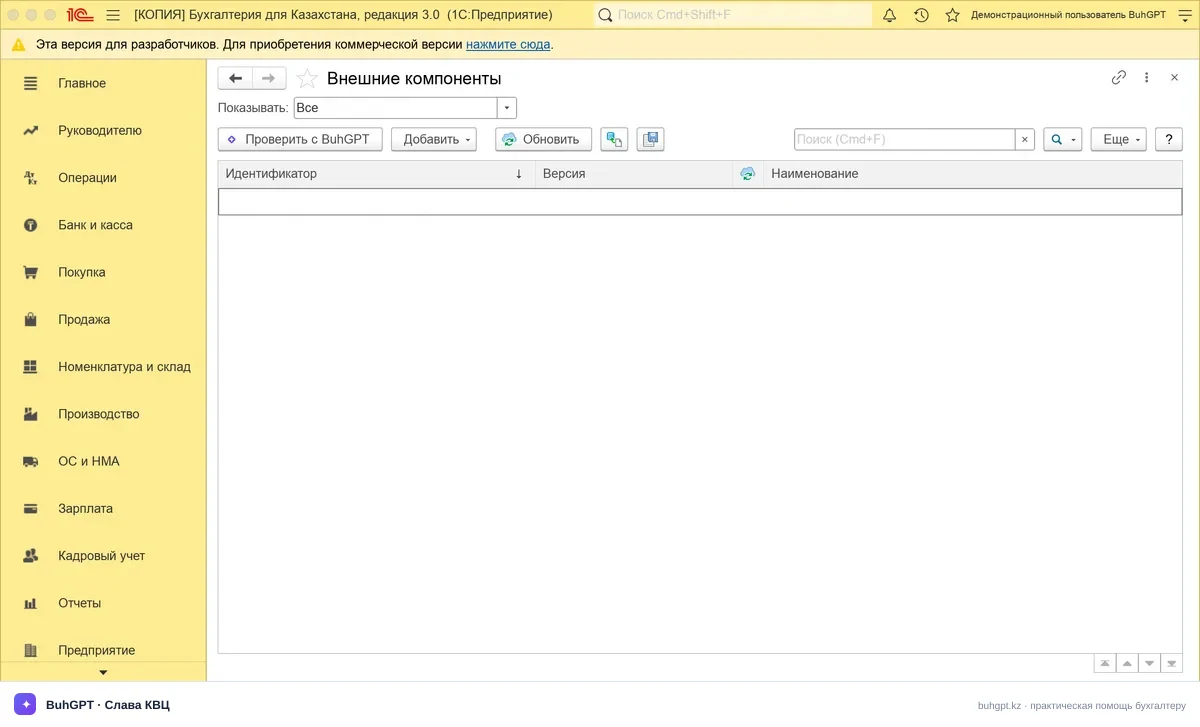
In release 3.0.74.2, you can open the “External Components” system directory via “Main Menu” → “All Functions” → “Directories” → “External Components”. If “All Functions” is hidden, the guide gives the following path: “Tools” → “Options” → “Show the ‘All Functions’ Command” (guide to external components).
Review the course materials as well. They should specify the release, the starting scenario, the sequence of steps and the expected result. Be wary of promises to teach “all of 1C,” courses without a training database, training that relies entirely on screen recordings and answers that come without a demonstration of how to verify them.
Before buying the course, agree in writing on what it will cover, who will check the assignments, whether access to the materials will continue and what the instructor will do if the configuration is updated. The contract or offer should set out all payment and training terms in writing.
Frequently asked questions
What does a 1C:Accounting instructor do? — A 1C:Accounting instructor teaches learners how to use a specific configuration and release. For accountants in Kazakhstan, the instructor should use the Kazakhstan configuration and keep software instruction separate from legal advice.
Does the instructor need experience as an accountant? — Practical accounting experience is useful, but teaching ability needs to be assessed separately. Check how well the instructor knows the configuration, how clearly they explain it and how effectively they help learners work through errors.
Can you learn 1C from video recordings alone? — Recordings are suitable for reviewing the material. To learn day-to-day tasks, it is more helpful to use a training database, complete assignments independently and get feedback on mistakes.
How can you tell if a course covers records management? — Ask for a list of the documents and tasks covered. If the syllabus only covers accounting documents and reports, you will need separate training in records management or HR recordkeeping.
Why does the 1C release matter? — Instructions must match the interface and features of the training database. For example, the paths to technical directories in this article were verified for 1C:Accounting for Kazakhstan, edition 3.0, release 3.0.74.2.
Sources
- “Digital Signature and Encryption Programs” directory
- “External Components” directory in 1C:Accounting for Kazakhstan
- 2026 Tax Code of the Republic of Kazakhstan — Adilet Legal Information System
- Labour Code of the Republic of Kazakhstan — Adilet Legal Information System
- Social Code of the Republic of Kazakhstan — Adilet Legal Information System
- E-Invoice Information System
- National Certification Authority