An accountant asks, “Could you go account by account, using 1070 as an example, and explain exactly what needs to change for 2027?” The short answer is to avoid renaming accounts or transferring balances just because a new year is starting. First, there must be approved amendments to the Standard Chart of Accounts and a 1C release that supports them. The sources provided do not confirm a separate chart of accounts for 2027. The Standard Chart of Accounts approved by Order No. 185 of the Minister of Finance dated 23 May 2007 is available (appendix to the Standard Chart of Accounts).
What does it mean to go account by account?
In practice, this request usually covers several different tasks: checking whether the working chart of accounts matches the Standard Chart of Accounts, finding manually added subaccounts, preparing analytical accounting details, or determining whether balances will need to be transferred after the 1C update. These tasks cannot be combined into a single operation to replace the chart of accounts.
Take account 1070 as an example. Until an official document is published, accountants should avoid deciding on their own that the account must be deleted, renamed, or replaced. Start by drawing up a mapping table with the following fields:
- current account in the database;
- account name;
- parent account;
- purpose of the account under the organization’s accounting policy;
- analytical dimensions used (subcontos);
- balances and turnover;
- documents that generate journal entries;
- account under the new official chart, to be entered only after publication;
- transition method: no change, rename, create a new subaccount, or transfer the balance.
This table answers the question of what to do with account 1070. Until an official mapping is available, leave the last part of the table blank. You can still take inventory of the database and identify areas that will need attention.
The Standard Chart of Accounts contains general ledger accounts, and the working database adds the analytical detail the organization needs. The same account code can therefore have different settings in two databases, including different analytical dimensions, currency tracking, quantity tracking, and subaccount purposes. Before making changes, compare the code, the name, and the full analytical accounting structure.
What to check in 1C before the transition
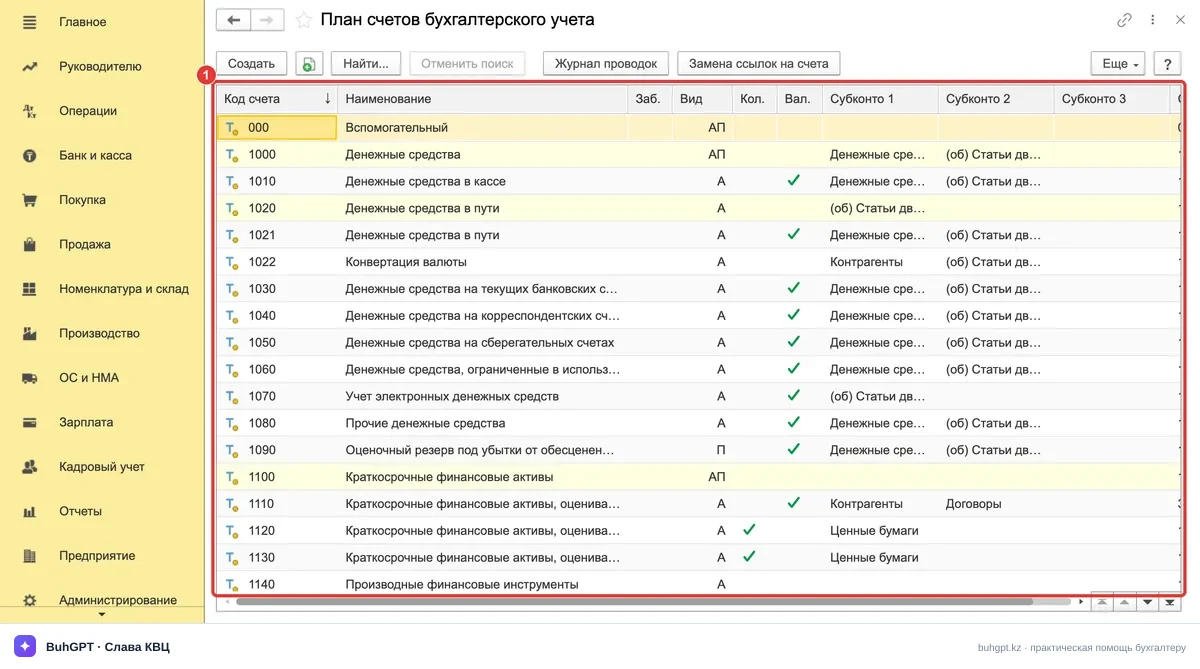
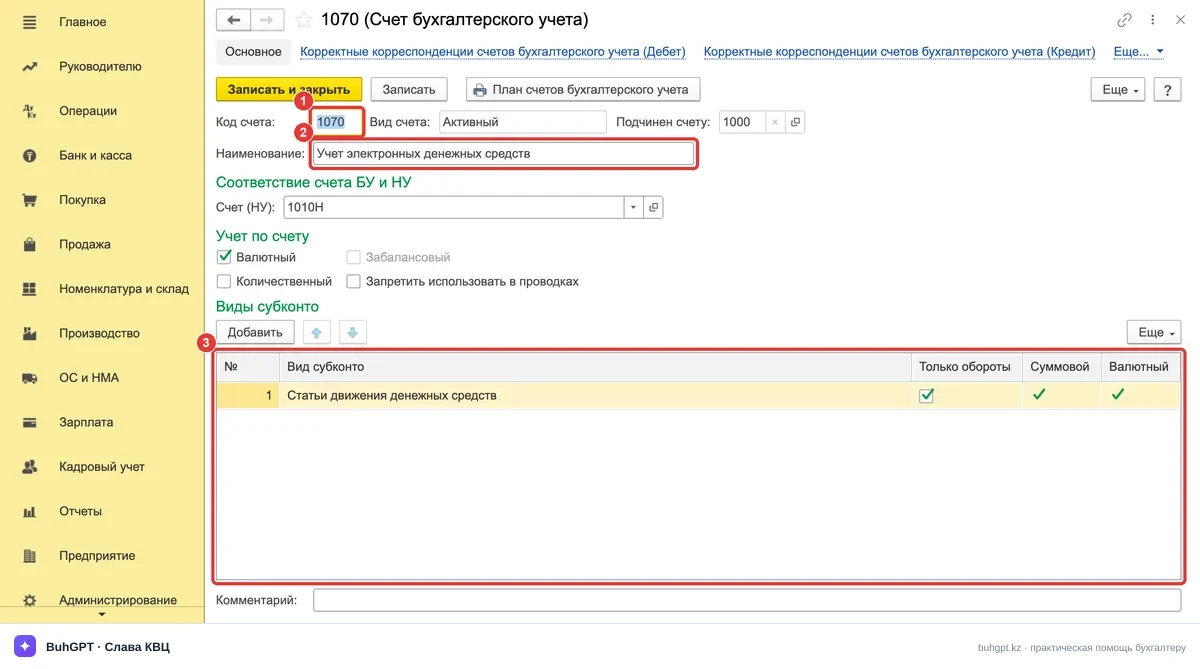
Start by working in a copy of the database. In the Accounting for Kazakhstan configuration, edition 3.0, go to Main → Chart of Accounts. Find the account by code and open its record. Check the code, name, account type, currency and quantity tracking settings, list of analytical dimensions, and parent account.
Next, generate the Trial Balance by Account for the account you are reviewing, using a period that covers the current balances. Expand the breakdown by analytical dimension and department. This shows which balances you will need to map if the official transition changes the account code or purpose.
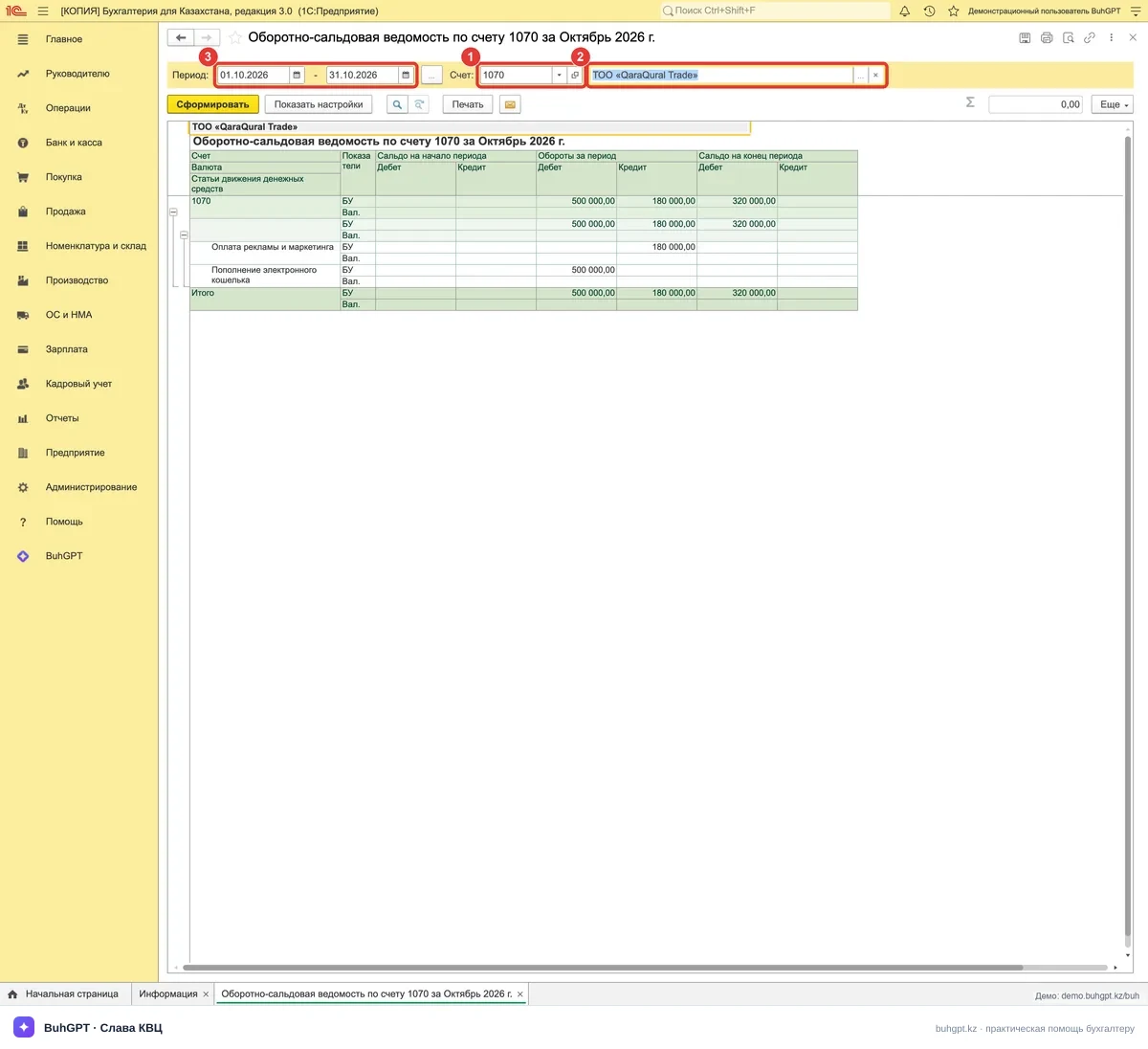
Menu path: Reports → Trial Balance by Account (Financial Accounting) → Generate.
- Check account 1070.
- Check the organization.
- Check the reporting period.
Separately, check standard transactions, manual journal entries, bank data import templates, data exchanges, and external processing tools that reference the account explicitly. If a setting or processing tool has the code hard-coded, renaming the chart of accounts entry alone will leave the associated routine using the old setting or cause it to return an error.
The technical documentation describes the 1C message “The chart of accounts does not contain an account with code %1.” The message is associated with the `ПланСчетов.Налоговый` object. When troubleshooting, check whether the parent account identified by code is populated and correct (description of the 1C message). Use this information when testing. Before creating a missing account manually, determine why the specific operation expects it.
What to do once the official amendments and the 1C release are available
Once the official document and configuration release are available, update a copy of the database and read the release notes. The notes should identify the accounts that were added or changed and say whether the release includes an automated transition utility. Use this information to finalize the mapping table.
Follow these steps for a safe transition:
- Record the configuration version and list of extensions.
- Create a backup before updating.
- Update the test copy of the database using a supported release.
- Compare the chart of accounts before and after the update.
- Review the account records and analytical details for account 1070 and other accounts in use.
- Run the transition utility if the developer included one in the release.
- Generate the trial balances again.
- Reconcile opening and closing balances, turnover, and analytical details.
- Post test documents for the main accounting areas.
- Apply the changes to the production database only after a successful reconciliation.
For example, suppose the database uses account 1070 with analytical tracking by bank account and currency. If the official document keeps the code and purpose the same, leave the balances in place and check the account record after the update. If the official document replaces the account, enter the new code, analytical dimensions, and transfer method in the mapping table, then verify that the balances match in the test database. Wait for official confirmation before assigning a new code, since the sources provided contain no such mapping.
Avoid creating an account with a code that is already in use or deleting an account with posted transactions. Update the standard configuration through the release process and avoid manually editing predefined accounts. These manual changes make future updates harder and can disrupt document posting, reporting, and data exchanges.
After the test update, open documents from each material accounting area and check the journal entries they generated. For banking transactions, check cash accounts and bank account details. For inventory, check inventory accounts and warehouse details. For settlements, check counterparties and contracts. Review the generated journal entries as well as the account records.
What accountants can prepare now
While waiting for confirmed rules for 2027, prepare an internal account register. Include only accounts and subaccounts actually in use, along with the responsible accounting area, analytical dimensions, balance, source documents that record transactions, and external data exchanges. The register will help you quickly assess the impact of official changes without rushing to restructure the entire database.
Assign one of these statuses to each account: “standard, unchanged,” “added by the organization,” “used by an external processing tool,” “has a balance,” or “has manual transactions.” Pay particular attention to manually created accounts and accounts whose codes appear in exchange rules or journal entry templates.
Prepare three documents that can be checked: an export of the current chart of accounts, trial balances for the accounts in use, and a mapping table. Once the official chart is published, add the confirmed new accounts and a reference to the applicable provision to the table. Verify the text of the regulatory document in the Adilet Legal Information System and use it as the authoritative source.
Frequently asked questions
Do I need to change account 1070 now? — The mention of 2027 alone gives no reason to change the account. Wait for the official amendments and the 1C release that implements the transition.
Can I manually add future accounts to the chart of accounts? — Adding accounts before their codes and purposes are confirmed creates a risk of duplicate accounts and incorrect journal entries. Check the official chart first, then review how the configuration update handles the changes.
What should I do if 1C reports that the chart of accounts does not contain an account with the specified code? — Check which chart of accounts object the operation uses, whether the account exists, and whether its parent account is set correctly. A separate technical description is available for the error associated with the `ПланСчетов.Налоговый` object.
Do I need to transfer balances after updating? — Only if the official transition changes an account you use and the release provides a transfer procedure. Verify the result in the test database using the trial balance and its analytical breakdown.
Where can I verify the official text of the chart of accounts? — In the Adilet Legal Information System. The materials provided confirm the appendix to the Standard Chart of Accounts and do not include a separate chart for 2027.