In 2026, cloud accounting means working with an accounting database over the internet. The current release of “1C:Accounting for Kazakhstan” is 3.0.74.2, dated 27 August 2026, and the current release of “1C:Payroll and HR Management for Kazakhstan” is 3.1.37.4, dated 22 September 2026. Before migrating, check the database release, create a backup, and agree on the number of users and databases. Reconcile the data after migration.
What is cloud-based 1C:Accounting?
Searches for “cloud 1C accounting,” “1C accounting in the cloud,” “1C cloud accounting,” and “cloud accounting with 1C” generally refer to the same setup. The application database is hosted on remote infrastructure, and the accountant connects to it over the internet from authorized devices.
Kazakhstan-specific configurations available for cloud use may include “1C:Accounting for Kazakhstan”, “1C:Retail for Kazakhstan”, and “1C:Payroll and HR Management for Kazakhstan”. The selected plan determines which applications are included, how many databases are available, and how many concurrent sessions are allowed. Confirm these details before paying, especially if the accountant handles multiple organizations or several employees use the database at the same time.
Cloud hosting covers technical tasks such as hosting the software, providing remote access, applying updates, and making backups, subject to the terms of the provider agreement. The accountant remains responsible for recording source documents on time, ensuring transactions are recorded correctly, maintaining accounting policies, and preparing reports. File tax reporting forms and view your taxpayer account through the Taxpayer Portal of the Integrated Tax Administration Information System. Use the Electronic Invoice Information System (EIIS) for electronic invoices, the virtual warehouse, and accompanying waybills for goods.
Who can benefit from cloud accounting in Kazakhstan?
Cloud accounting is convenient for accountants who work remotely, handle multiple organizations, or need to access the database from different locations. It also suits companies that have no plans to host the accounting system on their own server and maintain it themselves.
Before signing up, determine the following:
which Kazakhstan-specific configuration the company needs;
whether the production database is running a release in the current configuration series;
how many employees will work at the same time;
how many application databases are needed;
whether customization, training, or specialist support is needed;
how user permissions will be assigned;
who will prepare, migrate, and validate the database;
which additional services and integrations are needed.
Review the agreement for details on advisory support, how configuration updates are handled, how often backups are made, how long they are retained, and the terms for restoring the database. If the company needs customizations, confirm in advance that they can be migrated and used in the cloud environment. Check that extensions and external processing modules are compatible with the current release before starting the migration.
The company should establish internal procedures for database access. Assign permissions based on job responsibilities and promptly revoke access for former employees. Give each user an individual account and prohibit employees from sharing usernames and passwords with colleagues. Specify which employees can change accounting settings, close an accounting period, generate reports, and export data.
How much does cloud-based 1C accounting cost?
Cloud accounting pricing varies with the configuration, number of concurrent sessions, number of databases, subscription term, storage capacity, support, and additional work. Request an itemized quote that distinguishes the recurring subscription fee from one-time migration and setup costs.
When comparing cloud and local software, consider all costs, including the subscription fee. A local database may require a server or workstation, hardware maintenance, software updates, backups, and secure remote access. For a cloud plan, check the number of databases and sessions included, available storage, what support covers, how updates are handled, and the cost of migration, recovery, and additional features.
Include the following tasks as separate items in the migration estimate:
reviewing the condition and release of the existing database;
creating and verifying a backup;
uploading the database to the cloud environment;
checking extensions, external processing modules, and data exchanges;
setting up user accounts and assigning permissions;
reconciling the data before and after migration;
training employees on how to connect to the cloud database;
providing ongoing support and making further customizations.
Before paying, document the price, the plan term, the work included, and the payment terms for additional services. Confirm how many databases and concurrent sessions the company needs, whether updates and backups are included, who restores data after a failure, and how long recovery takes.
How to migrate a database to the cloud
Before migrating, take inventory of the application databases. Identify the production database, check its release, and decide which archive copies to retain. In “1C:Accounting for Kazakhstan” 3.0.74.x, check the installed release number under Help → About. Update the database to a release supported by the chosen cloud platform before handing the file to the migration specialist.
Follow these steps to migrate:
Choose the configuration and determine how many databases and concurrent sessions you need.
Agree on the plan, additional services, update procedures, and scope of support.
Check the release number of the database you are migrating under Help → About.
Confirm that all scheduled operations and data exchanges have completed.
Create a backup before transferring the data.
Hand the prepared database to the specialist responsible for uploading it to the cloud environment.
Set up individual user accounts and assign permissions.
Check that the main sections, documents, directories, and reports open.
Compare key figures in the source and migrated databases for the same period.
Run a test transaction and verify the result before switching to regular work in the cloud.
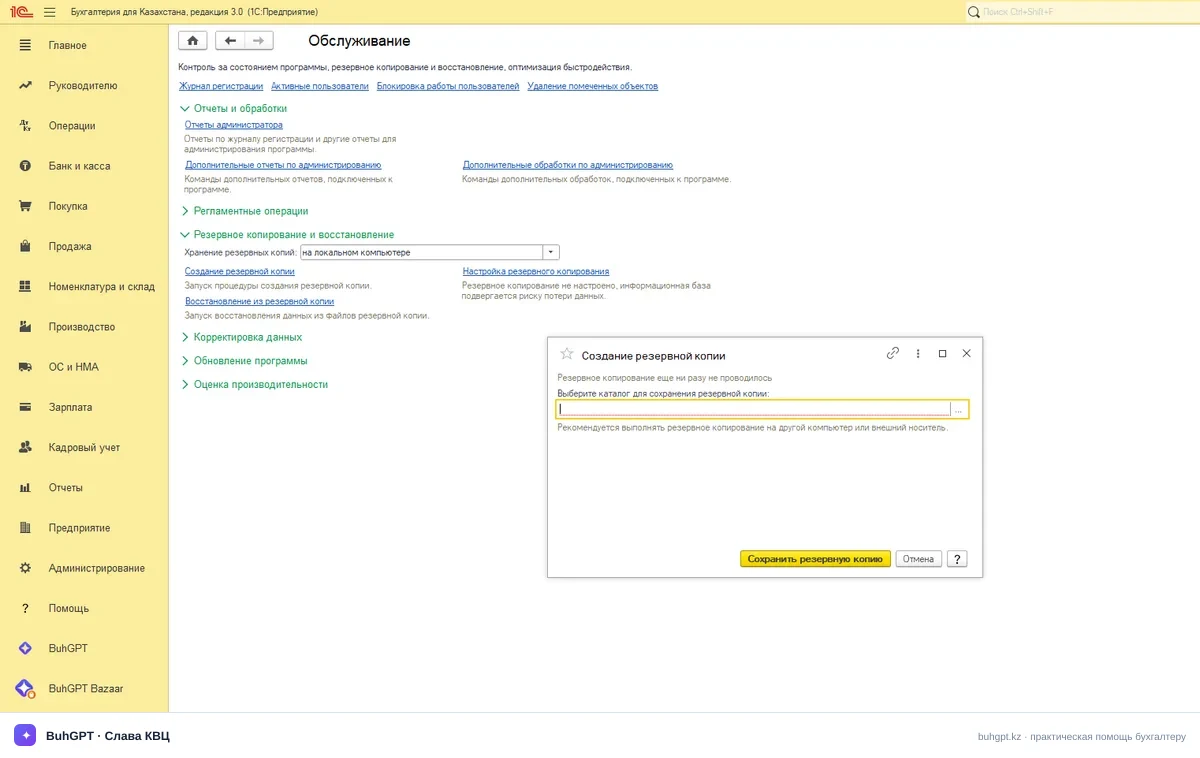
In “1C:Accounting for Kazakhstan” 3.0.74.x, create a backup under Administration → Maintenance → Backup and Restore → Create Backup. Store the backup file separately from the production database and retain it until the post-migration reconciliation is complete.
When validating the migrated database, check the organizations and accounting policies, users and permissions, directories, balances, trial balances, settlements with counterparties, personnel records, accruals, and configured data exchanges. Generate reconciliation reports in the source and cloud databases as of the same date. Resolve any discrepancies before employees start entering documents exclusively in the new database.
A production cloud database and a cloud archive serve different purposes. Accountants use the production cloud system to enter documents and generate reports online each day. A cloud archive stores backups for data recovery. When choosing a plan, check whether archiving is included, how often backups are made, and how long they are retained.
Frequently asked questions
What does “1C accounting in the cloud” mean? — It means working with a 1C application database over the internet. The database is hosted on remote infrastructure, and employees connect using individual accounts with assigned permissions.
Which applications for Kazakhstan can run in the cloud? — Cloud platforms can host the Kazakhstan-specific configurations “1C:Accounting for Kazakhstan”, “1C:Retail for Kazakhstan”, and “1C:Payroll and HR Management for Kazakhstan”. Confirm that the service agreement specifies the availability of the configuration and release you need.
Can an existing 1C database be migrated to the cloud? — Yes. Before migration, check the release, create a backup, and confirm compatibility for extensions and data exchanges. After uploading the database, compare key figures in the source and cloud databases as of the same date.
How many users can work at the same time? — The plan determines the number of concurrent sessions. Count the maximum number of users who will need to work in the database at the same time.
How does a production cloud database differ from a cloud archive? — The accountant enters documents and generates reports in the production database each day. A cloud archive stores backups used to restore data.
Sources
Official 1C:Fresh Kazakhstan website