
Correctly filled accounting accounts for inventory are the foundation on which the entire automation of document processing in 1C relies. If the register is configured correctly, the program automatically fills in the necessary accounts for receipts, sales, and transfers, leaving the accountant only to verify the result. However, if the configuration is "floating," errors are replicated in all documents and surface during the month-end closing or reconciliation with the trial balance. Let's break down the topic as if we were analyzing a typical database: step by step, with caveats and examples.
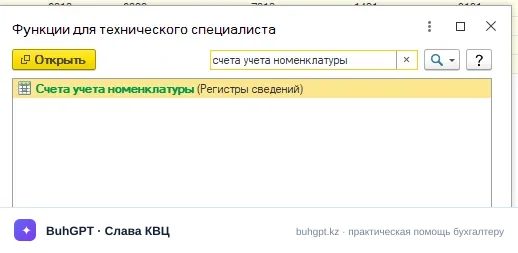
What We Configure and Why It Is Necessary
In typical configurations of 1C for Kazakhstan, there is a special information register — "Accounting Accounts for Inventory." This is a kind of directory of rules that the program uses to determine which accounting account a particular item will fall into when processing documents.
Each line of the register is a set of accounts for a specific combination of conditions: a specific inventory item or group (folder) of inventory, warehouse, organization, and type of operation. When you process, for example, a receipt of goods, the program refers to this register, finds the appropriate line, and takes the inventory accounts, revenue accounts, cost accounts, accounts for settlements, and VAT accounts from it.
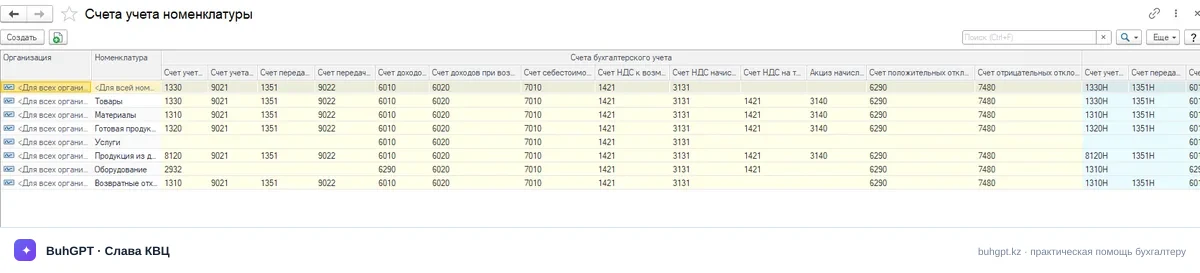
Key Principle — priority from specific to general. If a separate line is specified for a specific inventory item, it is used. If such a line does not exist, the program moves up to the next level: it looks for a setting for the group (folder), then for the organization as a whole, and only then uses the "universal" line where the clarifying fields are not filled in. This allows for one general rule to be set for the entire database and to redefine it for specific items or warehouses.
Who This Concerns
The configuration is relevant for any organization that keeps records of inventory, goods, finished products, and materials in 1C. It is especially important in three situations:
- Starting work in a new database — before entering the first documents, it makes sense to check and supplement the register to avoid having to redo entries retroactively. - Emergence of a new type of activity — for example, a company that was trading goods has started producing products: separate accounting accounts will be needed. - Reclassification of inventory — if an item was mistakenly accounted for on the wrong account (goods instead of materials and vice versa), the correction begins with this register.
I would like to specifically mention chief accountants and specialists who submit accounts for audit: incorrect accounting accounts are one of the most common reasons for discrepancies between inventory analytics and synthetic accounts of the Typical Chart of Accounts.
How to Perform the Configuration Step by Step
The general logic is the same for most configurations; only the names of the menu sections differ.
Step 1. Open the register. Find it through the section dedicated to inventory and warehouse (usually "Warehouse" / "Directories" / "Inventory"), item "Accounting Accounts for Inventory." You can also open the register directly from the inventory item card via the corresponding link.
Step 2. Determine the level of configuration. Decide for what purpose you are creating the rule: for the entire organization, for a group of inventory, or for a specific item. Practical advice — start with general rules at the group level ("Goods," "Materials," "Finished Products"), and create individual lines only where exceptions are truly needed. The fewer lines, the easier it is to maintain the database.
Step 3. Fill in the details of the line. In the new line, specify:
- Organization (if accounting is conducted for several legal entities); - Inventory or group — leave the field blank if the rule is universal; - Warehouse — if necessary, to separate accounting by storage locations; - Accounting accounts — inventory account, revenue account from sales, cost account, VAT accounts, accounts for settlements with counterparties.
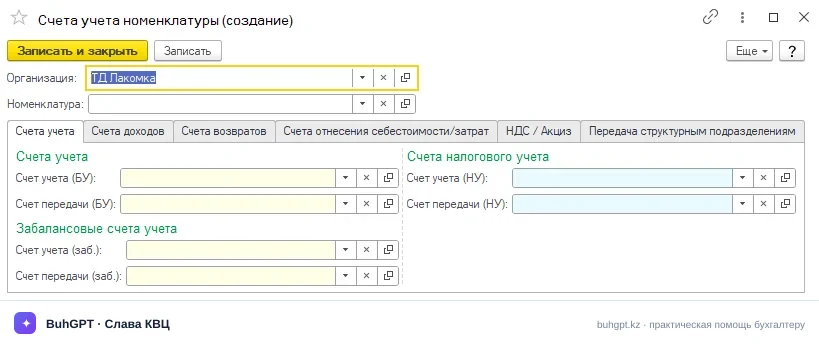
Step 4. Reconcile accounts with the Typical Chart of Accounts. Select accounts according to the economic meaning of the item. For goods, materials, and finished products, use accounts from the inventory subsection; for revenue from sales — revenue accounts; for cost write-offs — corresponding expense accounts; for VAT — tax accounting accounts. Take specific numbers from your working chart of accounts: it should be based on the Typical Chart of Accounts for accounting approved by the authorized body of the RK and the accounting policy of the organization.
Step 5. Test with a document. Create a test document for receipt or sale based on the configured inventory and ensure that the accounts are filled in correctly. This is the most reliable check — it shows how the priority of lines actually worked.
Typical Errors and Caveats
In practice, the following problems are most commonly encountered.
Empty register or incomplete rules. If no suitable line is found for the inventory, the document will either not be processed or will require manual account entry. Create at least one universal line in the register with unfilled clarifying fields.
Duplicates and priority conflicts. Multiple lines at different levels may override each other in ways you did not expect. If the account being filled in is "not the right one," look for a more specific line (for a specific inventory item or warehouse) that overrides the general rule.
Mixing types of inventory. Goods for resale, raw materials, and finished products are accounted for on different accounts. An error at this level distorts both the cost and the financial result.
Retroactive correction. Changing the register does not automatically reprocess already created documents. To have old transactions fall under new accounts, it will be necessary to reprocess documents for the period — plan this in advance and make a backup.
Accounting policy is primary. The register only automates what is established in the accounting policy and working chart of accounts. First, methodology, then program configuration, not the other way around.
Deadlines and Organization of Work
There are no strict regulatory deadlines specifically for configuring the register — this is an internal technical operation. However, there are reasonable guidelines: basic configuration should be completed before entering primary documents into the new database; adjustments should be made before closing the reporting period to avoid reprocessing a large volume of documents. All changes in accounting methodology that affect accounts should be formalized through the updating of the accounting policy.
Frequently Asked Questions
What happens if the accounting account is not found during processing? — The program will either not process the document or will prompt you to specify accounts manually. To avoid this, create a universal line in the register without clarifying fields.
How to set an individual account for one item without changing the others? — Create a separate line in the register specifically for this inventory item. Thanks to the priority "from specific to general," it will override the general rule only for it.
Will the entries in old documents change after the register is corrected? — No, they will not be recalculated automatically. It is necessary to reprocess documents for the required period, making a backup of the database beforehand.
Can different accounts be set for different warehouses? — Yes, the "Warehouse" field in the register line allows for separating accounting by storage locations if this is provided for in your accounting policy.
Where to get specific account numbers? — From the working chart of accounts of the organization, built on the basis of the Typical Chart of Accounts for accounting of the RK and established by the accounting policy.
Sources
- Information and Legal System of Regulatory Legal Acts of the RK "Әділет" - Official website of 1C in Kazakhstan