A new version 3.1.37 of the standard 1C:Payroll and HR Management 8 for Kazakhstan solution has been released.
First of all, to work with the new version 3.1.37 of the application, you must install platform version 8.3.27.2214.
The main changes in the release affected virtually all accounting sections:
1.HR records.
2.Timekeeping and recording leave and compensatory time off.
3.Accounting for advances and payments.
4.Payroll calculation.
5.Financial accounting and reserve accounting.
An employee may work several hours on a non-working day rather than a full day, then accumulate those hours and take a day off in lieu. Previously, accumulated hours, their conversion into days and monitoring of the period in which they could be used (no more than one year) were handled manually. The new version allows a day off in lieu to be used for a partially worked non-working day or public holiday; that is, the accounting for compensatory time-off hours has been automated using a chronological write-off algorithm and one-year time-limit monitoring.
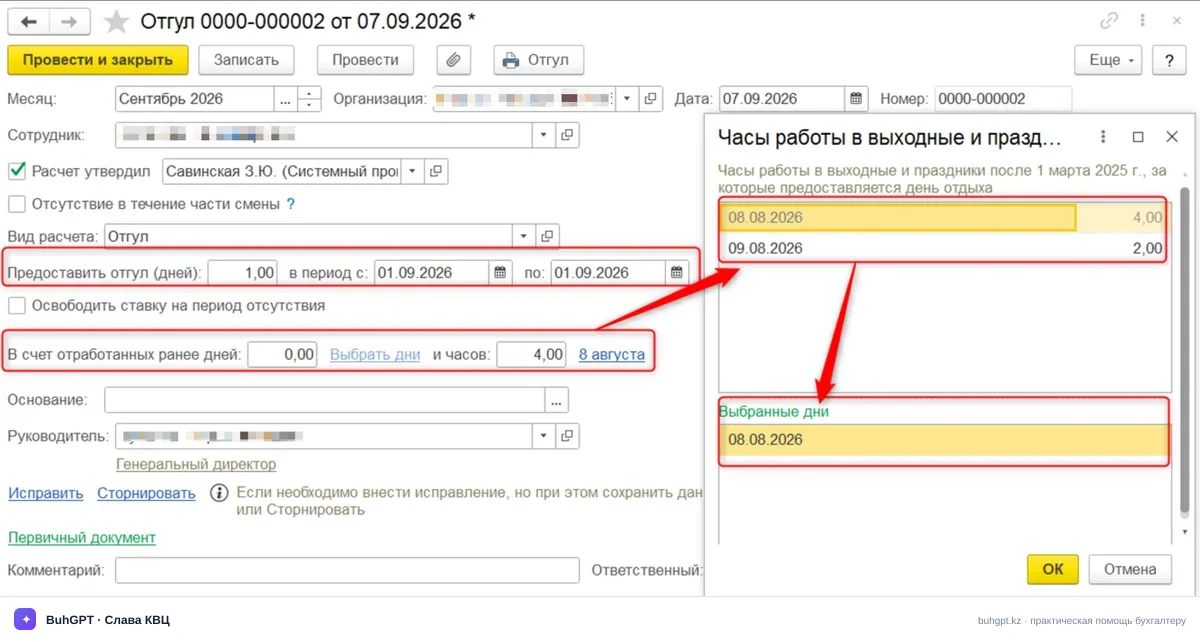
In the Compensatory Time Off and Leave documents, the application itself prompts the user to select specific dates and hours worked. During automatic completion, full days are written off first, followed by hours, starting with the earliest ones. Information is also displayed about unused days and hours for which compensatory time off is due.
For example, due to operational requirements, an employee previously worked on non-working days: 4 hours on 8 August and 2 hours on 9 August. If the employee takes one day off in lieu, the days field is completed with 1 (1 September). The application then automatically determines how many hours the employee has by day. You can independently select how many hours and for which days should be used toward the current compensatory time off. However, only a whole day can be selected; that is, it is not possible to select several hours from different days.
But what should be done if an employee has not managed to use the accumulated compensatory time off before the employment contract is terminated? Previously, this required additional actions, but a compensation mechanism has now been added to the termination document.
When an employment contract is terminated, all unused days and hours of rest for work on non-working days must be compensated in cash.
Previously, the payroll specialist had to calculate the remaining compensatory time off manually and register separate one-time accruals.
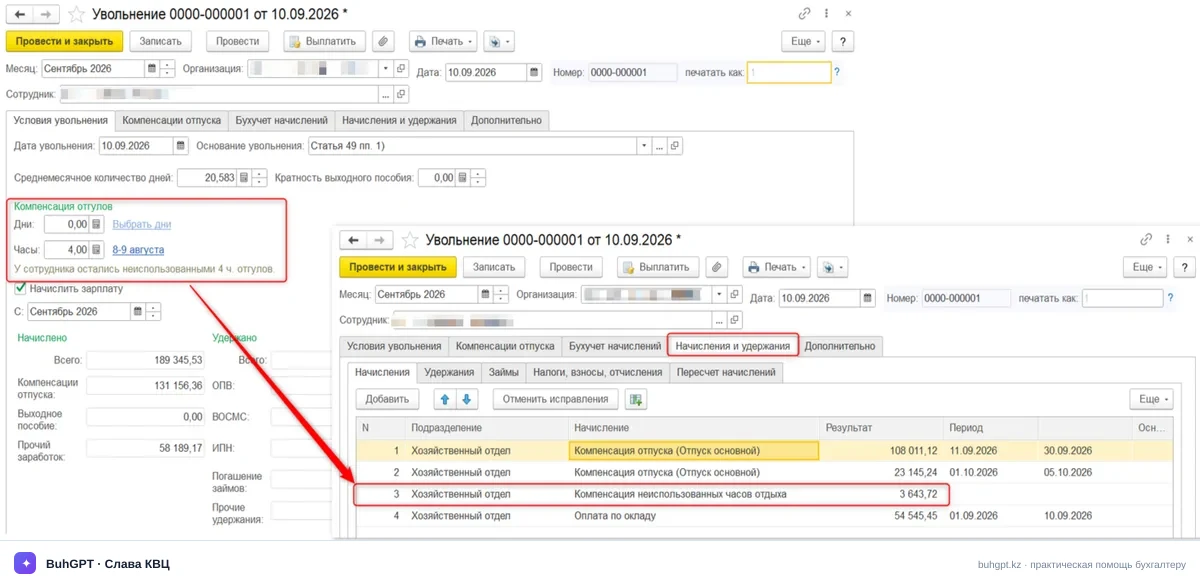
The new version introduces an automatic compensatory time-off compensation section in termination documents.
The application automatically calculates the balance of unused compensatory time-off days and hours, enters them in a special section where they can be adjusted if necessary, and calculates the Compensation for unused days/hours of rest accrual.
The leave accounting mechanism has also changed in the new version.
Certain categories of employees are granted additional leave days. For example, leave for hazardous working conditions, length of service, etc. Previously, when preparing documents, a type of additional leave could accidentally be selected for an employee to whom it had not been assigned in the HR records, resulting in excessive leave payments and distorted balances. The new version introduces automatic background verification of entitlement to additional leave when a document is entered. Let us consider how this works. When a line for additional leave is added for an employee for whom the database contains no HR document confirming this entitlement, the system displays a warning.
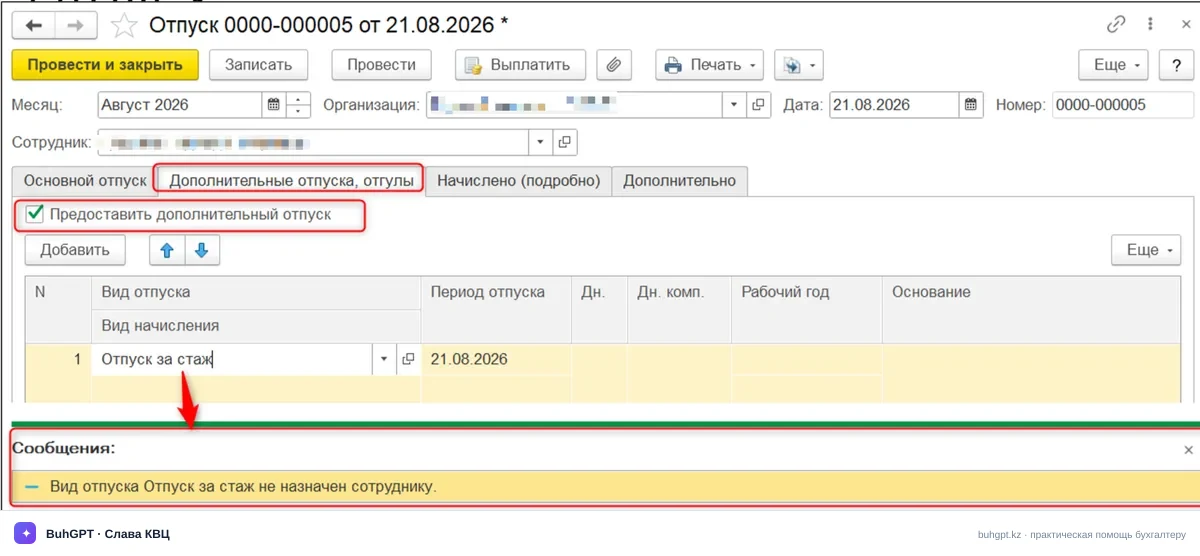
This verification helps prevent leave from being recorded incorrectly before the document is posted.
In situations where an employee has already been granted leave but circumstances arise that require it to be extended or rescheduled, the new version of the application includes a mechanism for recalculating leave balances for earlier working periods. For example, an employee takes leave consisting of basic leave for the previous year and additional leave for the current year. During the leave, the employee falls ill and submits a sick leave certificate. By default, a recall or sick leave supersedes the type of leave on whose dates it actually falls. As a result, leave for the new year is used up, while old unused balances remain outstanding. The new version introduces a setting for automatically recalculating the sequence of working years when correcting leave. This is done using the HR records setting Recalculate the duration of leave types in the event of illness or recall from leave. Let us consider how this works using an example.
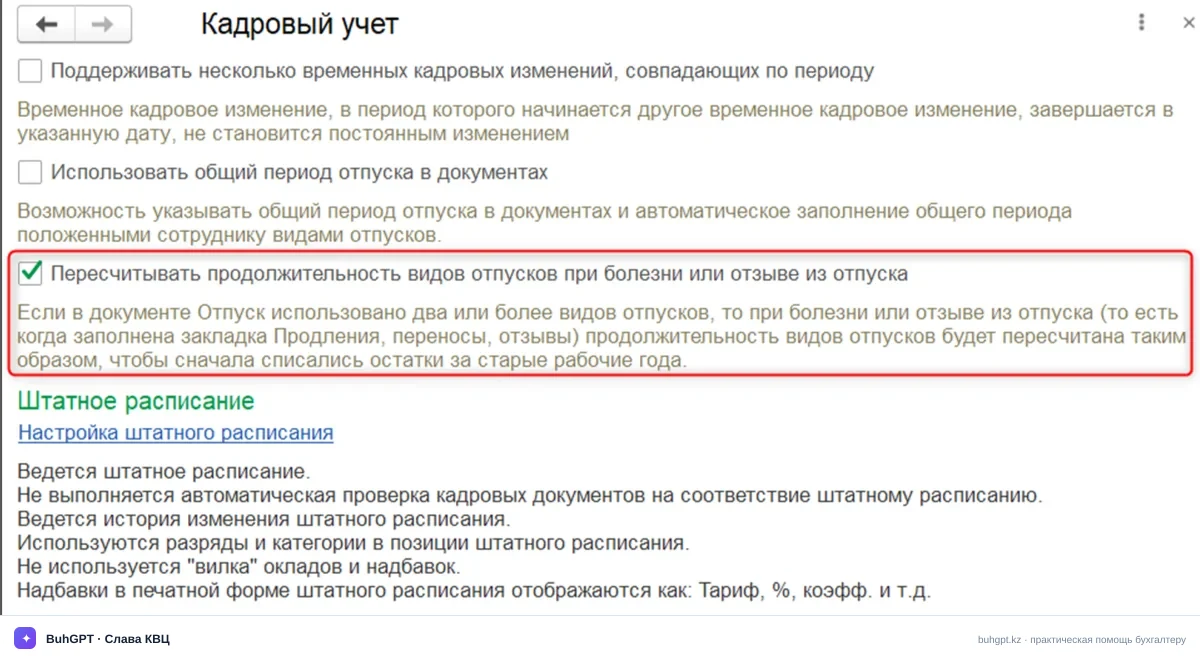
The employee has the following balance:
- basic leave, starting from 2024 (the leave balance for the 2024 – 2025 working year is 5 days);
- additional leave (for hazardous working conditions), starting from 2024 (the leave balance for the 2024 – 2025 working year is 5 days).
The employee takes leave from 1 August for 20 days:
• 15 days of basic leave;
• 5 days of additional leave (for hazardous working conditions).
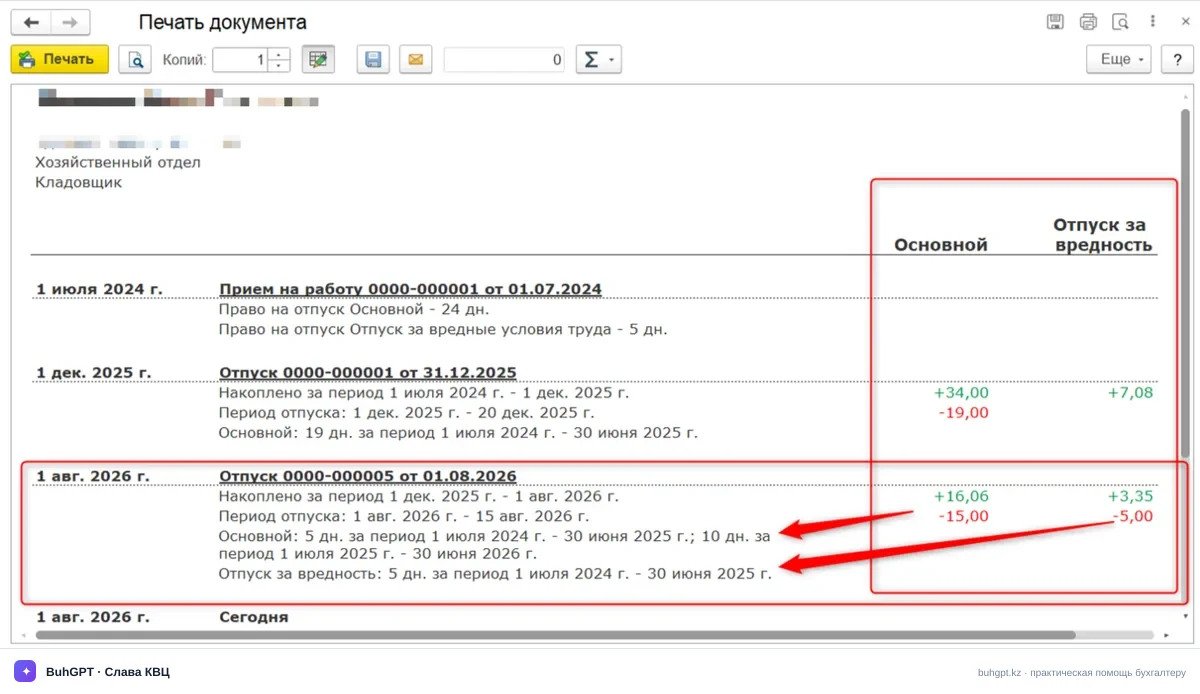
Thus, the employee's leave consists of two types: basic leave from 01.08 to 15.08 and additional leave from 16.08 to 20.08.
While on leave, the employee falls ill and submits a sick leave certificate for the period from 16.08 to 20.08. When the sick leave certificate is calculated, the leave is superseded for the period of illness, making it necessary to correct the calculation of leave days.
To adjust the leave, a new Leave document is created. When the document is created, the system asks whether the leave period should be extended by the days of illness or shortened to the start date of the sick leave certificate.
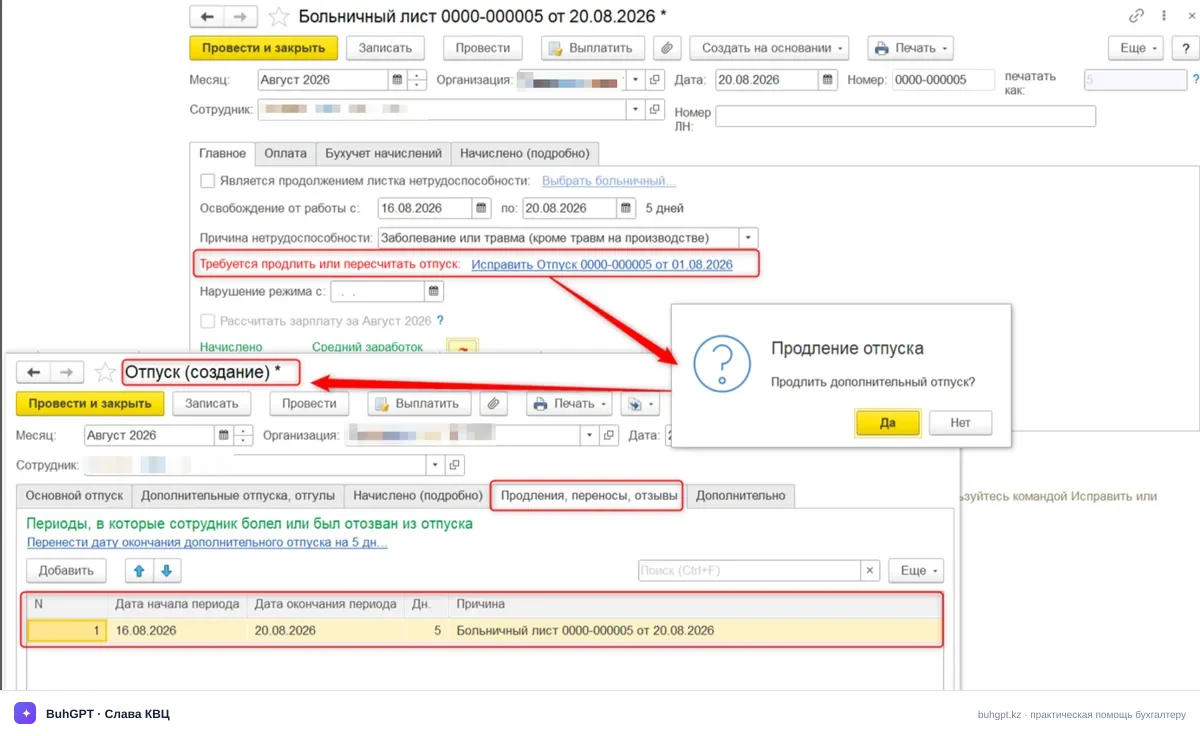
In this example, the leave is not extended, and when a new Leave document is created, the leave dates remain unchanged, but the leave from 16.08 to 20.08 is superseded by sick leave.
If the HR records setting Recalculate the duration of leave types in the event of illness or recall from leave is disabled, by default the sick leave supersedes the additional leave (for hazardous working conditions), since the sick leave period falls within this type of leave.
As a result, only 15 days of basic leave will be used, while 5 days of additional leave are “returned” to the employee.
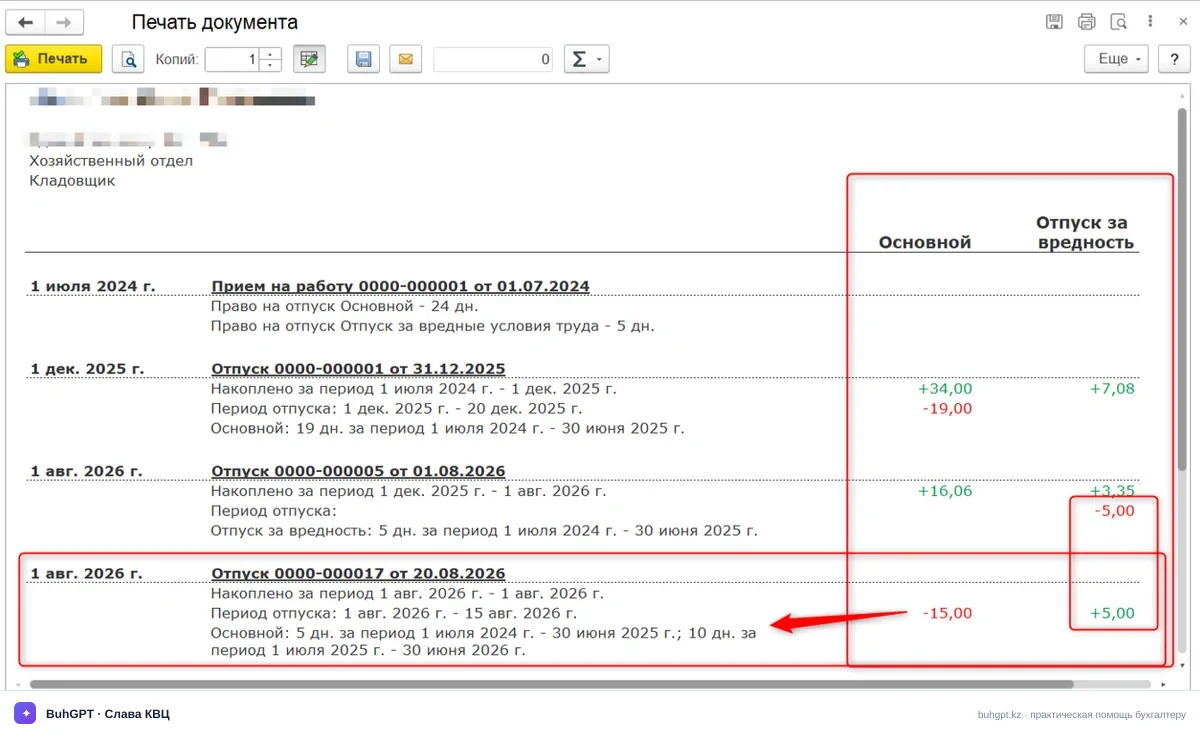
When the setting is enabled, upon entry of a sick leave certificate or recall, the system automatically “shifts” the boundaries of the leave types so that the earliest working period is accounted for first among the days used.Only the leave types specified in the document being corrected are used.In this way, if the setting is enabled, balances for earlier working periods are written off first.
In this example, basic leave will be written off in the amount of 5 days for 2024-2025, 5 days for 2025-2026 and 5 days of additional leave (for hazardous working conditions) for the 2024-2025 working year.
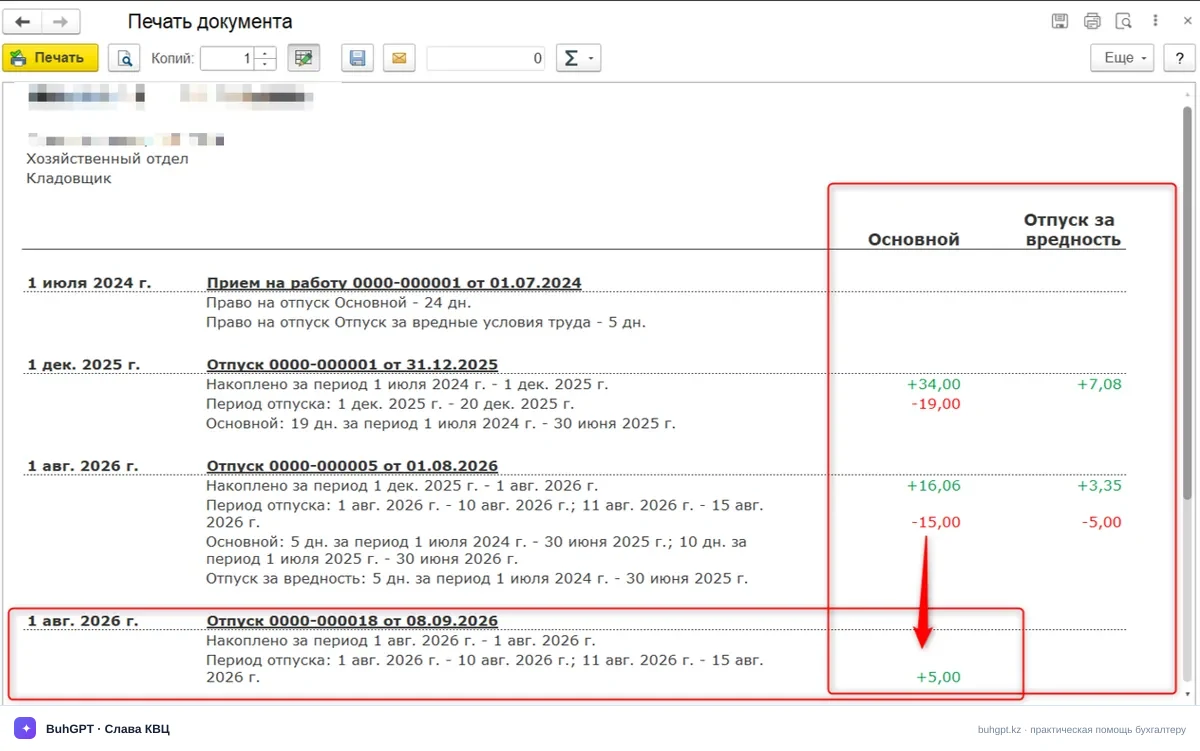
As a result, 10 days of basic leave and 5 days of additional leave will be used, while the other 5 days of basic leave previously written off are “returned” to the employee.
In this case, the earliest working period is accounted for first.