Updated 26.11.2026: From 20 November 2026, Form 328.00 must be filed in the version prescribed by Order No. 734 of the Ministry of Finance of the Republic of Kazakhstan dated 02.11.2026, with a new Appendix 2 (currency contract, VAT in digital tenge, NTIN, gross weight). For details, see “New Form 328.00 from 20 November 2026”.
Form 328.00 is prepared in 1C using the “Application for the Import of Goods and Payment of Indirect Taxes” document. The data can then be exported as XML for submission through the tax reporting system. Release 3.0.63.1 of “Accounting for Kazakhstan” supports the Tax Reporting Processing System (SONO) template form_328_00_v10_r120 dated 30 December 2024. Before preparing the application in 2026, check whether your configuration version supports the current template.
What is Form 328.00 in 1C?
The 1C materials refer to Form 328.00 as the application for the import of goods and payment of indirect taxes. Use this full document name when searching the accounting system, since searching for “Form 328” alone may miss it.
“Accounting for Kazakhstan, Edition 3.0,” version 3.0.63.1, supports exporting this document as XML using the form_328_00_v10_r120 template. The same feature is listed for the Basic edition and for version 3.0.63.1 of “Accounting for Construction Companies in Kazakhstan.”
The presence of the document in the database is insufficient to establish that its format is valid for 2026 reporting. Release 3.0.63.1 came out in January 2025 and includes a template dated December 2024. First, confirm the full release number of your installation and check the published release notes.
Check the tax treatment of transactions against the current version of the Tax Code of the Republic of Kazakhstan. Verify the applicable provision and the circumstances of the transaction before specifying a tax rate, an application filing deadline, or a payment deadline.
How to prepare the data and export the XML file
Use the following steps to prepare and check the application:
- Confirm the configuration and its full release number. Support for the required document has been confirmed for three configurations at version 3.0.63.1: the standard, Basic, and construction accounting editions.
- Find the “Application for the Import of Goods and Payment of Indirect Taxes” document and check the details of the organization, the counterparty, and the imported goods against the source documents.
- Reconcile the amounts and other information in the application with the accounting records. Pay particular attention to the parties’ identifiers, the names and quantities of goods, the amounts, and the supporting document details.
- Post the document and check the result. Fix any errors before generating the file. The XML carries over the data you entered, so verify the figures and tax treatment separately.
- Export the application as XML and save the file in the organization’s working folder under a clear filename that includes the period and the counterparty.
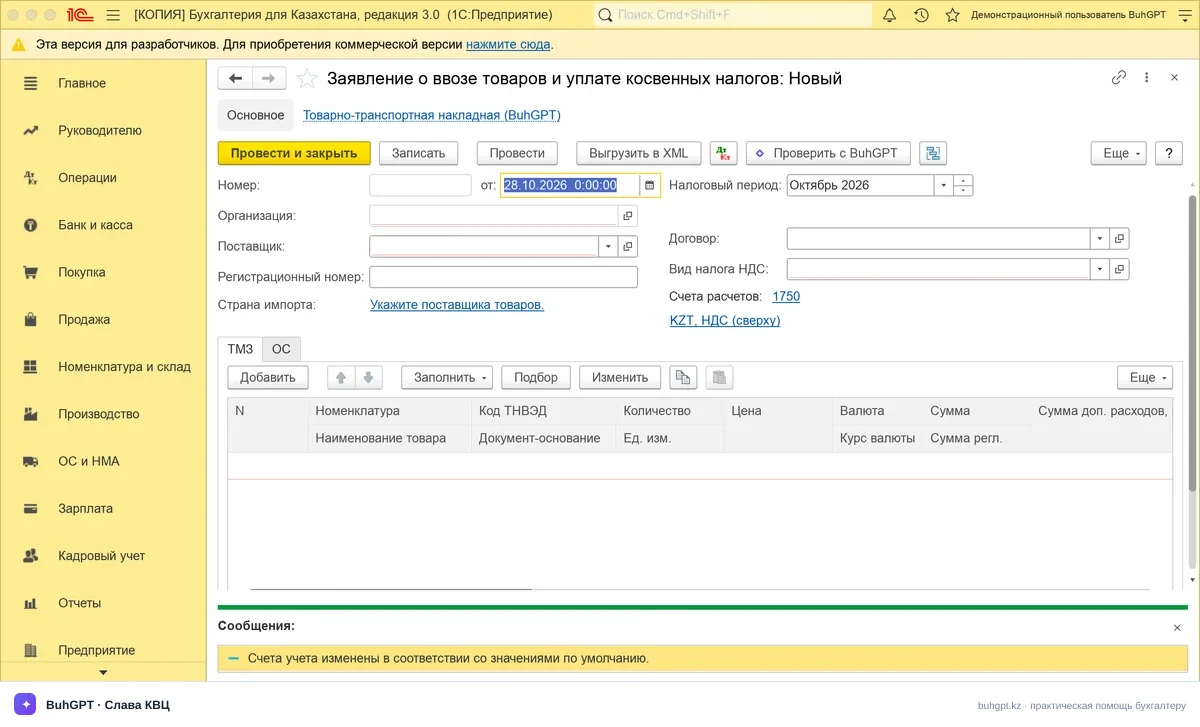
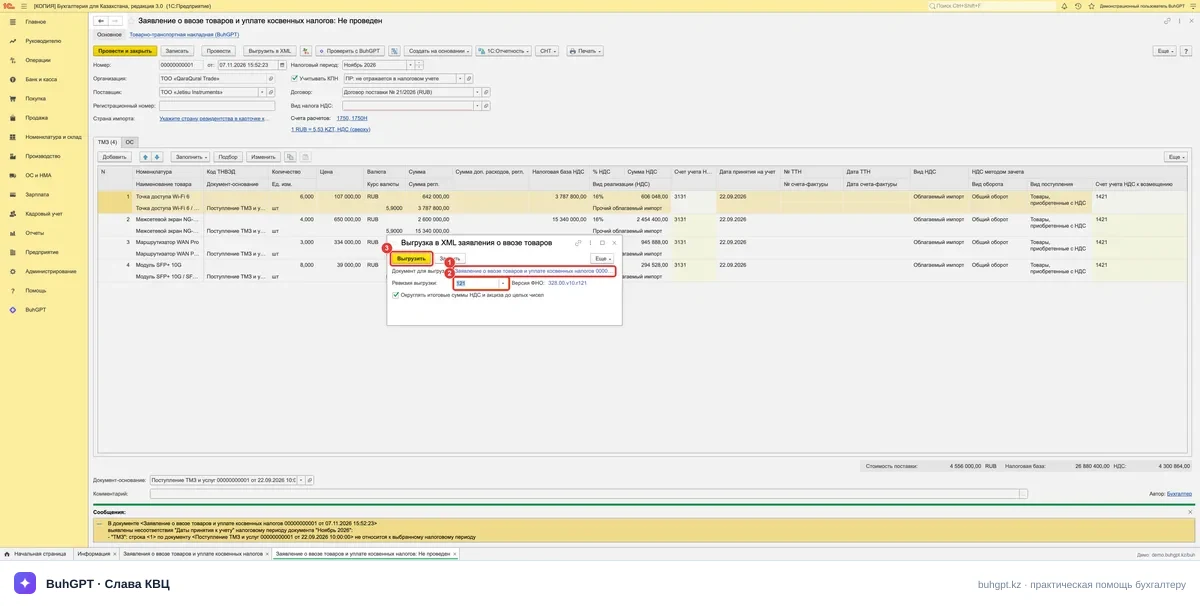
Menu path: Purchases → Applications for the Import of Goods and Payment of Indirect Taxes → open the application → Export to XML.
- Check which document is selected for export.
- Check the export revision.
- Locate the “Export” button.
The exact menu path for creating the document depends on the configuration and release. The available release notes list the document name and supported export format. Verify the menu path in your version before relying on a sequence of commands.
What to check before submitting the form in 2026
The main technical risk is generating the file with an outdated template. The only template confirmed for version 3.0.63.1 is form_328_00_v10_r120, dated 30 December 2024. For 2026 reporting, check for updates to your specific configuration and verify that your filing system accepts the file format.
Use this checklist before exporting:
- the correct organization and counterparty are selected;
- the information matches the source documents, including the full wording and original order;
- all goods line items appear exactly once;
- the amounts match the accounting records;
- the document was posted after the latest corrections;
- the XML file was regenerated after the data changed;
- a copy of the submitted file and the acknowledgment of receipt have been saved.
Use the Taxpayer Portal of the Integrated Tax Administration Information System (ISNA) to view tax filings, outstanding balances, and your taxpayer account. First verify the application data in the 1C accounting database, then use the exported file in the designated system.
If the XML file fails to upload, compare your configuration version and the template identifier in the file with the receiving system’s requirements. Regenerating the file alone generally leaves format incompatibilities unresolved. After updating the configuration, reopen the application, check the completed fields, and generate a new XML file.
How Form T-2 and Form 328.00 differ in 1C
Searching for “Form T-2 in 1C” is unrelated to exporting the Form 328.00 application. The release documentation confirms XML export for the document named “Application for the Import of Goods and Payment of Indirect Taxes.” The materials cover neither the purpose of Form T-2 nor its location in the interface.
To find the Form 328.00 application, search for “import of goods” or “indirect taxes”. A search for Form T-2 will miss the required tax document. Use the built-in application for the export. The confirmed feature exports data from that document using the prescribed XML template, so a custom print form cannot serve the same purpose.
Frequently asked questions
Is Form 328.00 available in “Accounting for Kazakhstan”? — Yes. Edition 3.0, version 3.0.63.1, supports the “Application for the Import of Goods and Payment of Indirect Taxes” document and exports its data as XML.
Which XML template does release 3.0.63.1 support? — The release notes list form_328_00_v10_r120 dated 30 December 2024. Before submitting the file, verify that the template is valid for the transaction and for 2026 reporting.
Can I use the instructions for the standard edition in the Basic edition? — XML export is confirmed for both configurations at version 3.0.63.1. Verify the menu path in the Basic edition before following the same steps.
Why can’t I export Form 328 in 1C? — First check the full release number, whether the document has been posted, whether all required fields are complete, and whether the receiving system accepts the XML template. Regenerate the file after making corrections.
Are Form T-2 and Form 328.00 the same document? — No. The materials identify a separate document for Form 328.00 called “Application for the Import of Goods and Payment of Indirect Taxes.”
Sources
- “Accounting for Kazakhstan, Edition 3.0,” version 3.0.63.1
- “Accounting for Kazakhstan Basic, Edition 3.0,” version 3.0.63.1
- “Accounting for Construction Companies in Kazakhstan,” version 3.0.63.1
- Tax Code of the Republic of Kazakhstan
- Taxpayer Portal of the Integrated Tax Administration Information System (ISNA)